When two people share one mic, quick exchanges get awkward. One host has to pass it back mid-thought, or the other has to lean in just to finish a sentence. Giving each person a mic lets them speak naturally.
The harder part is finding a system that fits your setup. A receiver made for a venue mixer solves a different problem from one that plugs into a camera. It’s easy to buy two good mics and still end up with the wrong connections.
We researched the market and compared dual systems for live events, workshops, and recorded shows. Our five picks make it easier to match the way you co-host with the equipment you already use and the kind of audio you need at the end.
How We Selected the Best Dual Wireless Mic Systems
We started with what each co-host needs to do while speaking. A handheld makes sense for an emcee who also takes audience questions. A wearable mic is a better fit for a presenter who needs both hands for a demo.
We compared manufacturer listings and setup guides for the exact kits, checking what came in each box, how the receiver handled two voices, and how much setup each system asked of the hosts.
- Mic style: Choose a handheld, lapel, headset, or clip-on based on how you move and what you need to hold.
- Receiver connections: Check the input on your mixer, camera, or computer before you commit to a kit.
- Separate audio: Keeping voices apart gives you more control over their levels during the show or in editing.
- Frequency setup: Look for controls you can comfortably use during a soundcheck at an unfamiliar venue.
- Power: Check what needs an outlet and which units need fresh batteries or time on a charger.
Each pick suits a different kind of shared mic work. Start with the one that matches your usual setup.
Best Dual Wireless Mic Systems for Co-Hosts
For a live show, start with your mixer. For a recorded show, start with how you want the two voices saved.
1. TONOR TW-820 Dual Wireless Handheld System
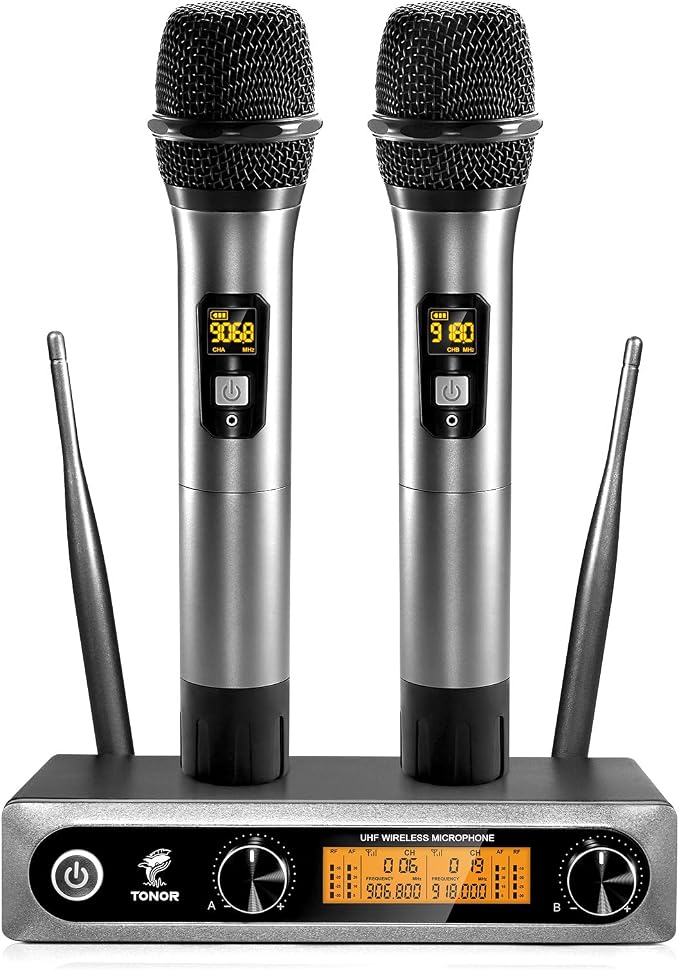
The TONOR TW-820 is our pick for co-hosts who share announcements and audience questions at small events with an existing mixer or PA. The kit pairs two handheld dynamic mics with one receiver, so both hosts can keep a mic within reach throughout the program.
Each mic has 15 selectable UHF frequencies. If a signal cuts out during rehearsal, you can try another frequency on the affected mic. The receiver gives each voice its own volume knob, handy when one presenter projects and the other speaks softly.
The metal mic bodies have steel mesh grilles. More useful at the sound desk is the choice of outputs. Two balanced XLR jacks let you send each host to a separate mixer input, while the quarter-inch output combines both voices into one feed.
The mics pair automatically when you turn them on with the receiver. Each needs two AA batteries, which the kit leaves for you to supply. We’d count out four before packing, especially if the system is going straight from the box to an event.
If you need to change the frequency, the switch sits inside the battery compartment, so make that adjustment during soundcheck. TONOR’s setup guide also calls for keeping the receiver in clear sight of the mics and leaving the grille uncovered as you speak.
A few things to note:
- Skip it if your only recording device is a laptop or phone and you need a system that connects directly to it.
- Choose a wearable kit if both presenters need their hands free for most of the session.
2. Phenyx Pro PTU-71-2H Dual UHF Auto Scan System
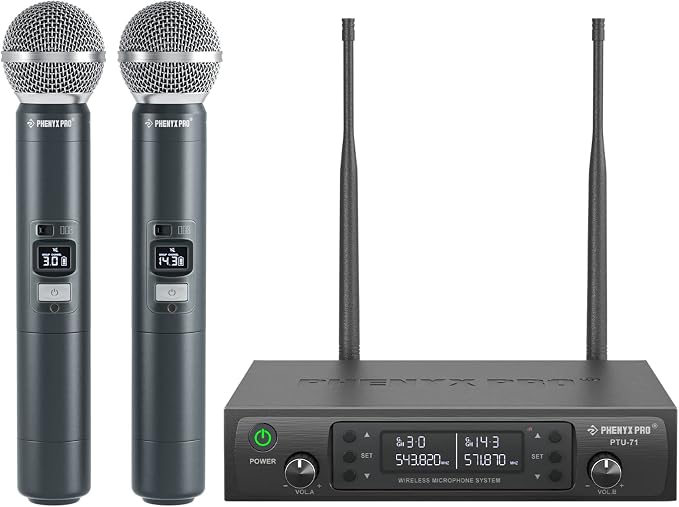
We’d choose the Phenyx Pro PTU-71-2H for co-hosts who bring sound gear to different venues. It gives each host a handheld mic, and the receiver can look for a clearer frequency during setup. That’s especially useful when you don’t know the room’s wireless setup.
The receiver has 100 selectable UHF frequencies per channel. Run Auto Scan to find a candidate, then line up the mic’s infrared window with the receiver to sync it. Do that for both mics before you walk the whole stage and listen for dropouts.
The frequency lock is a small feature with a clear purpose. Once the mics are synced, you can lock the receiver settings to avoid changing a frequency by accident. We’d use it if the receiver sits at a busy table that several people will operate.
The receiver uses an external power adapter, and each mic takes two AA alkaline batteries. Phenyx Pro gives its longest range figure for open space, so we’d pay more attention to the path between the stage and receiver than to the number on the box.
A few cautions:
- If the receiver will sit somewhere you can’t easily reach, factor in the trip back to the sound desk whenever either handheld mic needs to sync again during setup.
- Pick a wearable system if both presenters regularly need to handle props, take notes, or work a laptop while they speak.
- If your setup runs entirely on batteries, this receiver’s external power adapter makes it a poor fit for sessions away from an outlet.
3. Phenyx Pro PTU-52-2H Dual UHF Tunable Frequency System
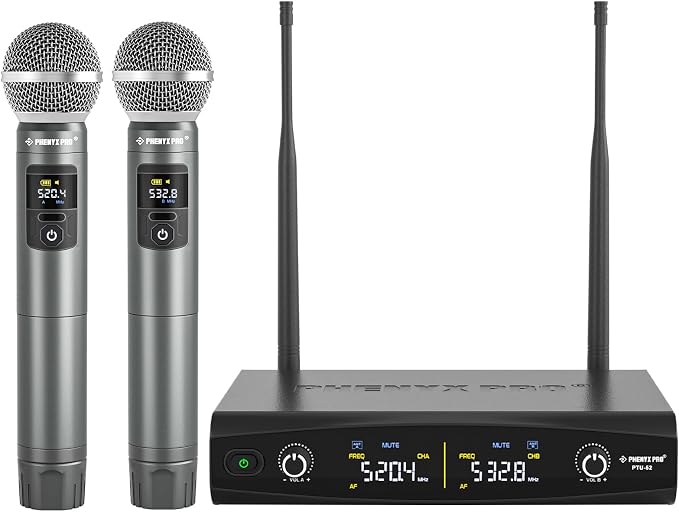
The Phenyx Pro PTU-52-2H suits co-hosts who run recurring talks or community panels and do their own soundchecks. We’d pick it for a pair who want to change frequencies from the handheld itself while leaving the receiver connected to their usual mixer.
Each mic has 30 selectable UHF frequencies. Pressing SET on a handheld changes its frequency, and the receiver follows the change. That gives the person holding the mic direct control over tuning, which is useful when the mixer is across the room.
Phenyx Pro lists a metal build and supplies rings that help keep the handhelds from rolling. That’s a practical detail for panel hosts who set their mics down between turns, particularly if the only place to put them is a narrow table.
The receiver has separate XLR outputs and a mixed quarter-inch output. We’d use the two XLR connections when your mixer has room, since they let you adjust each host’s level on its own channel. The mixed output is an option when inputs are limited.
The tuning and volume buttons sit behind the handheld’s battery cover. That keeps them out of the way during a talk, but it makes an adjustment less convenient once people are speaking. Phenyx Pro recommends choosing frequencies and pairing the mics before going onstage.
Notes of caution:
- Choose another system if you need a receiver that automatically scans for an open frequency.
- Phenyx Pro specifies up to two systems for setups that need several sets running together.
- Skip it if the receiver has to run off its own battery.
4. HOTEC H-K25 Dual Lapel and Headset System
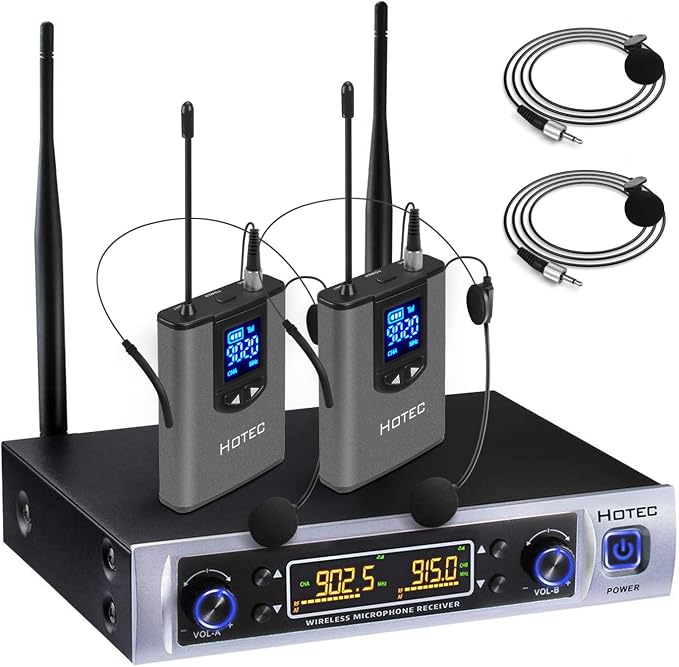
The HOTEC H-K25 is our pick for workshop leaders and trainers who both need their hands free. The kit includes two rechargeable bodypacks, two lapel mics, and two headsets, so each presenter can choose what to wear for their part of the session.
A lapel mic clips to your clothing and connects by cable to the bodypack. The headset also connects to the pack, but holds the mic near your mouth as your head moves. We’d favor the headset for a demo that involves turning often.
At the receiver, separate volume controls let you balance the two hosts. Two XLR outputs keep their signals separate for a mixer, while the quarter-inch jack combines them. The system also offers 32 selectable frequencies per bodypack, with frequency changes made at the receiver.
HOTEC rates the system for up to 100 feet with a clear path between the bodypacks and receiver. The receiver needs wall power. We’d plan its position before setting up, particularly if the sound desk sits behind a wall or far from the presenters.
HOTEC’s setup directions call for connecting the receiver to your sound gear and plugging the mics into the bodypacks before switching the units on. During soundcheck, listen for clothing or jewelry brushing a lapel mic while each host moves.
A few things to note:
- Skip it if your hosts prefer a mic they can hand to an audience member for questions.
- If you record to a phone over USB, the receiver’s analog audio outputs require a compatible audio interface.
5. RØDE Wireless GO (Gen 3)
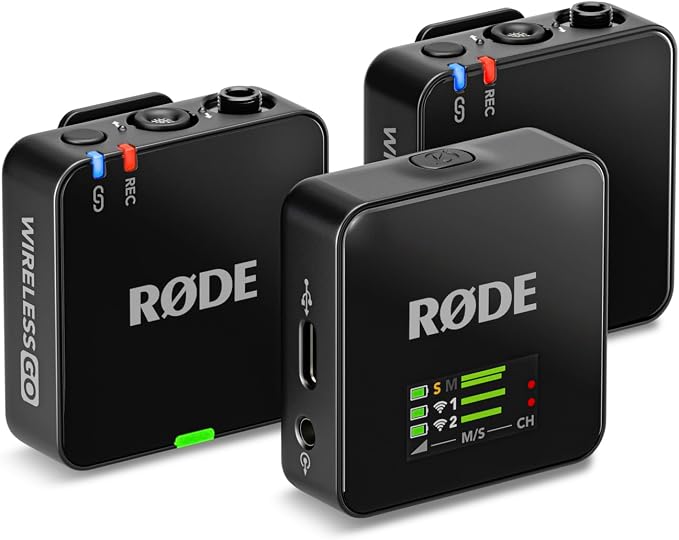
We’d pick the RØDE Wireless GO (Gen 3) for video podcast co-hosts or interview teams that edit their own footage. Each host gets a clip-on transmitter with a built-in mic. The receiver connects to compatible cameras over 3.5 mm or to computers over USB-C.
Split mode assigns each transmitter its own output channel. If your recording device captures both channels, you can adjust each host separately in the edit. That helps if one person laughs over the other’s answer and you want to turn down only the louder voice.
Each transmitter can also record a 32-bit float file internally. We like having a local backup for interviews that can’t easily be repeated. If the wireless feed drops out, a recording already running on the transmitter gives you another file to work with.
The retailer’s listing title mentions a charging case, but its contents describe a charging hub and pouch. RØDE lists the Charge Case+ separately from the standard kit. If you need to recharge all three units away from an outlet, confirm what the seller actually includes.
For a session you need to back up, switch on Always recording in RØDE Central or start a recording on each transmitter manually. Check that both are recording before the hosts begin, then listen to a short test from the camera or computer.
A few cautions:
- Skip it if your setup calls for two handheld mics to pass between speakers.
- Choose a mixer-focused system if your venue needs two dedicated XLR outputs straight from the receiver.
- Confirm the bundle first if a battery charging case is essential.
How These Dual Wireless Mic Systems Compare
Compare how each pair is worn or held, then check the limitation that matters most to your setup.
| Product | Best for | Mic style | Standout feature | Main limitation |
|---|---|---|---|---|
| TONOR TW-820 | Small live events | Handheld | Separate receiver volume knobs | No direct phone or laptop connection |
| Phenyx Pro PTU-71-2H | Co-hosts changing venues | Handheld | Automatic frequency scan | Infrared sync at receiver |
| Phenyx Pro PTU-52-2H | Recurring talks and panels | Handheld | Frequency changes from the mic | Tuning buttons behind battery cover |
| HOTEC H-K25 | Hands-free workshops | Lapel or headset | Two wearable mic styles included | Receiver needs wall power |
| RØDE Wireless GO (Gen 3) | Video podcasts and interviews | Clip-on | Local recording on each transmitter | Charging case inclusion unclear |
Final Thoughts
We’d start with how you and your co-host work together. If you spend most of a session on your feet, choose a mic you’ll be comfortable wearing or holding. If the recording matters after the event, decide how much control you’ll need over each voice.
From there, check the inputs on the gear you already own and leave room in your budget for any cables, batteries, or charging accessories you’ll need. Choose the setup you can connect and soundcheck confidently before the first person speaks.
Be First to Comment