A product demo can look sharp and still be hard to follow if the voice sounds distant. In a small shop or home office, room reflections can make speech harder to understand as the camera moves farther from the speaker.
Shopping for a mic brings another set of decisions. Some draw power from the camera, while others use a battery. Even two mics with the same size plug can have different power and wiring needs, so it pays to check what your camera supports.
We researched the market, checked manufacturer specs and compared camera connections, mounting options and recording controls to pick five directional mics. Our picks include classic shotguns and compact cardioid camera mics, so you can match the setup to the videos you actually make.
How We Selected the Best Shotgun Microphones
We started with the jobs a small team might film in a week, from a quick product update to a sit-down interview. Then we looked at what each mic would ask of the person running the camera.
We compared manufacturer specs and setup instructions, then checked retailer listings where the accessories varied by bundle. We gave more weight to features you can put to work on a typical shoot than to specs in isolation.
- Camera connection: Check the input and cable so you can record straight to your camera.
- Power: Know whether you need a powered jack, a spare battery or time to recharge.
- Pickup pattern: Match the mic to where people will stand and how much they’ll move.
- Level controls: Look for a way to adjust the signal if your shoots vary in volume.
- Mounting: Check whether the mic can sit close to the speaker when your shot needs a wider frame.
- Wind protection: See which cover comes in the box if you regularly film outside.
Each pick makes sense for a specific setup. Start with where you’ll record and what you’ll plug into.
Best Shotgun Microphones for DSLRs and Mirrorless Cameras
Start with the setup that looks most like yours, whether you film handheld, switch between devices or record interviews with a boom.
1. RØDE VideoMicro Compact Camera Microphone with Rycote Lyre
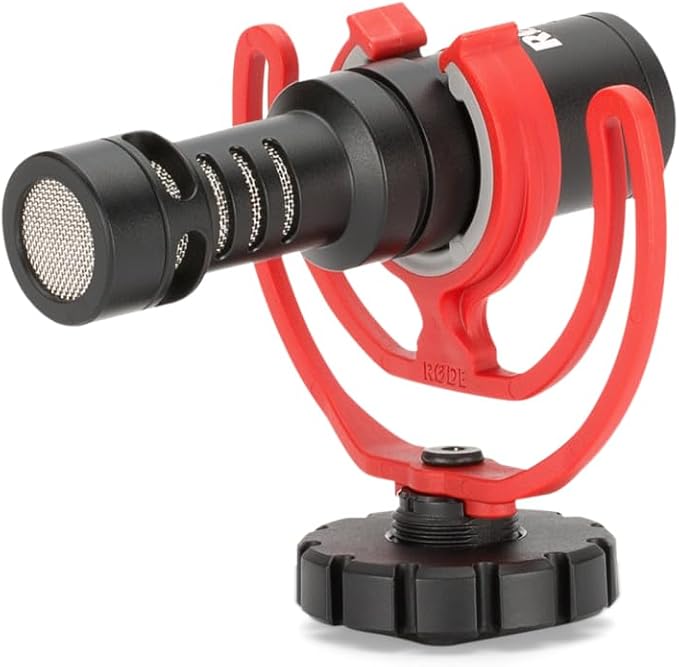
We’d pick the original RØDE VideoMicro for solo shop owners who shoot handheld product walkthroughs with a small camera. The 42-gram microphone adds little weight above the lens, which matters if you spend much of the shoot holding the camera yourself.
The cardioid pickup pattern favors sound in front of the mic. That suits a walkthrough where you can point the camera at whoever is speaking. If you step back for a wide shot, check mic distance before you record the full take.
The kit pairs an aluminum mic body with a Rycote Lyre suspension and a furry windshield. The suspension helps isolate the mic from camera movement, and the windshield gives you a way to cut wind noise when you step outside.
The power specifications are worth checking before you buy. The mic needs 2 to 5 volts of plug-in power through its 3.5 mm TRS connection. A jack that looks right can still leave you without a signal if the camera supplies no power.
Fit the mic in its mount and run the included camera cable to the mic input. Since the VideoMicro has no switches of its own, record and play back a short clip with someone speaking at the distance you’ll use on the shoot.
A few cautions:
- Skip it if your camera lacks a powered mic input and you need the mic to connect directly for your usual handheld shoots.
- Choose a mic with onboard level controls if you need to adjust output at the mic during a shoot.
2. Movo VXR10 Universal Shotgun Mic for Camera
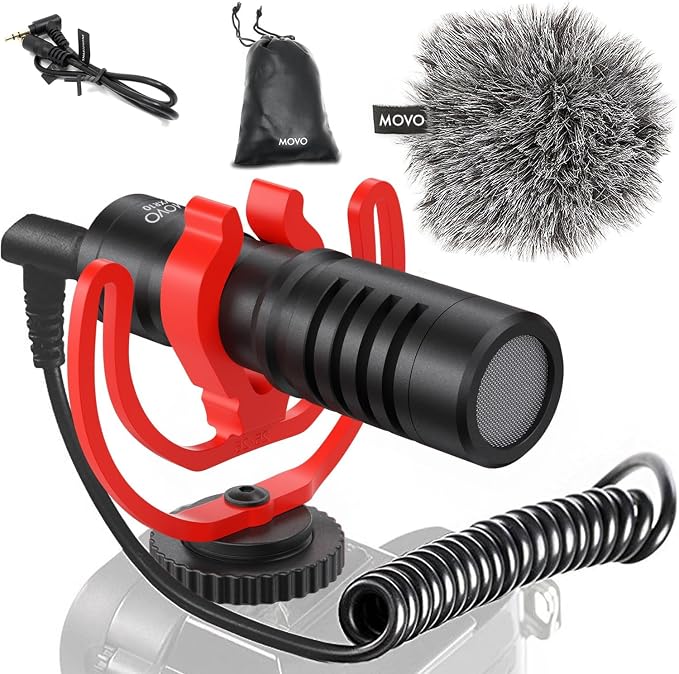
We’d choose the Movo VXR10 for a small team that films product demos on a camera and quick updates on a phone with a compatible analog mic input. The two supplied cables let you move the same mic between those setups.
Its cardioid condenser capsule favors the person in front of the mic. That suits a demo with one presenter who stays near the camera. If two people speak from different angles, careful mic placement matters more than pointing the lens somewhere between them.
The metal microphone body is about 3.2 inches long, and the kit includes a shock mount, a furry windscreen and a bag. We like that you can pack the mic with its own wind protection and go without keeping a separate mic battery charged.
The tradeoff is that the connections are analog. For a camera, follow Movo’s mounting and wiring steps and use the TRS lead. For a compatible phone or tablet headset jack, switch to TRRS. Keep both cables in the bag if you often alternate between devices.
A few things to note:
- If your phone has only USB-C, the supplied analog cables won’t connect directly. Check whether your device supports a mic input adapter before relying on it for phone footage.
- If you often move from speech to loud tools, a mic with its own output switch is a better fit for adjusting the signal at the mic.
- If your tutorials call for wide shots from across the room, plan for closer mic placement before choosing this as a camera-mounted mic.
3. RØDE VideoMic Pro R Camera Shotgun Microphone
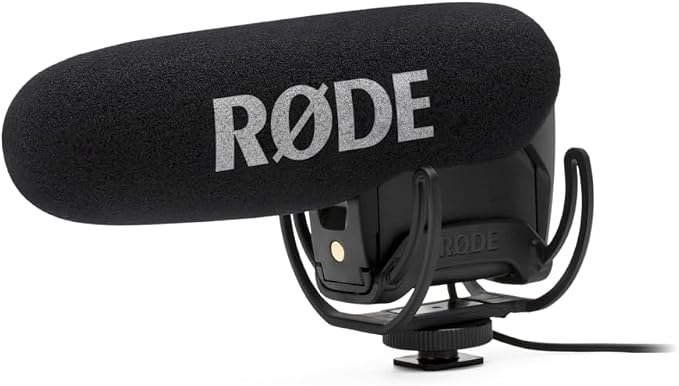
The RØDE VideoMic Pro R is our pick for videographers who record quiet interviews and louder demonstrations with one camera. The Rycote Lyre version uses a supercardioid pattern to favor sound in front and gives you direct control over the signal sent to the camera.
Its three output settings are minus 10 dB, 0 dB and plus 20 dB. The lower setting sends a weaker signal for louder scenes. For quiet speech, the boost can help reduce hiss by letting you turn down the camera’s input gain.
There’s also a switchable 80 Hz filter that reduces low rumble. We like having that switch handy if you move between a quiet office and a room with a low background hum. The Lyre suspension helps isolate the mic from handling vibration.
The main drawback is 9-volt battery power. RØDE lists over 70 hours with an alkaline battery, which you’ll need to pack and check. The mic connects through a 3.5 mm TRS plug and sends the same mono signal to both channels.
For setup, the quick start guide shows how to secure the mount and clip the lead to reduce cable noise. Set levels manually if your camera allows it, and check a sample at the loudest level you expect before recording the full take.
Notes of caution:
- Skip it if you want a mic that draws camera power so you can pack without a separate battery.
- Look elsewhere if you need true stereo audio to preserve the direction of sounds on either side of the camera.
4. Deity V-Mic D3 Pro Location Kit
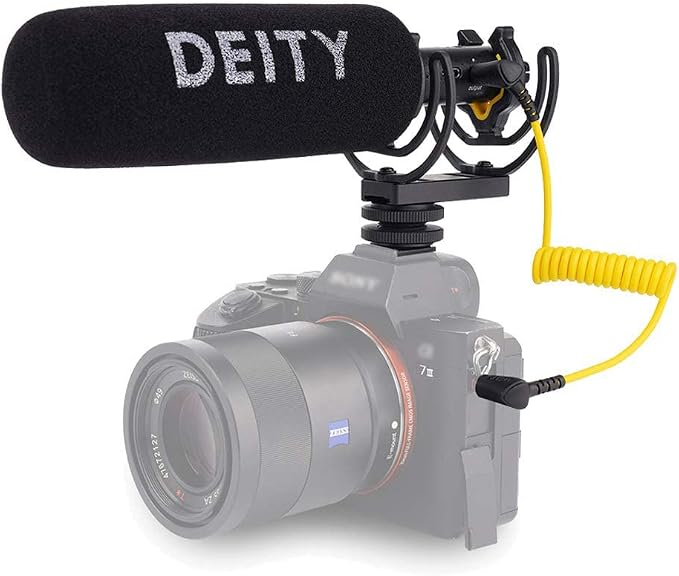
We’d consider the Deity V-Mic D3 Pro Location Kit for crews that alternate between camera-mounted footage and seated interviews. The location recording bundle gives you mounting options for both, so you can move the mic nearer the speaker when the camera needs to stay back.
The mic has a continuous gain dial with up to 20 dB of boost. You can make small changes to the output between speakers. The 75 and 150 Hz filters help reduce low sounds such as hum.
The bundle contents are the main reason to choose the Location Kit. Alongside the camera shoe mount, it adds a Rycote pistol grip mount for handheld or boom use and a D-XLR adapter for compatible recorders with phantom power.
Deity lists a built-in battery rated for 51 hours and charged over USB-C. That means planning for charging between shoots. For camera use, Deity recommends disabling automatic gain where possible so the camera doesn’t undo adjustments you make with the dial.
The kit is unavailable at Adorama and B&H Photo. The Amazon listing title names the Location Kit. We couldn’t verify the grip and adapter there, so confirm both with the seller.
A few cautions:
- If your camera requires a separate TRS cable, confirm you have one before counting on the kit for a shoot.
- If you need swappable batteries for back-to-back jobs, choose a model that lets you replace its battery in the field.
- If you need the complete location bundle for a booked job, skip listings where the seller can’t confirm both accessories.
5. Movo X1-Mini Video Shotgun Mic
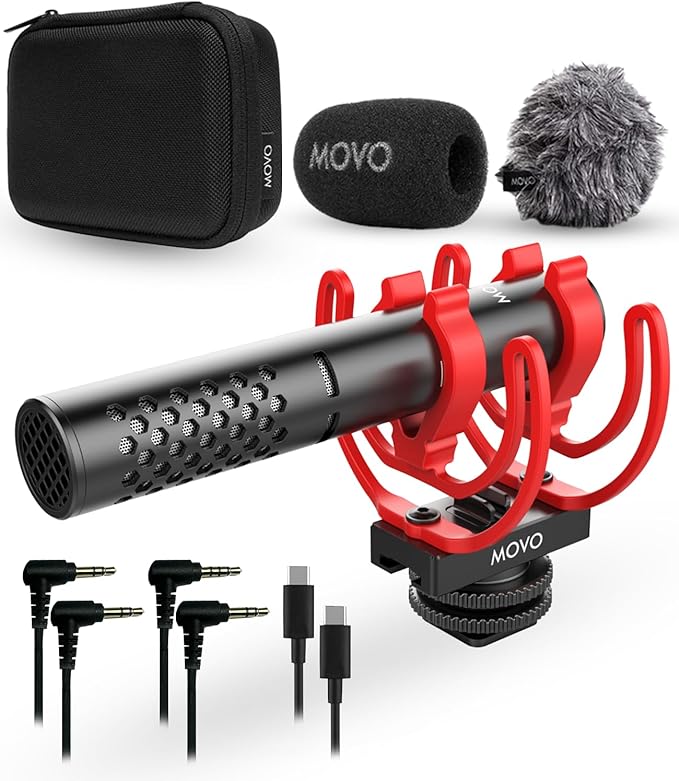
The Movo X1-Mini is our pick for creators who shoot on a DSLR or mirrorless body and also record clips on a phone or computer. Its analog and digital connections let one mic serve both jobs if your devices support external mics.
The supercardioid pickup pattern favors sound in front of the mic, which makes sense for a single presenter talking through a product demo. Movo specifies up to 24-bit recording in digital mode. For camera shoots, the kit has a separate 3.5 mm TRS cable.
We like that Movo includes two wind covers, one foam and one furry, along with a Rycote shock mount and a hard case. The aluminum mic body packs into the case with its leads, and there’s no separate battery to carry.
The connection you choose matters. Movo lists USB-C for phones and computers, and it specifies 3.5 mm TRS for cameras. If your camera has only a USB-C port, check its manual for external mic support before you count on using that port.
For DSLR use, Movo recommends manual audio levels to help reduce hiss. If you’re switching from a laptop voiceover back to your camera, check that the camera is recording from the external mic and listen to a short sample before filming.
A few things to note:
- If you need a mic that works through your camera’s USB-C port, skip this model unless your camera documentation confirms support.
- If most of your shoots call for onboard level adjustment, choose a model with a dedicated output switch or gain dial.
How These Camera Microphones Compare at a Glance
Compare how each mic connects to your camera and what you’ll need to power it.
| Product | Best for | Camera connection | Power | Main limitation |
|---|---|---|---|---|
| RØDE VideoMicro | Handheld product walkthroughs | 3.5 mm TRS | Camera plug-in power | Needs a powered input |
| Movo VXR10 | Camera and analog phone shoots | 3.5 mm TRS | No separate battery | Analog connections only |
| RØDE VideoMic Pro R | Shoots with changing sound levels | 3.5 mm TRS | 9-volt battery | Separate battery to manage |
| Deity V-Mic D3 Pro Location Kit | Camera and boom interviews | 3.5 mm | Built-in rechargeable battery | Complete kit can be hard to find |
| Movo X1-Mini | Camera, phone and computer recording | 3.5 mm TRS | No separate battery | USB-C camera support unconfirmed |
Final Thoughts
We’d start with the way you film most often. Think about where the speaker stands, how close the mic can get and who will handle sound while the camera is rolling. A setup that suits your usual shoot is easier to use consistently.
Then check your camera manual and set a budget for the full setup, including any cable, mount or wind cover you’ll need. Once you’ve chosen a mic, make your first recording in the space where you usually work.
Be First to Comment