Working from home sounds ideal until the reality sets in. Your neck hurts by noon, your desk is a cluttered mess, and the neighbor’s dog is barking through your third meeting of the day. Remote work is genuinely great, but only when your setup actually supports you.
This list covers 10 products across completely different categories, each one solving a real problem that remote workers face every single day. No filler, no fluff. From your chair to your lighting to the air around you, every pick here earns its place on your desk. Most of the products here cost below $50.
Whether you are just getting started or refining a setup you have had for years, at least a few of these will make your workdays noticeably better.

How We Selected the Best Remote Work Products
We did not just pull together a random assortment of popular items. Every product on this list was evaluated against the realities of full-time home office work, which means long hours, video calls, varying home environments, and the need for gear that actually holds up day after day.
Here is what shaped our selections:
- Comfort and ergonomics: Does the product reduce physical strain during extended use? Products that help your body sit, see, and breathe better were prioritized.
- Build quality: We looked at how products feel in use, how well they hold up over time, and whether they justify their price point through durability.
- Real-world functionality: Features that sound great on paper but go unused in daily work did not score well. Practical, everyday utility was the deciding factor.
- Setup simplicity: Remote workers do not have IT support. Products that are easy to set up, adjust, and maintain got bonus points.
- Value: We weighed what each product delivers against what it costs, looking for picks that punch above their weight with most of them falling below $50.
- Noise and distraction management: Given that home environments are unpredictable, products that help you stay focused or communicate clearly were weighted heavily.
- Desk footprint: Space matters in a home office. Products that do their job without dominating your workspace were favored over bulkier alternatives.
Every product on this list passed through those filters. What you are reading is the result of that process, not a collection of whatever happened to be trending.
Best Amazon Finds for Remote Workers (Expert Ranking & Review)
Ten products, ten completely different categories, one goal: making your remote work setup genuinely better. The lineup runs the full range from under your feet to over your ears, covering comfort, productivity, focus, and everything in between
[10] Amazon Basics Adjustable Laptop Stand: The Easiest Posture Fix You Can Make
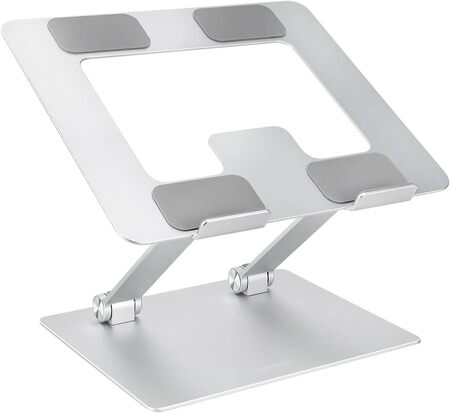
If you spend most of your day hunched over a laptop sitting flat on your desk, this stand is the fastest way to fix that. It raises your screen by up to 7 inches, bringing it closer to eye level and immediately reducing the neck strain that builds up over hours of work. The adjustment happens in seconds and the stand holds its position firmly once set.
The build is lightweight rust-resistant aluminum, and it weighs just 1.7 lbs, which makes it genuinely portable. It folds flat to a compact 10 x 8.7 x 1.8 inches, so tossing it in a laptop bag requires almost no thought. For remote workers who move between rooms or occasionally work from a coffee shop, that portability actually matters.
We found the non-slip silicone pads do a solid job of keeping both the stand and the laptop stable, even during heavier typing. The open hollow design also allows airflow underneath your laptop, which keeps things cooler during long or intensive sessions. That is a practical benefit that a lot of laptop stands at this price skip entirely.
It supports laptops and tablets from 10 to 15.6 inches and is compatible with MacBooks, Dell XPS, HP, ASUS, Chromebooks, and more. At this price, the Amazon Basics stand is an easy first upgrade for any remote setup.
Key Specs:
- Height adjustment: Up to 7 inches
- Weight capacity: 11 lbs (5 kg)
- Folded size: 10 x 8.7 x 1.8 inches
- Weight: 1.7 lbs (0.77 kg)
- Compatible with: 10 to 15.6-inch laptops and tablets
Pros:
- Instant ergonomic improvement at a very low price
- Lightweight and folds flat for easy portability
- Ventilated design keeps laptops cooler
Cons:
- Hinges are quite stiff and can be difficult to reposition but once you get a perfect position it’s good.
[9] HUANUO Electric Standing Desk: The Workday Upgrade That Changes Everything
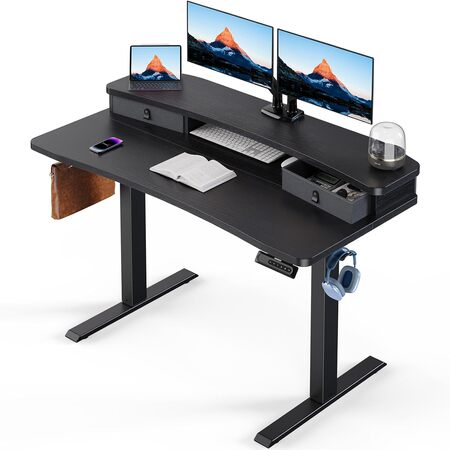
There is something about sitting in the same position for nine hours that makes everything feel harder than it should. The HUANUO 48-inch electric standing desk solves that by letting you switch between sitting and standing with a single button press. The height range runs from 27.5 to 46.4 inches, which covers a wide range of body types and setups comfortably.
The four programmable preset buttons are genuinely useful here. Once you find your ideal sitting height and your ideal standing height, you save them and never have to think about it again. The transition is smooth and quiet, powered by a carbon steel frame motor that has impressed people coming from noisier, pricier alternatives.
What sets this desk apart from a lot of standing desks in its class is the thoughtful built-in storage. Two desktop drawers keep clutter off the surface, and the open cubicle underneath is sized well for a keyboard and mouse. The raised monitor shelf also brings screens closer to eye level without requiring a separate monitor arm.
The 48-inch surface gives you enough room for a dual monitor setup with plenty of working space left over. The extended rear platform edge of 2.36 inches is designed to be C-clamp monitor mount compatible, which is a small detail that makes a big practical difference. Assembly takes two people and some time, but once it is done the desk feels genuinely solid.
Key Specs:
- Desktop size: 48 x 24 inches
- Height range: 27.5 to 46.4 inches
- Weight capacity: 176 lbs
- Frame material: Carbon steel
- Desktop material: Engineered wood
Pros:
- Smooth, quiet motorized height adjustment
- Built-in drawers and storage reduce desk clutter
- Four programmable height presets
- C-clamp monitor mount compatible
Cons:
- Assembly requires two people and takes time
[8] PEGZONE Ergonomic Footrest: The Under-Desk Upgrade Nobody Talks About
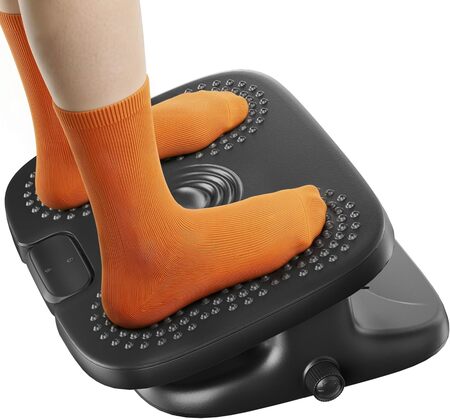
Most people do not think about what their legs are doing while they work. After a few hours in a chair that is not quite at the right height, your lower back starts to remind you. The PEGZONE footrest addresses that by giving your feet a stable, comfortable surface that encourages a more natural seated posture throughout the day.
The standout feature here is the dual adjustability. A twist knob on the side controls the height, moving between 5 and 7 inches. A separate lever on the front adjusts the tilt angle from positive 5 degrees to negative 15 degrees. That combination means you can dial in a position that works for your specific chair and desk height, rather than compromising with a fixed footrest.
The textured massage surface is a nice touch that goes beyond aesthetics. The raised center point provides a subtle pressure point effect underfoot, and the non-skid pads on the bottom keep the whole unit locked in place on hard floors. We found that the gentle rocking motion the tilt allows actually helps keep your legs moving slightly throughout the day, which reduces stiffness during long work sessions.
It arrives fully assembled and requires no setup whatsoever. The 17.5 x 13.4-inch platform is wide enough to fit both feet with room to shift around, which a lot of cheaper footrests do not offer.
Key Specs:
- Platform size: 17.5 x 13.4 inches
- Height range: 5 to 7 inches (stepless adjustment)
- Tilt range: +5° to -15°
- Weight: 7.47 lbs
- Material: Plastic with textured surface
Pros:
- Both height and tilt are independently adjustable
- Textured surface adds a subtle massage effect
- Arrives fully assembled, no setup needed
Cons:
- Center massage point may not reach the arch for all foot shapes
[7] Galyimage 4K Webcam with Ring Light: Look Polished on Every Call
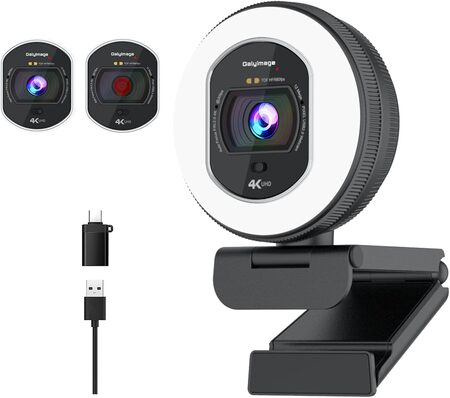
Your built-in laptop camera was not designed for daily professional video calls, and it shows. The Galyimage 4K webcam replaces that grainy, flat image with genuine 4K resolution at 30 frames per second, or 1080p at 60 frames per second for smoother video when motion is involved. The difference in image quality on a Zoom or Google Meet call is immediately noticeable.
The built-in ring light is what separates this from a standard webcam upgrade. It offers three color temperature settings (white, natural, and warm) that you control with a touch sensor on the back of the camera. The outer ring controls brightness through a rotary dial. That combination means you can look properly lit even during early morning calls or in rooms where natural light is inconsistent throughout the day.
TOF autofocus locks on quickly and handles movement without the hunting and drifting that cheaper webcams struggle with. Dual noise-canceling microphones filter out keyboard noise and HVAC sounds, which matters more than most people realize until they hear the difference in call recordings. We found it especially effective for people who work in rooms without dedicated acoustic treatment.
The sliding privacy cover is a genuine convenience, not just a marketing feature. One push blocks the lens completely. Setup is true plug-and-play across Windows, Mac, and Linux, and it works with every major video platform without any driver installation.
Key Specs:
- Video resolution: 4K at 30fps, 1080p at 60fps
- Autofocus: TOF (Time of Flight)
- Ring light: 3 color temperatures, adjustable brightness
- Microphone: Dual noise-canceling
- Connectivity: USB, plug-and-play
Pros:
- Sharp 4K image quality with reliable autofocus
- Built-in ring light with adjustable color temperature
- Dual noise-canceling mics improve call audio significantly
- Built-in sliding privacy cover
Cons:
- Ring light brightness is not as strong as a dedicated ring light at maximum output
[6] Otlonpe Portable Desk Fan: Small Fan, Surprisingly Big Impact
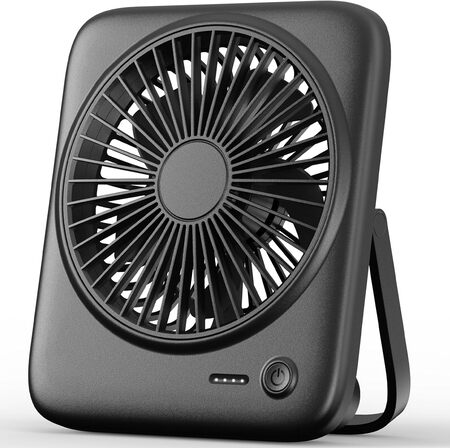
Heat is one of those comfort problems that creeps up on you slowly. You do not realize how much it is draining your focus until you finally do something about it. The Otlonpe desk fan is a 6.5-inch cordless unit with a 4000mAh battery that runs for up to 23 hours on a single charge, making it genuinely independent from your outlet situation.
Four speed settings cover a useful range, from a gentle barely-there breeze up to a noticeable airflow. The fan operates at under 35 decibels on lower settings, which is quiet enough to run during calls without picking up on the microphone or creating that distracting wind-hitting-a-mic sound. For people who work in shared or semi-open spaces, that matters more than the spec sheet suggests.
The foldable bracket adjusts through 180 degrees, letting you point airflow directly at your face, angled downward toward your workspace, or anywhere in between. The unit weighs just 260 grams and collapses to 2.4 x 4.3 x 6.6 inches, which means it fits in a bag alongside a laptop without any awkwardness. Taking it to a coffee shop or a kitchen table is no effort at all.
One clever detail is the emergency charging function. The built-in battery can charge your phone in a pinch. It also charges via USB-C and can run while plugged in, so you are never stuck waiting for it to recharge before using it. The 4-LED battery indicator on the front tells you at a glance how much power remains.
Key Specs:
- Battery: 4000mAh
- Runtime: Up to 23 hours
- Noise level: Under 35dB
- Speed settings: 4
- Size: 6.6 x 5.6 x 1.5 inches (unfolded)
Pros:
- Long battery life handles full workdays comfortably
- Quiet enough for calls and focused work
- Rechargeable and portable with foldable design
Cons:
- LED battery indicator lights can be very bright, which may be bothersome at night
[5] AULA F99 Wireless Mechanical Keyboard: Typing That Actually Feels Good
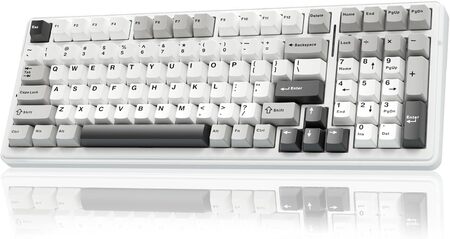
Most people upgrade their keyboard and immediately wonder why they waited so long. The AULA F99 is a 99-key wireless mechanical keyboard with a 96 percent layout that keeps the number pad and arrow keys while saving meaningful desk space compared to a full-size board. It connects via Bluetooth 5.0, 2.4GHz wireless, or USB-C wired, and it can hold up to five device connections simultaneously.
The pre-lubed linear switches deliver what keyboard enthusiasts call a creamy, thocky sound: smooth actuation with a satisfying, muffled depth that is completely different from the harsh clatter of membrane keyboards. It is actually pleasant to type on, which sounds like a trivial thing until you consider how many hours a remote worker spends at a keyboard every day. We found ourselves typing more smoothly and with less effort than on a standard office keyboard.
The 8000mAh battery is unusually large for a keyboard and delivers weeks of real-world use between charges for people using it wirelessly every day during full work shifts. The hot-swappable PCB means you can replace individual switches without soldering if you want to experiment with different switch types down the line. Gasket-mounted construction with five layers of sound dampening absorbs the hollow, echoey resonance that less thoughtfully built boards produce.
PBT double-shot keycaps resist shine and wear over years of heavy use. The RGB backlighting includes 16 lighting effects and supports music rhythm mode through the software. This is a keyboard that makes sitting down to work feel a bit more satisfying every single time.
Key Specs:
- Layout: 99 keys, 96% compact
- Connectivity: Bluetooth 5.0, 2.4GHz, USB-C
- Battery: 8000mAh
- Switch type: Pre-lubed linear (hot-swappable)
- Keycaps: Double-shot PBT
Pros:
- Smooth, satisfying typing feel with great sound
- Massive battery life for a wireless keyboard
- Tri-mode connectivity supports multiple devices
- Hot-swappable switches for future customization
Cons:
- Keycaps are not shine-through, so backlit letters are less visible in the dark
[4] TRALT Ergonomic Office Chair: Your Back Will Thank You Within a Week
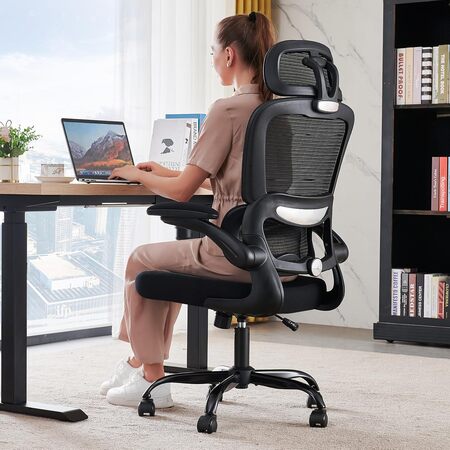
Dining chairs and budget office seats are fine for an hour. For eight hours a day, five days a week, they slowly break your posture and exhaust you. The TRALT ergonomic desk chair is built around the kind of adjustability that long work sessions actually require: adjustable lumbar support, an adjustable headrest, flip-up armrests, and a seat height range that accommodates roughly 5’5″ to 6’2″.
The breathable mesh back keeps the seating surface cooler during long sessions, which is more of a comfort factor than most people anticipate before experiencing it. The backrest reclines between 90 and 120 degrees with a smooth mechanism, and the 330-pound weight capacity combined with a five-point metal base gives the whole chair a planted, stable feel. Silent rolling wheels work well on hard floors without marking up the surface.
What we noticed most in extended use is how much the lumbar support changes the late-afternoon experience. The fatigue that builds in your lower back during the second half of a long workday is noticeably reduced when the chair is properly adjusted to your body. The flip-up arms are a practical detail for people who tuck their keyboard under the desk or need to slide close to a standing desk.
Assembly is straightforward and takes around 15 minutes. All necessary tools and screws are included in the box. For remote workers who have been putting off a chair upgrade because of the cost, this one lands at a price point that makes the decision significantly easier.
Key Specs:
- Weight capacity: 330 lbs
- Seat dimensions: 20″W x 17.3″D
- Height range: 18.5 to 21.7 inches (seat)
- Back recline: 90 to 120 degrees
- Base: Five-point metal
Pros:
- Adjustable lumbar support, headrest, and flip-up armrests
- Breathable mesh back keeps things cooler during long sessions
- Solid 330-pound weight capacity
- Quick and easy assembly
Cons:
- Lumbar support adjustment is only front-to-back, not height adjustable
[3] KYY 15.6-Inch Portable Monitor: A Second Screen You Can Bring Anywhere
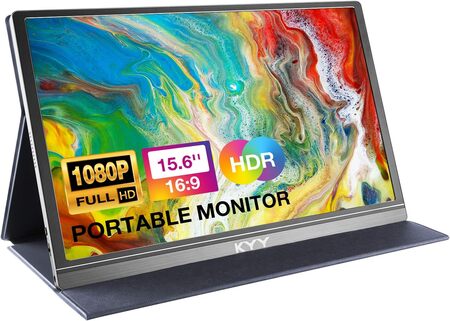
Working from a single laptop screen while juggling meetings, spreadsheets, email, and research is one of the most common productivity bottlenecks in remote work. The KYY portable monitor gives you a second 15.6-inch display that weighs just 1.7 pounds and slides into a laptop bag without any drama.
The 1080p IPS panel delivers a 178-degree viewing angle with HDR support and a 1000:1 contrast ratio. Colors are accurate and sharp enough for everyday work, video streaming, and light creative tasks. The matte screen finish handles reflections well in rooms with varied lighting. Two full-function USB-C ports and a mini-HDMI port cover most connection scenarios, and a single USB-C cable from a compatible laptop powers and drives the display simultaneously without needing a wall outlet.
We were impressed by how genuinely travel-ready this monitor is. The included PU leather smart cover doubles as a stand and offers two viewing angles, providing a complete setup straight out of the box. A 3.5mm audio input and two built-in stereo speakers round out the package for people who need audio from the second screen without extra equipment.
Setup is plug-and-play on supported devices with no driver installation required. For remote workers who sometimes work from different rooms, travel for work, or simply need more screen real estate without committing to a permanent dual-monitor desk mount, this monitor hits a genuinely useful balance of quality, portability, and value.
Key Specs:
- Screen size: 15.6 inches
- Resolution: 1920 x 1080 (FHD 1080p)
- Panel type: IPS
- Viewing angle: 178 degrees
- Ports: 2x USB-C (full function), 1x mini-HDMI
- Weight: 1.7 lbs
Pros:
- Genuinely lightweight and fits in any laptop bag
- Single-cable USB-C setup on compatible devices
- Sharp IPS display with HDR and wide viewing angle
- Smart cover doubles as a stand
Cons:
- Stand only offers two fixed viewing angles, with no fine-tune adjustments
[2] Quntis Monitor Light Bar: The Lighting Upgrade That Saves Your Eyes
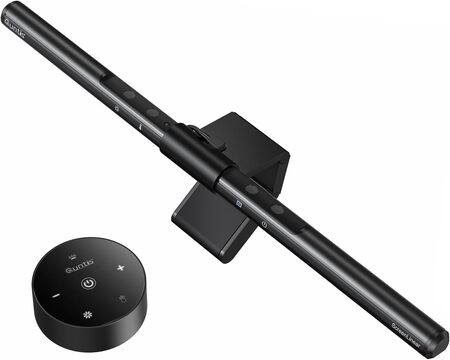
Bad desk lighting is something most remote workers live with for years without realizing how much it contributes to headaches, eye fatigue, and that drained feeling at the end of the day. The Quntis ScreenLinear monitor light bar mounts on top of your screen in minutes and illuminates your desk area without creating any glare on the display itself.
The asymmetrical optical design is the key engineering detail here. It directs light downward onto your desk surface and documents rather than forward onto your screen, which eliminates the reflective hotspots that traditional desk lamps produce. The built-in ambient light sensor monitors the surrounding brightness continuously and adjusts the lamp output to maintain a comfortable 900 lux, reducing the manual effort of managing your lighting as the day changes.
Color temperature adjustment runs from 3000K warm white to 6500K cool daylight, which means you can match your lighting to your task or your time of day. The 78 high-quality LED beads with a CRI of 98 produce light that is very close to natural daylight, which is particularly valuable for people doing color-sensitive work or reading documents for extended periods. All controls are managed through a touch sensor on the lamp itself.
The unit clips onto flat monitors and curved monitors alike, frees up your entire desk surface compared to a traditional lamp, and draws power directly from a USB connection. People who use this regularly report that headaches they had attributed to screen time often decrease significantly after switching to a monitor-mounted light bar.
Key Specs:
- Length: 15.7 inches (41cm)
- LED count: 78 beads
- Color temperature: 3000K to 6500K
- Auto-dimming: Built-in ambient light sensor
- Power: USB (5V)
Pros:
- Zero screen glare due to asymmetrical optical design
- Auto-dimming adjusts intelligently to your environment
- High CRI 98 output produces natural, comfortable light
- Frees up desk space entirely compared to a traditional lamp
Cons:
- Mounting tension can require two hands to adjust the angle
[1] MOVSSOU E7 Active Noise Cancelling Headphones: The Productivity Tool You Wear
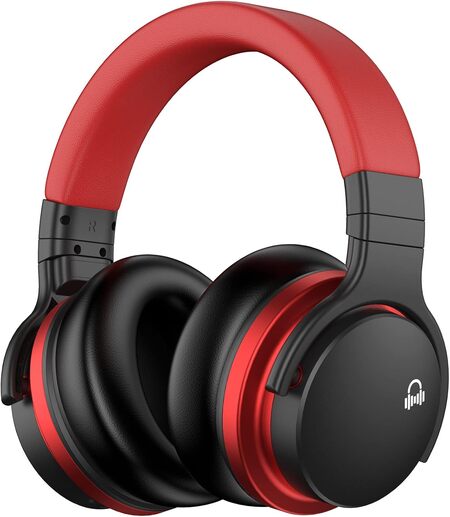
The number one enemy of deep work at home is noise. Traffic, family members, neighbors, HVAC systems, and your own environment compete constantly for your attention. The MOVSSOU E7 headphones use active noise cancellation to reduce low and mid-frequency ambient sounds, carving out a quieter mental space that makes concentration significantly easier.
The 45mm dynamic drivers produce a full-frequency sound profile with a strong bass presence. For work calls, the built-in noise-canceling microphone handles background isolation well, and the Bluetooth 5.0 connection is stable across smartphones, tablets, and laptops simultaneously. A 3.5mm audio jack is also included for wired use when the battery is running low or when connecting to a device that does not support Bluetooth.
Comfort is where the E7 genuinely impresses for the price. The protein ear pads are soft and distribute pressure across the ear rather than concentrating it, which makes all-day wear far more sustainable than most headphones at this level. The headband is adjustable and lightweight at 0.77 pounds, and the over-ear design seals around the ear without the clamping force that cheaper ANC headphones sometimes use to compensate for weak passive isolation.
The 750mAh battery delivers 30 hours of playback, which is enough to get through multiple long workdays between charges. Touch controls handle volume, calls, and ANC toggling without reaching for your phone. This is the kind of headphone that starts as a work tool and quietly becomes the pair you reach for whenever you need to focus, travel, or simply switch off.
Key Specs:
- Driver size: 45mm dynamic
- Battery life: 30 hours
- Connectivity: Bluetooth 5.0, 3.5mm audio jack
- Noise cancellation: Active (ANC)
- Weight: 0.77 lbs
Pros:
- ANC effectively reduces low and mid-frequency ambient noise
- 30-hour battery life handles extended use comfortably
- Comfortable protein ear pads for all-day wear
- Built-in mic with noise isolation for clearer calls
Cons:
- ANC performance on high-frequency noise is more limited
- Button layout takes some time to learn
10 Amazon Finds for Remote Workers: A Quick Rundown
- Amazon Basics Adjustable Laptop Stand: Best budget ergonomic upgrade for posture improvement
- HUANUO Electric Standing Desk: Best for remote workers who want to switch between sitting and standing throughout the day
- PEGZONE Ergonomic Footrest: Best under-desk comfort addition for long sitting sessions
- Galyimage 4K Webcam with Ring Light: Best for remote workers who need to look polished on video calls
- Otlonpe Portable Desk Fan: Best compact, cordless fan for keeping cool anywhere you work
- AULA F99 Wireless Mechanical Keyboard: Best keyboard upgrade for daily typing comfort and wireless flexibility
- TRALT Ergonomic Office Chair: Best value ergonomic chair for full-time home office use
- KYY 15.6-Inch Portable Monitor: Best portable second screen for remote workers who multitask or travel
- Quntis Monitor Light Bar: Best desk lighting upgrade for reducing eye strain during long screen sessions
- MOVSSOU E7 ANC Headphones: Best all-around noise-cancelling headphones for focus, calls, and everyday use
Final Thoughts
The best remote work setups are not built around any single product. They are built around the idea that small improvements in comfort, focus, and functionality add up to a genuinely different experience across an entire workday. If your back hurts, your eyes are tired, and background noise keeps pulling you out of deep work, those are not minor annoyances. They are real costs on your time and energy.
Start with the area causing you the most friction right now. If it is posture, look at the chair and laptop stand. If it is focus, the headphones and monitor light bar will carry a lot of weight. If it is productivity, the standing desk and second monitor are hard to argue against once you have used them. Whatever you choose, give it a proper chance and pay attention to how your days feel. The right upgrade has a way of making you wonder how you worked without it.
Be First to Comment