Juggling multiple devices at your desk used to mean juggling multiple keyboards too. One for the work laptop, another for the gaming rig, and maybe a third for the tablet you swear you only use for reading. That clutter adds up fast, and frankly, it is a headache nobody needs. A single great keyboard that switches between your devices with a simple keystroke can completely change how your workspace feels.
We have spent weeks testing and comparing the top contenders out there. The goal was simple. Find the keyboards that make bouncing between a PC, a Mac, a phone, or a tablet feel effortless without forcing you to compromise on typing feel or build quality. No gimmicks, just practical tools that earn their place on your desk.
What follows is our curated list of the five best Bluetooth mechanical keyboards that genuinely excel at multi-device use. Each pick brings something unique to the table, whether you need a full number pad, a compact travel companion, or a keyboard with enough personality to make your coworkers peek over the cubicle wall. You will walk away knowing exactly which one fits your setup and your fingers.
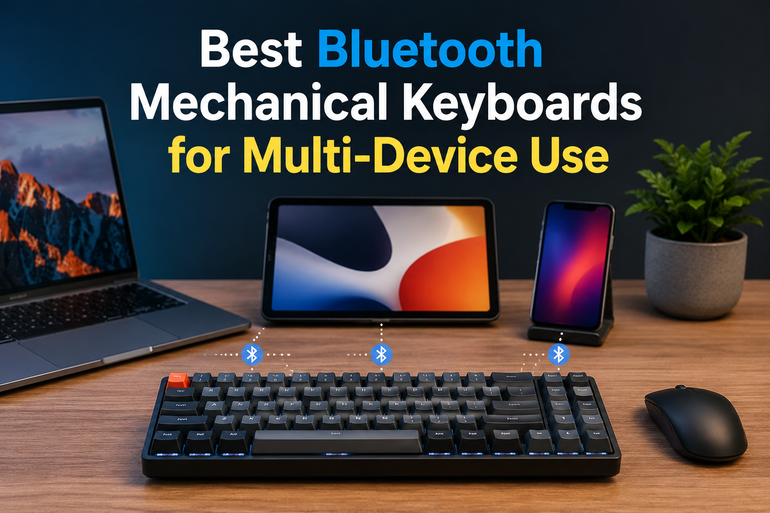
How We Selected the Best Bluetooth Mechanical Keyboards for Multi-Device Use
Our testing approach went far beyond just reading spec sheets. We used each keyboard as a daily driver across multiple operating systems, switching actively between Windows laptops, MacBooks, iPads, and Android phones. The aim was to simulate what a real person actually does during a busy workday. We typed thousands of words, edited spreadsheets, and even squeezed in some late-night gaming sessions where it made sense.
Here are the factors that guided our selections.
- Multi-device pairing and switching speed: We checked how many devices each keyboard could remember and how fast you could hop between them. A clunky switching process kills the whole point of a multi-device keyboard.
- Typing feel and switch quality: We evaluated the keypress experience for long-form writing and quick bursts of communication. A satisfying feel reduces fatigue over hours of use.
- Build quality and materials: We looked at frame rigidity, keycap durability, and overall construction. A keyboard that flexes and creaks under pressure is a keyboard that will not last.
- Battery life and charging convenience: We tracked how long each keyboard lasted under normal use with backlighting on and off. Frequent recharging becomes a nuisance you should not have to tolerate.
- Operating system compatibility: We verified that each keyboard played nicely with Windows, macOS, iOS, and Android without requiring obscure workarounds. A keyboard should adapt to your ecosystem, not the other way around.
- Extra features that matter: We considered things like programmable keys, hot-swappable switches, dedicated media controls, and included accessories. Bonus points went to features that actually improve daily workflow.
Every keyboard on this list earned its spot through hands-on use and careful comparison. You can trust that these picks reflect real performance, not just marketing claims.
Best Bluetooth Mechanical Keyboards for Multi-Device Use (2026 Expert Review)
The following five keyboards represent the best options available right now for anyone who needs to work across multiple screens. Each one handles the basics beautifully while carving out its own specialty. Here is what we found.
1. Corsair K100 AIR Wireless: The Ultra-Thin Powerhouse with Pro-Level Speed
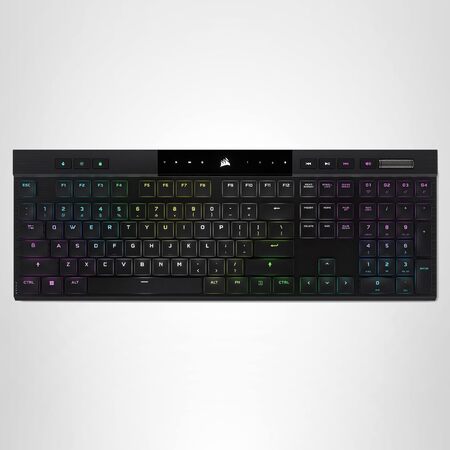
The moment you unbox the Corsair K100 AIR, its impossibly thin brushed aluminum frame grabs your attention. At just 11mm at its slimmest point, this keyboard looks more like a precision instrument than a traditional mechanical board. Corsair somehow packed full mechanical switches and per-key RGB lighting into a chassis this thin. It is a genuine feat of engineering that makes other wireless keyboards look bulky by comparison.
Connectivity is where the K100 AIR truly shines as a multi-device champion. You get three ways to connect: sub-1ms Slipstream wireless on a PC or Mac, low-latency Bluetooth for up to three host devices, and a wired USB mode with 8,000Hz hyper-polling. Switching between your desktop, laptop, and tablet happens at the press of a dedicated key, and the transitions are fast enough that you will forget you are swapping devices at all. We found ourselves hopping between a work MacBook and a gaming PC without skipping a beat.
The Cherry MX Ultra Low Profile mechanical switches deserve special mention. They deliver a tactile bump with an incredibly short 0.8mm actuation distance that feels precise and responsive under your fingertips. This is not a keyboard that forces you to choose between gaming speed and typing comfort. It handles both with the same confident snap. The gently scalloped keycaps guide your fingers into place naturally, which makes touch typing feel instinctive from the first session.
Battery performance holds up well under real-world conditions. With per-key RGB running at adaptive brightness, expect around 50 hours of wireless use. Turn the lighting off and that number jumps to roughly 200 hours. The keyboard also charges quickly enough that a short plug-in break gets you back to full wireless freedom. We think this board suits professionals and gamers who refuse to compromise on desktop aesthetics, build quality, or switching speed between devices.
Key Specs:
- Layout: Full-size with dedicated macro keys and media controls
- Switch type: Cherry MX Ultra Low Profile (tactile)
- Connectivity: Slipstream wireless, Bluetooth (3 devices), USB wired
- Battery life: Up to 50 hours (RGB on), up to 200 hours (RGB off)
- Polling rate: Up to 8,000Hz in wired mode
- Frame: Brushed aluminum
Pros:
- Unbelievably thin design with premium build quality
- Lightning-fast switching between up to five devices
- Tactile switches that excel at both typing and gaming
- Dedicated macro keys and a convenient volume roller
Cons:
- Requires Corsair iCUE software for full customization
- The slim chassis does not include an adjustable height mechanism
2. AULA F99 Wireless Mechanical Keyboard: The Creamy-Sounding Value Star
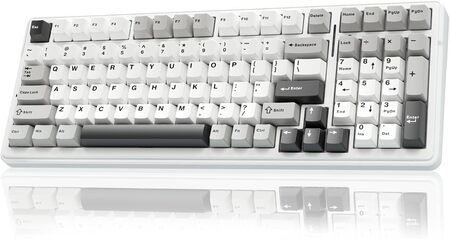
If you have been curious about the “creamy” keyboard trend taking over social media, the AULA F99 is your invitation to the party. This 96% layout board delivers a deeply satisfying typing sound and feel at a price that makes many competitors blush. We were genuinely surprised by how premium the experience feels given what this keyboard costs. The pre-lubed linear switches combined with a five-layer internal silencing system produce a soft, marbly thock that turns typing into a stress-relief exercise.
The F99 connects to up to five devices simultaneously through three methods: Bluetooth 5.0, 2.4GHz wireless with the included dongle, and USB-C wired. Switching between your connected gadgets uses simple FN key combinations that become second nature within a day. We tested it across a Windows desktop, a MacBook, and an Android tablet, and the transitions were smooth and reliable every time. The 8,000mAh battery is an absolute monster too. With daily use, you can go weeks without reaching for the USB cable.
Physical build quality punches above its class. The keyboard carries a reassuring heft that keeps it planted firmly on your desk during intense typing sessions. Double-shot PBT keycaps resist shine and wear far better than the thin ABS caps found on many mainstream boards. The gasket mount structure provides a slight flex when typing that softens bottom-out impact and adds to the overall comfort. We also appreciate that AULA included a full hot-swappable PCB, meaning you can swap in new switches later without touching a soldering iron.
Who is this keyboard for? Anyone who wants that custom keyboard sound and feel without spending custom keyboard money. It fits beautifully into home office setups, student desks, and any space where a full numpad matters. The only real trade-off is that the non-shine-through keycaps can be hard to read in a dim room with the RGB glowing behind them. That is a small quibble for a board that sounds this good right out of the box.
Key Specs:
- Layout: 96% (99 keys) with number pad
- Switch type: Pre-lubed linear switches (hot-swappable)
- Connectivity: Bluetooth 5.0, 2.4GHz wireless, USB-C wired
- Battery: 8,000mAh
- Keycap material: Double-shot PBT
- Mount style: Gasket with five-layer dampening
Pros:
- Exceptional creamy typing sound straight out of the box
- Massive battery that lasts for weeks
- Hot-swappable PCB for easy switch customization
- Gasket mount and internal foam provide a premium, soft typing feel
Cons:
- Stock keycaps are not shine-through, limiting the RGB effect in dark rooms
3. Redragon K673 PRO 75% Wireless: Compact Layout, Big Personality
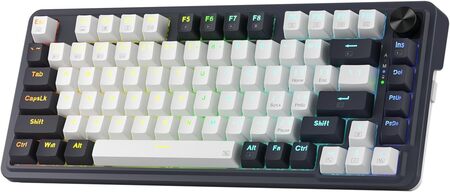
The Redragon K673 PRO carves out its own distinct lane by offering a gasket mount design and a dedicated control knob at a price that feels almost unfair to the competition. This 75% layout board trims away the number pad to free up precious mouse space while keeping the essential function row intact. No more hunting through FN layer combinations for your F5 key during a spreadsheet meltdown. The layout hits a sweet spot between compact minimalism and practical functionality.
Build quality impresses right away. Despite its plastic frame, the K673 PRO feels solid and dense, with absolutely no creaking or flexing during heavy use. Redragon packed five separate layers of sound-dampening material inside, including PORON foam, IXPE switch foam, and a silicone bottom pad. The result is a clean, controlled acoustic profile that keeps typing noises pleasant without being distracting. Our team found the pre-installed linear red switches offered a smooth, quiet experience ideal for shared workspaces.
Switching between devices is handled through the three standard modes: Bluetooth, 2.4GHz wireless, and USB-C wired. The magnetic dongle storage on the side of the keyboard is a thoughtful touch that prevents you from losing the receiver when you toss the board in a bag. The dedicated metal volume knob sits in the upper right corner and offers satisfying, clicky rotation. You can also program it to control media playback or other functions through the Redragon software.
We think the K673 PRO is a perfect entry point for anyone curious about the gasket mount trend without wanting to risk a big investment. The hot-swappable sockets open the door to future switch experimentation, and the compact size makes it a smart choice for smaller desks or a dual-purpose home and office setup. The sleep timer cannot be adjusted when running on battery, which is a minor annoyance, but the keyboard wakes instantly with a keystroke.
Key Specs:
- Layout: 75% (81 keys) with function row
- Switch type: Redragon linear red switches (hot-swappable)
- Connectivity: Bluetooth, 2.4GHz wireless, USB-C wired
- Dampening: Five-layer internal foam and silicone
- Special feature: Dedicated metal control knob
- Keycap material: PBT
Pros:
- Satisfying gasket feel and clean typing acoustics
- Dedicated metal volume knob adds daily convenience
Cons:
- Sleep timer duration is not user-adjustable
4. Logitech POP Keys: Personality-Packed Typing with a Smile
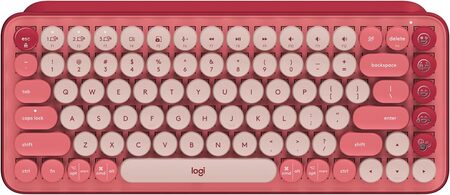
Nobody makes a keyboard quite like the Logitech POP Keys, and frankly, that is the whole point. This compact mechanical board throws subtlety out the window and replaces it with vibrant color combos, swappable emoji keys, and an infectious sense of fun. The Heartbreaker Rose variant we tested pairs neon coral with crushed raspberry tones in a way that genuinely brightens your desk. If your workspace needs a shot of joy, this keyboard delivers it in spades.
The typing experience matches the playful aesthetic with bouncy, tactile mechanical switches that deliver a vintage typewriter feel. Each keypress produces a satisfying click and pop that makes writing emails or chatting with friends feel more engaging. The scooped round keycaps cup your fingertips comfortably, and the compact footprint encourages better shoulder positioning by letting you place your mouse closer. Logitech clearly prioritized ergonomic comfort alongside the bold design language.
Multi-device functionality is classic Logitech excellence. The POP Keys pairs with up to three devices and lets you hop between them using the dedicated Easy-Switch keys on the F1 through F3 row. You can connect via Bluetooth or the included Logi Bolt USB receiver, and the keyboard remembers your pairings reliably. We switched between an iPad, a Windows laptop, and a Mac Mini throughout testing without a single dropped connection. The cross-platform compatibility extends to Chrome OS, Android, and iOS too.
Battery life deserves a special round of applause. Logitech claims up to three years of use on the included AAA batteries, and while we obviously could not verify that full timeline, the endurance is legendary among wireless keyboards. The emoji keys are fully customizable through the Logi Options Plus software, and you can assign them to launch apps or trigger shortcuts if emojis are not your thing. The keyboard uses replaceable batteries rather than a built-in rechargeable pack. Some people prefer the convenience of swapping batteries, others want USB charging. That is really the only functional trade-off here.
Key Specs:
- Layout: Compact with full function row
- Switch type: Tactile brown mechanical switches
- Connectivity: Bluetooth (3 devices), Logi Bolt USB receiver
- Battery: Up to 3 years via 2 AAA batteries
- Special feature: 8 swappable emoji keys plus emoji menu key
- Compatibility: Windows, macOS, Chrome OS, Android, iOS, iPadOS
Pros:
- Irresistibly fun design that stands out on any desk
- Excellent multi-device switching with dedicated Easy-Switch keys
- Incredible battery longevity with standard AAA batteries
Cons:
- No rechargeable battery option for those who prefer USB charging
- The clicky sound may not suit noise-sensitive open offices
5. Keychron K4 Version 2: The Layout Genius for Number Crunchers
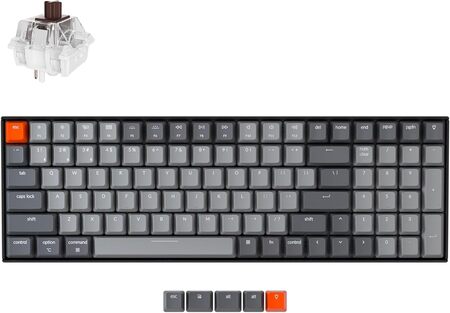
The Keychron K4 Version 2 solves a problem that plagues countless professionals. You need a number pad for data entry, but you do not want a massive full-size keyboard eating your entire desk. The K4 squeezes 100 keys into a 96% layout that trims every millimeter of wasted space while keeping the numpad, arrow keys, and function row fully intact. It is a masterclass in space efficiency, and we found the compact arrangement clicked within a day of use.
Typing feel lands in that ideal middle zone thanks to the Keychron Super Brown switches. They deliver a noticeable tactile bump without the sharp click of blue switches, making them appropriate for offices and shared workspaces where you want to stay on good terms with your neighbors. The white LED backlight keeps things clean and professional, with adjustable brightness levels that work well in bright offices and dim rooms alike. The inclined bottom frame, new to Version 2, angles the board for more comfortable wrist positioning during marathon sessions.
Connectivity options include Bluetooth 5.1 for up to three paired devices and a wired USB-C mode. The Broadcom Bluetooth chipset proved reliable throughout our testing, maintaining stable connections across a Windows PC, a MacBook Pro, and an iPhone. Switching is handled through simple function key shortcuts, and the keyboard wakes from sleep quickly. The 4,000mAh battery delivers up to 240 hours of typing with the backlight off, which translates to roughly a month and a half of standard office use between charges.
Extra details reveal thoughtful engineering. Keychron includes dedicated keycaps for both macOS and Windows, and a physical toggle switch on the side instantly flips between the two operating system layouts. The relocated Delete key and the dedicated Caps Lock indicator address community feedback directly, showing that Keychron listens to its users. This board is not hot-swappable like some of the brand’s newer models, so you are committing to the Super Brown switches from day one. For the vast majority of office workers, that will be a complete non-issue because the switches feel great and are built to last 50 million keystrokes.
Key Specs:
- Layout: 96% (100 keys) with number pad
- Switch type: Keychron Super Brown (tactile)
- Connectivity: Bluetooth 5.1 (3 devices), USB-C wired
- Battery: 4,000mAh, up to 240 hours with backlight off
- Frame: Plastic with optional aluminum rails
- OS support: macOS and Windows with dedicated toggle switch
Pros:
- Compact layout that keeps a full number pad and arrow keys
- Satisfying tactile switches that balance feel and noise
- Seamless Mac and Windows compatibility with included keycaps
- Long battery life with a large internal rechargeable battery
Cons:
- The condensed zero key on the numpad takes adjustment
- Non-hot-swappable PCB limits switch customization options
Best Bluetooth Mechanical Keyboards for Multi-Device Use: A Quick Rundown
- Corsair K100 AIR Wireless: Best for premium speed and ultra-thin design with pro-grade multi-device switching
- AULA F99 Wireless: Best value for a creamy, custom keyboard sound and enormous battery life
- Redragon K673 PRO: Best compact gasket mount board with a dedicated control knob at an accessible price
- Logitech POP Keys: Best for personality, fun typing feel, and legendary battery longevity
- Keychron K4 Version 2: Best layout for number crunchers who want a full numpad without the full desk footprint
Final Thoughts
Choosing the right multi-device keyboard comes down to understanding how you actually work. Prioritize typing comfort and switching speed above flashy features. A keyboard that feels clunky under your fingers will gather dust no matter how many devices it can pair with. Focus on the layouts and switch types that match your daily routine, whether that means a numpad for spreadsheets or a compact frame for a clean desk setup.
Take stock of what sits on your desk right now and imagine what you want your workflow to look like. Every keyboard we featured handles the multi-device dance with confidence. The difference lies in the personality, the footprint, and the feel under your hands. Trust your instincts, pick the one that excites you to sit down and type, and enjoy the freedom of controlling your entire digital world from a single fantastic keyboard.
Be First to Comment