A field recording can go from a quiet answer to a burst of laughter in seconds. When you’re running the interview and watching the recorder yourself, there’s little time to adjust levels or check whether every mic is recording.
Shopping for a recorder adds another layer of guesswork. Two models can look equally portable on paper, yet one fits in a pocket while the other makes more sense under a camera with several microphones plugged in.
We researched the market, checked manufacturer manuals, and compared recorders for the jobs people actually do on location. These five picks cover everything from quick interviews to shoots with multiple microphones, so you can choose around what you record and what you carry.
How We Selected the Best Portable Audio Recorders
We started with the kinds of field jobs a solo operator or small crew takes on, from gathering interview clips to recording a live performance or shooting a client video. Then we compared how each recorder handles those jobs from setup through editing.
We checked the manuals for details that short product descriptions can miss, especially which inputs work together, what the recorder saves, and which features need an accessory. Those details shaped how we matched each model to its best use.
- Microphone inputs: Count the sources you need to connect and check whether you can record them together.
- Track layout: Separate tracks give you room to adjust one speaker or sound source during editing.
- Recording format: Choose files your editing software can open and your clients can use.
- Monitoring: Check how easily you can listen to the incoming audio and spot problems during a take.
- Field setup: Consider where the recorder will sit, how you’ll power it, and what storage it needs.
Each pick makes sense for a specific kind of field work. Start with the job you do most often.
Best Portable Audio Recorders for Field Work
A quick interview and a shoot with four wired microphones call for different setups. Here’s where each recorder fits.
1. Zoom H1essential
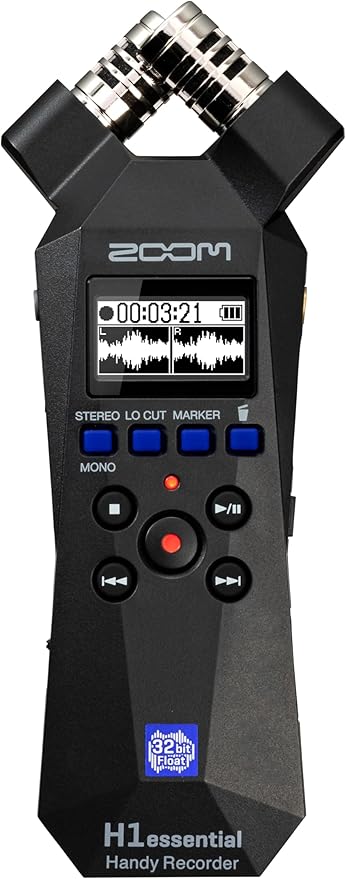
We’d pick the Zoom H1essential for solo creators who gather short interviews, sound effects, or street ambience and want a recorder they can keep within reach. Its built-in stereo microphones let you get started without setting up a separate mic.
The recorder saves 32-bit float WAV files, which give you room to turn quiet material up or bring loud passages down in compatible editing software. That flexibility helps when a source changes volume suddenly and you have only one chance to capture it.
We especially like the two-second pre-record feature for short, unpredictable sounds. Once enabled, it saves the two seconds before you press Record. That can preserve the start of a sound you hear just a moment too late to catch by hand.
The 3.5 mm input takes a compatible lavalier or line signal, giving you a way to place a mic closer to a speaker. The tradeoff is that connecting it disables the built-in microphones. You’ll have to choose between the two sources for that take.
For a seated interview, Zoom’s placement guidance suggests raising the recorder on a small tripod to reduce reflections from a tabletop. Also pack a compatible microSD card and two AAA batteries if you plan to record away from USB power.
Who should skip it:
- Crews with wired XLR microphones that need to connect directly to the recorder. Its sole external input is a stereo mini jack.
- Producers who want a close mic and room sound on the same take. The input switching design allows only one of those sources at a time.
2. Zoom H4essential
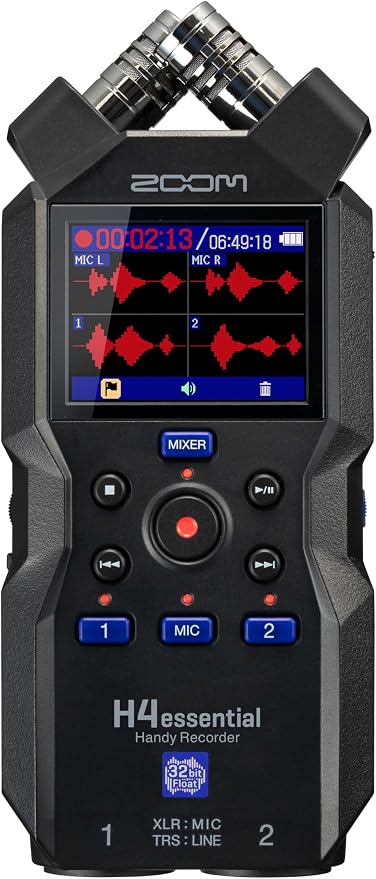
We’d choose the Zoom H4essential for a small podcast or video crew that wants to record two people on separate mics and keep some sound from the location. Its four-track recording setup pairs two XLR/TRS inputs with a built-in stereo mic.
Those two combo inputs take XLR microphone connections or TRS line connections. At a live event, for example, you can use them for a stereo desk feed while the onboard mics pick up the audience and room.
What makes this setup useful is that the recording workflow saves each selected track separately and creates a stereo mix at the same time. You can use the mix for a quick review and still have the individual tracks to work with later.
The on-screen mixer lets you balance what you hear through headphones and see the levels for each source. We’d use it before the take to check that both voices are coming through and that the room sound sits where you want it.
There’s one input choice worth checking before you pack. The 3.5 mm jack takes over from the built-in stereo mic when you plug something into it. If your plan depends on room sound from the onboard pair, connect your other sources through the combo jacks.
Who should skip it:
- Crews that need three or more direct XLR connections for an interview or panel. Two of the four recording tracks come from the onboard stereo pair in that setup.
- Operators who want a dedicated gain knob for each mic. The mixer controls use a screen and a shared dial.
- Crews that need a mini-jack source and the onboard stereo pair running together. Those two options share an input path.
3. TASCAM DR-70D
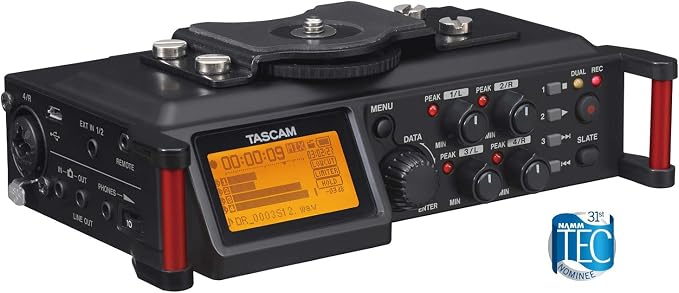
The TASCAM DR-70D is our pick for videographers who want the recorder under the camera and need up to four wired sources on a shoot. Its camera mounting bracket keeps the recorder close to the camera while you work from a tripod.
Four XLR/TRS combo inputs give you room to connect several mics, and each channel has its own level control. We’d use the separate mono files for a panel or group interview, where one soft speaker may need a different edit from everyone else.
The camera audio output can send a reference mix to a camera with a compatible input. Enable the automatic slate tone and both devices can record the same cue, giving you a clear point to line up the files in your editor.
For a one or two channel interview, dual recording mode can save a second copy at a lower level. That gives you a backup for sudden peaks. Check the mode before rolling, since it’s unavailable with more than two channels armed.
Who should skip it:
- Crews that need a quieter backup for every mic in a four-source setup. The backup recording mode works with up to two channels, which must form a valid pair if you select both.
- Editors who need native 32-bit float files. The recording format specs list 16-bit and 24-bit WAV or BWF, so check the delivery format before choosing this model.
- Operators who need to record to SDXC cards above 128 GB. The supported media list tops out at 128 GB, so check any cards you already own before a shoot.
4. Zoom H5studio
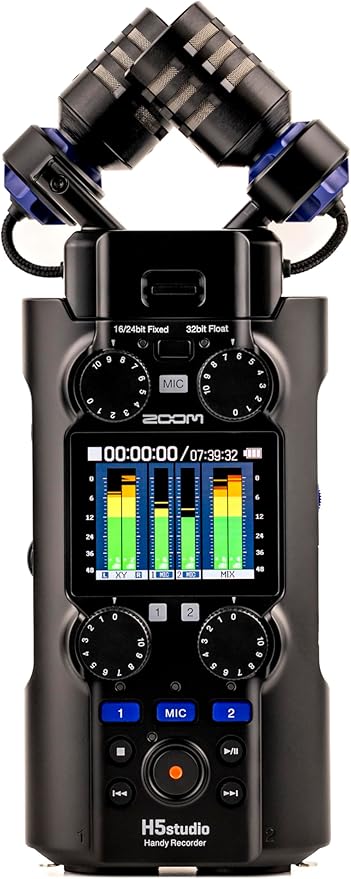
The Zoom H5studio suits filmmakers and location recordists who alternate between loud live sets and jobs that call for a different microphone setup. We’d choose it for that mix because the supplied stereo capsule is removable, and the recorder has two locking XLR/TRS inputs.
Zoom rates the supplied capsule for a maximum sound pressure of 140 dB SPL. That’s useful if you record drums or amplified performances. It describes the level the capsule can handle, so you’ll still want to listen from the position you plan to use.
The recording mode button switches between 32-bit float and 16-bit or 24-bit fixed formats. We’d use float when the sound level is hard to predict and choose a fixed format when a project calls for one, setting the input gain before the take.
The compatible capsule options include a shotgun capsule and a module that adds two XLR/TRS inputs. That gives you a way to change the recorder’s setup as jobs change. Check which capsule you’ll need before counting on extra inputs or a narrower pickup pattern.
On location, plan power around four AA batteries or a USB power source. If you’re recording from a tabletop with the stereo capsule, Zoom’s quick setup guide suggests raising it on a small tripod to reduce reflections from the surface.
Who should skip it:
- Crews that need timecode without adding hardware. Zoom’s timecode setup options require a separate adapter for wired timecode or an adapter and a compatible source for wireless timecode.
- Teams that need four direct XLR inputs in the standard setup. The recorder body has two, and adding two more requires the optional input capsule.
5. OM SYSTEM LS-P5
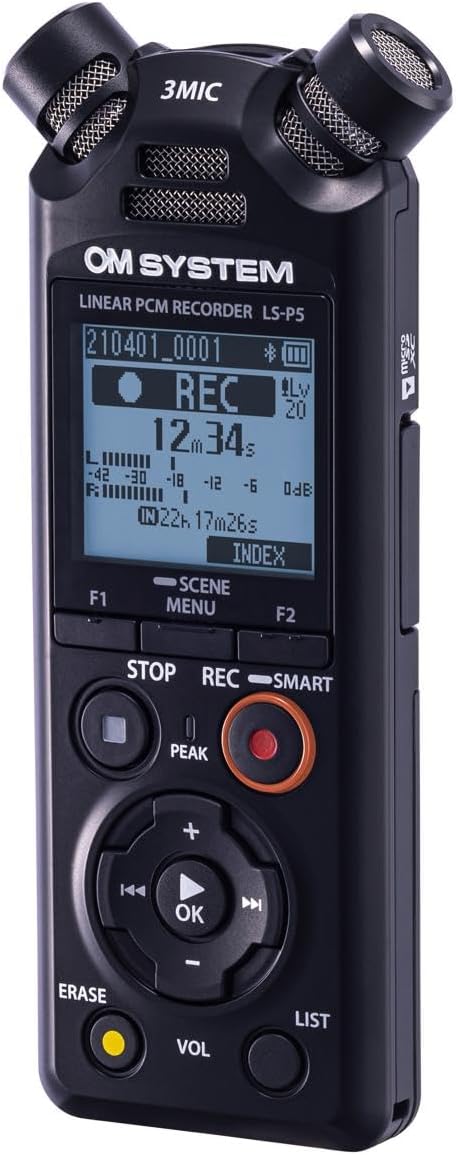
We’d pick the OM SYSTEM LS-P5 for reporters, researchers, or solo producers who want a pocket recorder for interviews and ambient sound. Its 16 GB internal storage lets you start recording without a card, and there’s a microSD slot if you want more space.
The adjustable microphone pickup gives you a wider setting for room sound or music and a narrower one for a source in front of you. We’d still place it close to a speaker where possible, especially in a room with competing conversations.
The Bluetooth remote controls let you operate the recorder from a phone with the dedicated app. Compatible Bluetooth headphones can stay connected at the same time. That’s handy when the recorder is well placed for the sound but awkward to reach during the take.
There’s also a calendar search feature that groups saved recordings by date. We like that for reporting trips or site visits spread across several days, when the date is often easier to recall than the name of a specific audio file.
For important interviews, follow the manufacturer’s recording guidance and record a short test first. Listen back before the conversation starts. If you’re using the narrower mic setting, that’s a good time to check how well it picks up everyone who needs to be heard.
Who should skip it:
- Crews that need direct XLR connections for their existing microphones. The 3.5 mm input is the recorder’s external audio connection.
- Editors who need 32-bit float. The linear PCM format tops out at 24-bit.
- Teams that carry only USB-C cables. The USB connection specs call for a Micro-B connection on the recorder.
Quick Comparison of the Best Portable Audio Recorders
Use the table to match your most common field job with the feature you’ll rely on and the tradeoff you’ll need to plan around.
| Product | Best for | Key feature | Main limitation |
|---|---|---|---|
| Zoom H1essential | Quick interviews and ambient sound | Two-second pre-record | External input disables onboard mics |
| Zoom H4essential | Two wired mics plus room sound | Separate tracks and stereo mix | Two direct XLR inputs |
| TASCAM DR-70D | Camera rigs with several wired mics | Four XLR/TRS inputs | Backup mode limited to two channels |
| Zoom H5studio | Live sets and changing mic setups | Removable stereo capsule | Timecode requires extra hardware |
| OM SYSTEM LS-P5 | Pocket interviews and reporting | 16 GB internal storage | No direct XLR input |
Final Thoughts
We’d start with the recording you can least afford to lose. Count the sources you need to hear clearly, decide where the recorder will sit, and make sure the files fit your editing workflow. Those choices will narrow the field quickly.
Then weigh the whole setup against your budget and the space you have to work in. Include any microphones, mounts, and storage you’ll need on a typical job. Choose the setup you can get ready before the moment passes.
Be First to Comment