A mic that sits too low can leave you leaning over your keyboard every time you record. And if your desk has a thick edge or a drawer in the way, fitting a clamp can be a project of its own.
A weighted desktop stand gives you a place to set the mic, but finding the right one takes a closer look. The base has to fit beside your gear, the stand has to reach a comfortable height, and the mount has to match your mic.
We researched the market, compared stand designs and mounting options, and chose five stands that make sense for different desks and recording needs. You’ll see which ones can reach past a keyboard, which come with useful accessories, and where to double check the fit before buying.
How We Selected the Best Desktop Microphone Stands
We started with freestanding models that use a weighted base. Then we looked at how each would fit on a desk used for calls, recording, or streaming, where a keyboard and screen already take up space.
We compared manufacturer specifications with listings for the exact models and bundles. When two sources disagreed about a measurement, we kept that uncertainty visible so you can judge whether it matters for your setup.
- Base footprint: Check how much room you need beside your keyboard, notes, or audio controls.
- Height adjustment: Look for a range that brings the mic to a comfortable spot while you’re seated.
- Horizontal reach: An adjustable boom can bring the mic closer while its base stays clear of your hands.
- Mounting fit: Match the thread size or clip opening to the microphone you plan to use.
- Included accessories: A compatible clip, shock mount, or pop filter can save you from sourcing parts separately.
- Load guidance: Check whether the stated capacity applies at the reach you’ll actually use.
Each pick solves a common desk setup problem. Start with the one that matches where you need the microphone to sit.
Best Desktop Microphone Stands with Weighted Bases
If you already own a mic, start with its mount. Then look at how far the stand needs to reach from the spot you’ve cleared for it.
1. InnoGear MS130 Desktop Microphone Stand
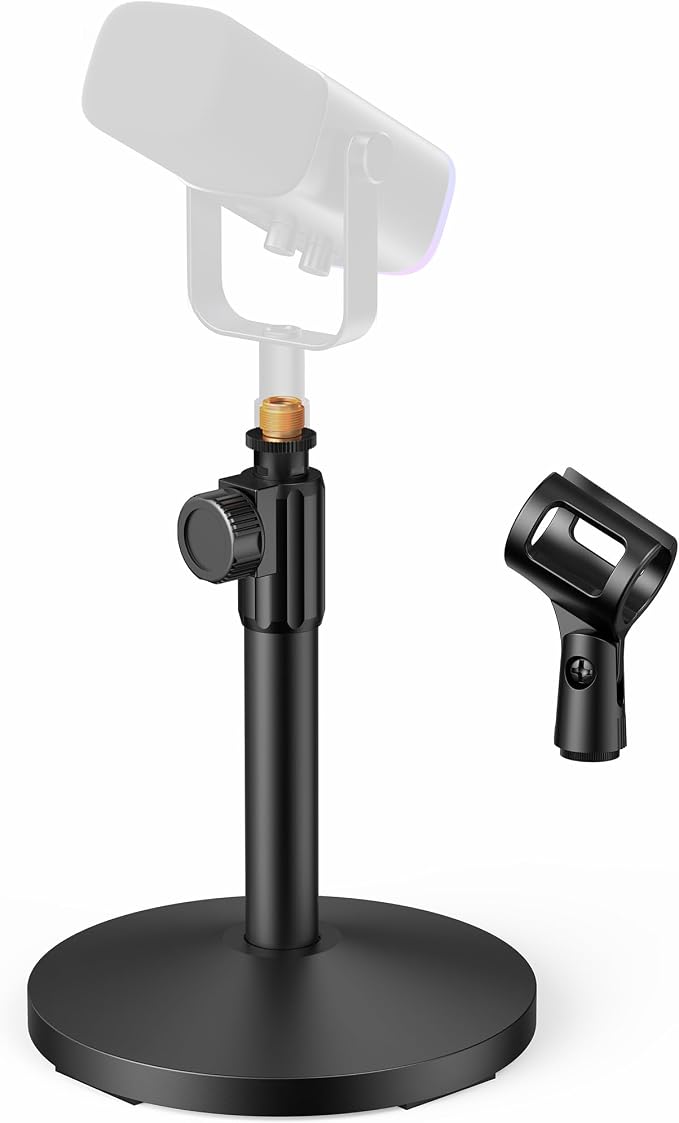
We’d choose the InnoGear MS130 for a solo podcaster or home office worker who wants to swap between a handheld mic and a compatible threaded USB mic. The included mounting hardware gives you both options on the same straight stand, with a clip and a screw adapter.
The metal base measures 5.12 inches across, with four pads underneath for grip and surface protection. That gives you a clear measurement to work with if the stand has to fit between your laptop and a notebook, or beside a keyboard you use during calls.
For a handheld mic, the clip opening takes a body up to 1.26 inches across. The same listing gives a combined load limit of 3.3 pounds for the mic and accessories, so include any mount you plan to add when checking your setup against that figure.
Height is the detail we’d confirm before buying. The Amazon listing gives a range of 8 to 12.8 inches, while the manufacturer page lists 10.6 to 15.4 inches. If your mic has to clear a screen or sit below a camera, that difference can affect whether it fits.
To set the height, InnoGear’s directions call for loosening the screw knob, sliding the shaft, and securing it again. We’d do that from your usual seated position, with the keyboard where you normally keep it, so you can see whether the upright placement feels comfortable.
Who should skip it:
- An adjustable boom is a better fit if the base must sit behind your keyboard while the mic reaches in front of it.
- If your handheld mic is wider than the included clip and you want to use it without buying a separate holder, look for a larger clip.
2. On-Stage DS7200B Adjustable Desktop Microphone Stand
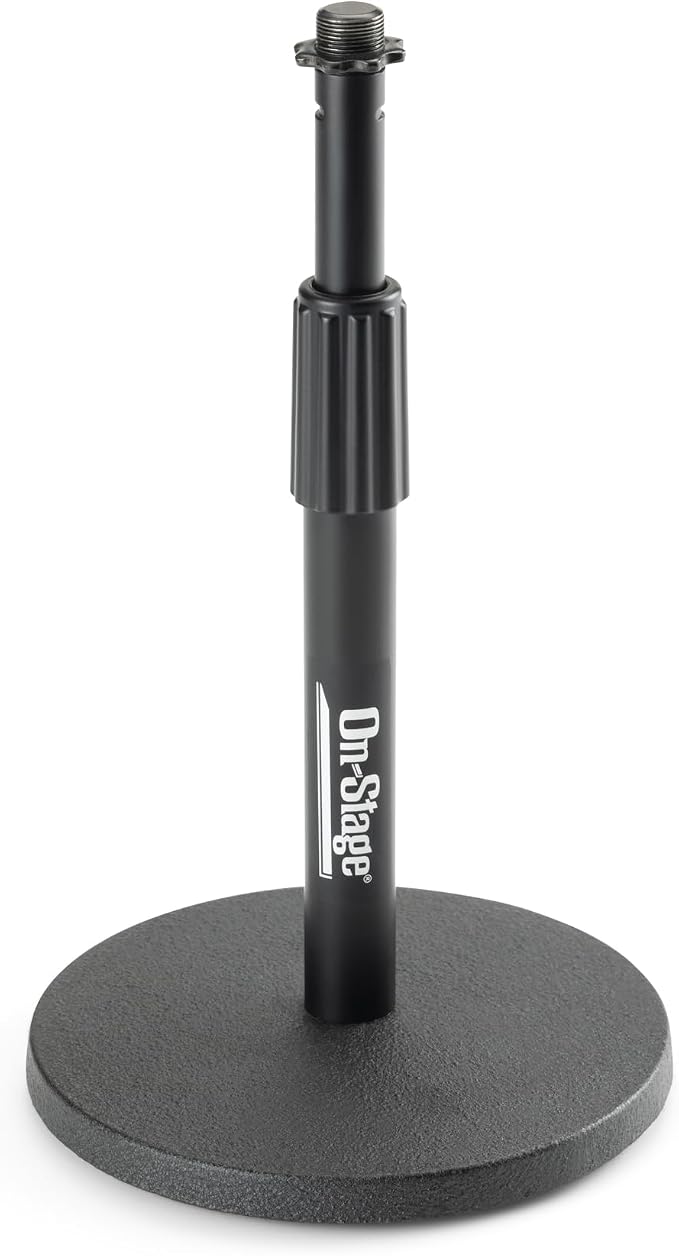
The On-Stage DS7200B suits a small podcast team or office that already has a compatible microphone holder. We’d put it on a shared table where the next speaker needs a quick height adjustment. Its steel twist clutch lets you set the stand anywhere from 9 to 13 inches.
The round base is 6 inches across and weighs 2 pounds. Five rubber feet sit beneath it. That fixed footprint makes it easy to mark out a spot at each seat if you’re setting up a table for interviews or discussions and need to leave room for notes.
The threaded top is a male 5/8-inch, 27-thread fitting, and the stand ships without a mic clip or holder. That’s fine if you already have one that fits. For a first setup, check the thread on your mic or holder so you can order any missing part together.
The shaft unscrews from the base, which is handy if the table doubles as a meeting or packing surface and you clear it after recording. Once it’s assembled, we’d check mic placement from each speaker’s seat before settling on a height, especially if different people use the same stand.
Who should skip it:
- If you’re setting up a bare handheld mic and need everything in one package, choose a model that includes a clip sized for the mic you own.
- If the stand itself must rise above 13 inches to clear your equipment, look for a higher maximum that matches the space you’ve measured.
- If the base has to stay at the side of your desk while the mic reaches across it, this straight shaft gives you vertical adjustment only.
3. InnoGear MS542 Adjustable Desk Microphone Stand with Boom Arm
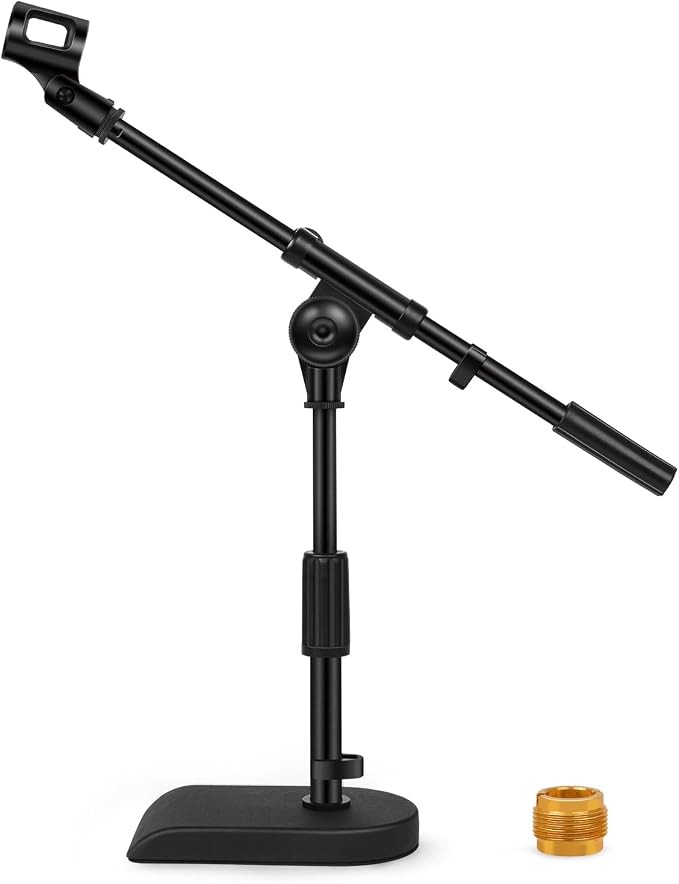
The InnoGear MS542 is our pick for a streamer or voiceover artist who needs the mic to reach past a keyboard or control surface. Its extendable boom lets you set the length and angle separately, so the base can sit off to one side while you bring the mic closer.
InnoGear lists a 5-pound base with rubber stripping underneath and a maximum stand height of 15.8 inches. The soft grip twist clutch adjusts the upright section. We’d use that adjustment to set the starting height, then position the boom around whatever needs to stay in front of you.
The thread adapter covers 3/8-inch and 5/8-inch fittings. InnoGear also lists two cable clips on the model page. Those are useful if you want to route the mic cable along the stand and keep it from dropping across a control or a key you reach for regularly.
The listed load limit of 4.4 pounds applies with the arm extended halfway. We couldn’t verify a separate limit at full extension, so the setup deserves a closer look if your mic and mount are heavy and the base has to sit well away from your chair.
Start by working out where the base can sit without taking up space you need for your hands. Then check the halfway load rating against the reach you need and the combined weight of your mic and mount.
Who should skip it:
- If you carry your stand between rooms for each session, the 5-pound base alone may be more weight than you want to move.
- If a heavy mic needs the full reach of the boom, choose a stand with a published load rating at that position.
4. BILIONE Versatile Desktop Microphone Stand Kit
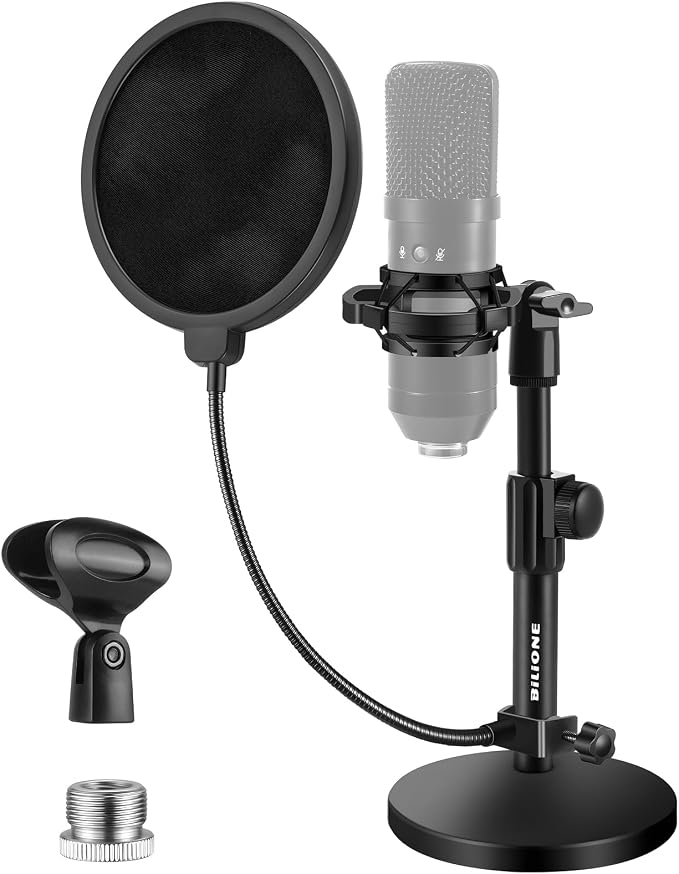
We’d pick the BILIONE Versatile Desktop Microphone Stand Kit for a new podcaster recording at a desk with a compatible mic. The round base kit includes a pop filter, shock mount, mic clip, and thread adapter. That’s a practical bundle if you’re starting without any mounting accessories.
The two recording accessories serve different purposes. A shock mount helps isolate a mic from vibrations that travel through the desk and stand. A pop filter helps soften bursts of air from sounds like p and b. How much you hear from either accessory depends on your setup.
The metal base measures 5.1 inches across and is listed at 1.5 pounds. We’d allow room beyond that circle for the filter in front of the mic. That extra space matters if you read from a laptop or keep a script propped up directly in front of you.
Before setting it up, measure the mic where the shock mount will grip it. The listed fit range is over 1.77 inches through 2.05 inches, and the Blue Yeti is excluded from the shock mount. If the mic fits, use the filter as a distance guide to help keep your speaking position consistent.
Who should skip it:
- If you own a Blue Yeti, the included shock mount won’t fit it. Choose a kit with a shock mount confirmed to fit your mic.
- If your mic falls outside the specified diameter range and you’re buying the bundle mainly for the shock mount, look for a holder sized to your mic.
- If you already have a filter and a mount you like, a stand without accessories may fit your setup with fewer parts to store.
5. BILIONE 101S 3 in 1 Desktop Microphone Stand
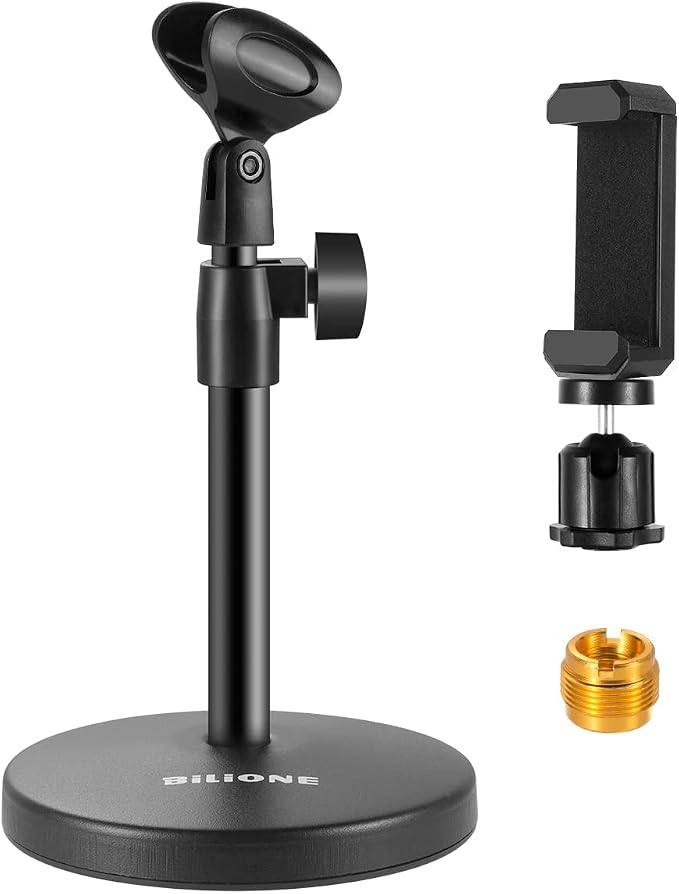
The BILIONE 101S is a good fit for a business owner who records voiceovers one day and uses a phone for a short product video the next. The swappable clips let the same stand hold a mic or a phone, depending on which device you need for that session.
The upright adjusts from 8.2 to 12.8 inches, and the round base weighs about 1 pound. We’d use it on a desk where the device can sit close to you, with the stand low enough to leave a clear view of the screen behind it.
There’s also a metal thread adapter with a 5/8-inch male thread and a 3/8-inch female thread. That gives you a third way to use the upright if your mic attaches with a threaded fitting. Check the thread on your mic or mount before counting on the adapter.
The main limit is that the clips share one mounting point. If you film on your phone while recording through a separate mic, you’ll still need a second stand or mount. The setup makes more sense when you record audio and video in separate sessions.
For setup, the assembly guide shows the upright screwed into the base and the chosen clip screwed onto the top. Loosen the knob to set the height, then tighten it again. If you keep your phone in a case, check the fit with the case on.
Who should skip it:
- If you need a phone and a separate mic at the same time, the single mounting point will leave one device without a holder.
- If your desk layout calls for a stand taller than 12.8 inches, check the height range before committing to this model.
How the Desktop Microphone Stands Compare
Match your usual recording setup to the mounting option and limitation that matter most at your desk.
| Product | Best for | Mounting option | Main limitation |
|---|---|---|---|
| InnoGear MS130 | Switching between handheld and threaded mics | Mic clip and thread adapter | Conflicting published height ranges |
| On-Stage DS7200B | Shared tables with existing mic holders | 5/8-inch threaded top | Mic holder sold separately |
| InnoGear MS542 | Reaching past a keyboard | Extendable boom arm | Load rating applies at half extension |
| BILIONE Versatile Desktop Microphone Stand Kit | First podcast setups | Shock mount, mic clip, and adapter | Shock mount excludes Blue Yeti |
| BILIONE 101S | Alternating between mic and phone | Swappable mic and phone clips | Holds one device at a time |
Final Thoughts
We’d make the choice from your usual seat. Mark where the base can go, then picture where the mic needs to sit while you type, read, or speak. That gives you two points to measure before you decide how much height or reach to buy.
From there, use your budget for the parts that make your usual work easier. If you already own a holder you like, check its thread first. A good fit should let you sit down and get straight to the call or recording.
Be First to Comment