A wireless keyboard can do a lot for a clean desk. It removes one more cable from the workspace and gives you a little more freedom to arrange everything the way you like. The catch is that rechargeable keyboards differ quite a bit in layout, battery life, connectivity, and overall feel.
That can make choosing one surprisingly difficult. Two keyboards may look almost identical at first glance, yet one may be far better for a busy spreadsheet workflow while another makes more sense for a compact home office or a multi-device setup. We sorted through those differences so you do not have to.
For this guide, we examined the category, compared the five selected models, and focused on the features that genuinely affect everyday use. Our aim is simple: help you quickly see where each keyboard fits, what makes it useful, and where you may want to look twice before buying.
How We Selected the Best Rechargeable Wireless Keyboards
We started with the things that matter most when a keyboard is supposed to keep your desk simple. That means looking at wireless connectivity, rechargeable power, layout, size, and the practical features you are likely to use every day rather than being distracted by a long specification sheet.
From there, we compared the products against their intended users and workflows. We relied primarily on manufacturer information for specifications and compatibility, while consumer and independent reviews helped us spot practical concerns that are harder to see on a product page.
- Desk footprint: A keyboard should leave enough room for your mouse, notebook, and other essentials without making the workspace feel cramped.
- Wireless setup: A straightforward Bluetooth or 2.4GHz connection helps cut cable clutter without creating a new setup headache.
- Battery life: A longer-lasting rechargeable battery means less frequent charging and fewer interruptions during work.
- Typing experience: Key design and layout can make a noticeable difference when you spend hours writing, coding, or handling documents.
- Device compatibility: Broad compatibility matters when your work moves between computers, tablets, and other devices.
- Build and usability: Size, controls, materials, lighting, and setup all influence how practical the keyboard feels in everyday use.
- Honest limitations: Knowing the feature gaps and recurring concerns can help you avoid buying a keyboard that simply does not fit your needs.
Together, these factors give us a useful mix of keyboards for different kinds of clean-desk setups. Now, let’s get into the picks.
Best Rechargeable Wireless Keyboards for Clean Desks
Our five picks cover a useful range, from full-size productivity keyboards to compact models built around portability and flexibility.
1. Logitech MX Keys S Wireless Keyboard Low Profile Fluid Precise
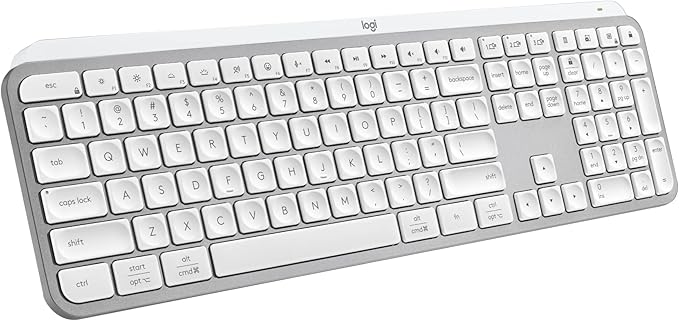
The Logitech MX Keys S is a strong match for a professional home office, freelance workspace, or small-business desk where you want a full-size keyboard without the chunky feel of a traditional desktop board. It is especially appealing when you want a polished setup that still feels practical for long typing sessions.
Its spherically dished scissor keys are designed to center your fingers, with Logitech specifying 1.8mm travel and 60g actuation. In simple terms, the keys are shaped to guide your fingertips naturally while keeping the typing action relatively controlled. You also get proximity and ambient-light sensors for the backlight, as outlined in the official specifications.
The wireless setup is where this keyboard becomes particularly useful for a modern desk. You can connect through Bluetooth Low Energy or the Logi Bolt receiver and switch between up to three devices. Logi Options+ adds customization and Smart Actions, which can make repetitive desktop tasks easier to handle from the keyboard. Logitech covers those features on its current product page.
Battery life is rated for up to 10 days with Logitech’s predefined settings, or up to five months with the backlight switched off. At 430.2mm wide, though, this is still a full-size keyboard, and independent testing also identifies it as a non-hot-swappable scissor keyboard in this independent review.
We would set it up using whichever wireless connection best suits your desk, then use Logi Options+ for lighting and other customization. Logitech also rates the standard keys for 10 million presses, which gives us some useful context about its intended durability. You can confirm those details in the manufacturer details.
A few cautions:
- It is still a full-size keyboard, so smaller desks may benefit from something more compact.
- Its scissor-key design will not appeal to anyone specifically looking for mechanical switches, hot-swapping, or a more pronounced key feel.
- The backlight is convenient, but frequent use reduces the stated battery runtime.
2. Arteck 2.4G USB Wireless Keyboard
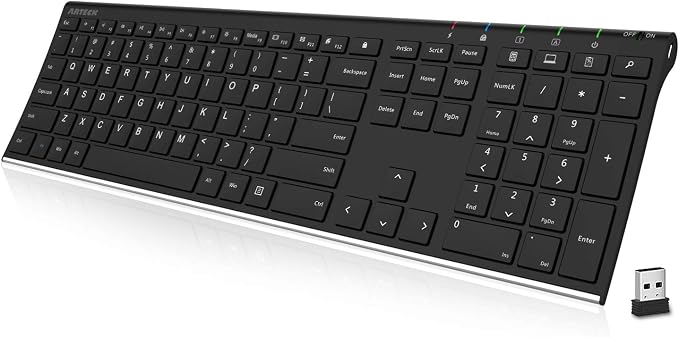
The Arteck HW192 makes a lot of sense for a conventional office desk where you want to cut the keyboard cable without giving up a familiar full-size layout. It is particularly well suited to spreadsheets, bookkeeping, forms, and other work where having a dedicated number pad is genuinely useful.
Arteck uses a stainless-steel construction with low-profile scissor-style keys, and the keyboard measures 16.9 by 4.9 by 0.6 inches while weighing 14.9 ounces. That keeps the overall design relatively slim while still giving you the full set of keys you would expect from a desktop keyboard, according to the official specifications.
Connectivity comes through a small 2.4GHz USB receiver, with Arteck describing setup as simply plugging in the receiver and switching the keyboard on. The company also lists a wireless range of up to 10 meters, along with dedicated media and shortcut keys for common commands. Those details are covered in the manufacturer directions.
Battery life is rated for up to six months based on Arteck’s stated usage of two hours per day. That is useful for a desk where you want to charge as infrequently as possible. Still, Mac users should take a closer look at compatibility, since a PCWorld review reported that several hotkeys did not work correctly with macOS. We would treat that as an important practical consideration rather than a universal limitation, based on the PCWorld review.
For everyday use, plugging the receiver directly into your computer keeps the setup simple, and the included rechargeable design means there is no need to keep disposable batteries around. Arteck also states a 24-month warranty on its current product information, which you can check on the current product page.
Notes of caution:
- It relies on a USB receiver, which may be less convenient on devices with limited USB ports.
- Mac users who depend heavily on specialized function-key shortcuts should verify compatibility first.
- The full-size layout takes noticeably more horizontal space than compact alternatives.
3. Logitech MX Keys S Mac Wireless Keyboard Fluid Precise
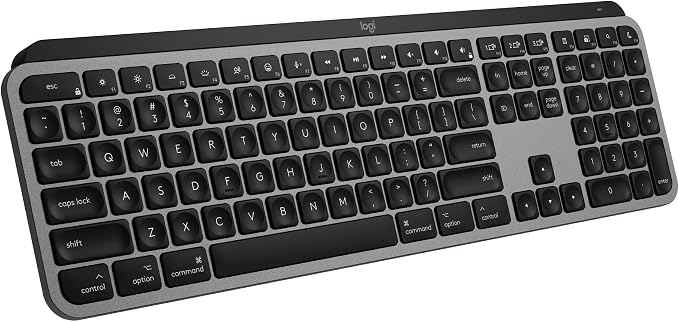
The Logitech MX Keys S for Mac is a natural fit for people who work mainly within Apple’s ecosystem and want a full-size, low-profile keyboard to keep the desktop feeling organized. Its Mac-focused layout is the main attraction, especially if you want the controls to feel familiar across your everyday Apple workflow.
The keyboard uses scissor switches with 1.8mm total travel and a 1,500mAh rechargeable battery. Its backlight also uses proximity and ambient-light sensing, so the keys can illuminate as you approach and respond to the surrounding light. Logitech provides those details in its official Mac specifications.
Bluetooth Low Energy allows the keyboard to connect to up to three Apple devices and switch between them. That can be especially handy when your desk includes a Mac and iPad, since one keyboard can cover multiple devices without requiring a pile of extra hardware. Logitech explains the setup on its official product listing.
Battery life is rated for up to 10 days with the predefined settings, with the claim extending to five months when the backlight is off. The keyboard is also about 430mm wide, so while it feels streamlined, it is not a small keyboard. We would keep that footprint in mind if desk space is tight.
For a simple setup, Bluetooth is the obvious place to start, and Logi Options+ can handle lighting and customization. Logitech also rates the standard keys for 10 million presses, while the low-profile design is intended to support a more natural wrist position. Those details are available in the support specifications.
A few things to note:
- Its full-size footprint may be more keyboard than you need on a compact desk.
- The Mac-focused layout is less convenient for workflows that regularly move between Apple and Windows machines.
- Anyone specifically looking for a receiver in the box should verify the exact retail package before ordering.
4. AULA F75 Pro Wireless Mechanical Keyboard

The AULA F75 Pro is a good fit for creators, programmers, students, and home-office users who want a compact mechanical keyboard without giving up wireless flexibility. Its 75% layout keeps the function row and arrow keys while removing the number pad, which gives us a more compact footprint without becoming extremely minimal.
You get 2.4GHz wireless, Bluetooth 5.0, and USB-C wired connectivity, along with 80 keys, a 4,000mAh rechargeable battery, RGB lighting, and a multi-function knob. The keyboard also has hot-swappable sockets that support compatible 3-pin and 5-pin switches, so the typing feel can be changed later. AULA lists these features in its official product details.
Its construction is another reason it stands out. AULA specifies a gasket structure with five-layer padding and side-printed PBT keycaps, while the case measures about 32.3 by 14.3 by 4.3 centimeters. That combination gives you a feature-rich mechanical board while keeping the overall desk footprint much smaller than a full-size model, according to the manufacturer specifications.
There is one practical concern worth knowing about before buying. A hands-on review reported serious key-chatter and spacebar problems on the reviewer’s unit, even though the reviewer also found the board well constructed. We would view that as an individual product report rather than evidence that every unit has the same issue, as reflected in this hands-on review.
For everyday use, choose the connection mode that suits your setup and keep the receiver accessible when you are using 2.4GHz. The supplied driver can handle programming and customization, while AULA also publishes a warranty policy for qualifying purchases through its store. You can review the details in the warranty policy.
A few cautions:
- The 75% layout does not include a dedicated number pad, so it is not ideal for heavy numeric-entry work.
- Buyers who want to minimize quality-control uncertainty should keep the documented review-unit issues in mind.
- RGB lighting and mechanical customization are useful extras, but they may be unnecessary for a straightforward office setup.
5. Arteck Universal Backlit Wireless Bluetooth Keyboard
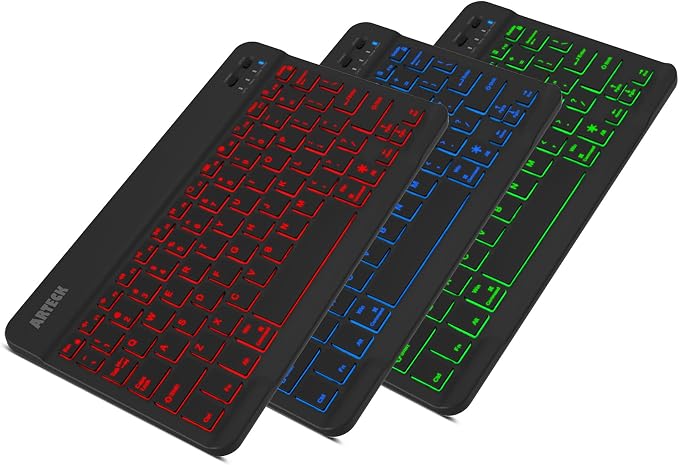
The Arteck HB030B is the easiest fit for a mobile workspace, tablet setup, or particularly small desk where portability matters more than having every desktop key. It is the kind of keyboard that makes sense when you want something you can put away quickly without sacrificing the convenience of physical keys.
At 9.7 by 5.9 by 0.24 inches and 0.37 pounds, it is considerably smaller and lighter than the full-size choices here. It uses scissor-style keys and Bluetooth 3.0, with support for iOS, Android, macOS, and Windows. You also get seven backlight colors and two brightness levels, according to the official specifications.
Arteck rates the rechargeable battery for up to six months when the keyboard is used for two hours a day with the backlight turned off. That makes it particularly appealing for a cleaner desk because you can spend long stretches without a charging cable sitting beside the keyboard. The same manufacturer page explains the battery details.
The compact design does come with compromises. There is no number pad, and the keyboard sits flat rather than providing the more angled profile found on many desktop boards. A PCWorld review also reported that it could pair with only one device at a time and noted some macOS pairing quirks, which are worth considering if your setup changes often. Those observations come from the PCWorld review.
For the simplest experience, pair it with the device you use most and switch the backlight off when maximum battery endurance matters. Arteck’s current information also states a 24-month warranty, giving you a clearly defined support period. The details can be checked on the current product page.
A few things to note:
- Its compact layout is not a great match for frequent spreadsheet or numeric-entry work.
- It is less convenient for workflows that regularly require several devices at once.
- The flat design may not feel as comfortable to users who prefer a more angled desktop keyboard.
Final Thoughts
A good clean-desk keyboard should make your workspace easier to live with, not simply remove one cable. We would focus on the things you will notice every day: the amount of space it takes, how it connects, how often you need to charge it, and whether the layout actually suits the work you do.
Once those basics are clear, the choice becomes much easier. Think about your typical workflow, the devices on your desk, and how much room you have available, then choose the design that fits those habits naturally. The best keyboard is the one that makes your setup feel simpler without making your work feel compromised.
Be First to Comment