There’s a certain kind of freedom that comes with clearing off your desk. Fewer cables, fewer distractions, and suddenly your mouse has all the room it needs to whip across a mousepad. That is exactly the feeling a 60% keyboard delivers. These tiny workhorses strip away the number pad, the function row, and even the arrow keys to give you a lean, focused typing and gaming surface.
Maybe you are a competitive gamer who needs every extra inch for low-sensitivity aiming. Maybe you just love a clean, minimalist setup that makes your desktop feel larger. Whatever your reason, making the jump to a compact layout can genuinely change how you interact with your computer every day.
We put in the time testing and researching the best options available right now so you do not have to guess. This guide breaks down five excellent 60% keyboards across a range of prices and features. By the time you reach the end, you will know exactly which one deserves a spot on your desk.
How We Selected the Best 60% Keyboards
Our selection process started with a deep look at what actually makes a compact keyboard worth owning. We focused on finding boards that balance pure performance with everyday usability. A 60% keyboard can feel like a toy if it is not built right, or it can feel like a precision tool that makes your old full-size board seem clunky. We wanted the latter.
We evaluated each keyboard against a series of real-world criteria that matter whether you are grinding ranked matches or typing up reports.
- Build Quality and Materials: A keyboard should feel solid under your fingers. We looked for aluminum frames, quality plastics, and durable keycaps that do not get shiny after a few months.
- Switch Performance: The heart of the experience. We compared traditional mechanical, optical, and magnetic switches for speed, feel, and reliability.
- Customization Software: Being able to remap keys and tweak lighting is a huge part of the 60% experience, so we tested the accompanying software for each board.
- Hot-Swap Capability: If you want to change the feel of your keyboard later without soldering, this feature is a major advantage. We noted which boards let you swap switches easily.
- Connectivity Options: A detachable cable is a must for portability and a clean setup. We also gave extra points to reliable wireless connectivity.
- Real-World Gaming Features: Features like adjustable actuation, Snap Tap, and high polling rates can make a tangible difference in fast-paced games. We tested these claims.
- Value for Price: A higher cost needs to bring clear benefits. We made sure every pick here justifies its cost with performance and features.
We lived with these keyboards, typing thousands of words and logging countless hours in games. Every pick on this list earned its place through solid performance and smart design. Now let us get into the specific boards that stood out.
Best 60% Keyboards for 2026 (Expert Ranking & Review)
We have organized five standout 60% keyboards that cover the full spectrum from budget-friendly modding platforms to high-end wireless performers. Each one brings something unique to the table. Dive into the individual breakdowns to find the one that matches how you play and work.
1. Redragon K617 Fizz: The Undisputed Budget Modding King
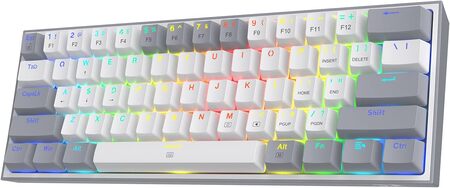
Plenty of budget keyboards feel like a compromise the moment you unbox them. That is not the case here. The Redragon K617 Fizz is shockingly capable, delivering a genuine hot-swap mechanical experience at a price that leaves plenty of room in your wallet for custom keycaps and fancy switches.
The build itself is a smart mix of practicality and style. A white and grey colorway with mixed-color keycaps gives it a fresh, modern look that stands out against the sea of all-black boards. We found the plastic chassis surprisingly rigid, and the adjustable two-level feet meant we could find a comfortable angle quickly. At just 0.43 kg, it is also one of the lightest boards we tested, making it a no-brainer for anyone who moves between setups or wants a keyboard they can toss in a backpack for LAN parties.
Out of the box, the stock red linear switches are smooth and quiet enough for a shared room. But the real magic is the hot-swap PCB. It accepts nearly any 3-pin or 5-pin switch, so you can transform the feel and sound of this board completely with a set of your favorite aftermarket switches. We had a great time experimenting, turning it from a quiet typing tool into a deep-sounding thock machine with some added foam and new switches. The vibrant RGB lighting, with up to 20 preset modes, adds an energetic glow that looks far more expensive than it is.
Key Specs:
- Switch Type: Hot-swappable Red Linear (3-pin/5-pin compatible)
- Connectivity: Wired, Detachable USB-C
- Layout: 61 Keys, Full N-Key Rollover
- Dimensions: 12.2 x 5.31 x 1.57 inches
- Weight: 0.43 kg
Pros and Cons:
- Pros: Exceptionally affordable, true hot-swap capability, very lightweight and portable.
- Pros: The stock red switches are smooth and quiet for an office-friendly sound.
- Cons: The ABS keycaps will show shine over time with heavy use.
2. HyperX Alloy Origins 60: A Rock-Solid, Premium Performer
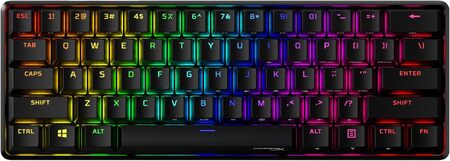
If you are the kind of person who judges quality by how a thing feels in your hands, the HyperX Alloy Origins 60 will win you over instantly. The full aircraft-grade aluminum body gives it a dense, substantial heft that completely removes any worry of it sliding around during a frantic firefight. This keyboard feels built to last a decade.
Beyond the exceptional build, what stood out in our testing was the sheer typing pleasure. The pre-installed double shot PBT keycaps have a subtle texture that resists finger oils beautifully, keeping the board looking clean. The side-printed secondary functions are a clever, elegant touch that keep the top of the keys looking clean while still helping you navigate without a manual. We tested the HyperX Aqua tactile switch variant, and it provided a perfectly balanced bump that was fast enough for gaming and satisfying enough for typing long documents.
The exposed LED design of the switches makes the per-key RGB lighting brilliantly bright and vibrant. We dialed in some subtle color wave patterns using the NGENUITY software, which was straightforward to use. The three adjustable keyboard angles and a detachable USB-C cable mean it can adapt to nearly any ergonomic preference and slips easily into a bag for travel. This keyboard is for someone who sees their gear as an investment and wants a clean, professional aesthetic that still packs serious gaming credentials.
Key Specs:
- Switch Type: HyperX Aqua Tactile (rated for 80 million keypresses)
- Keycap Material: Double Shot PBT with side printing
- Connectivity: Wired, Detachable USB-C
- Enclosure Material: Full aircraft-grade aluminum
- Dimensions: 11.7 x 4.2 x 1.5 inches
Pros and Cons:
- Pros: Incredibly sturdy aluminum build, excellent PBT keycaps right out of the box.
- Pros: HyperX Aqua switches offer a balanced feel for both gaming and typing.
- Cons: It is not a hot-swap board, so you are locked into the switch you choose at purchase.
3. EPOMAKER Aula WIN60 HE: Magnetic Precision for Competitive Play
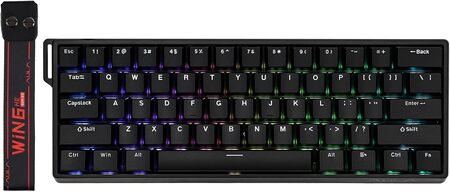
Speed wins games, and this keyboard was engineered for pure speed. The EPOMAKER Aula WIN60 HE jumps ahead of the pack with its hall effect magnetic switches, a technology that fundamentally changes how fast your keypresses can be registered. For competitive gamers, this is the kind of advantage you can actually feel.
Rather than relying on a physical contact point, these switches use magnets to detect movement, allowing for an adjustable actuation point. We set ours to 0.5mm for an almost telepathic response in a fast-paced FPS title. The 8000Hz polling rate ensures that the signal is sent to your PC eight times faster than a standard gaming keyboard. We also appreciated the software-based Snap Tap feature, which allows for clean, instantaneous direction changes by prioritizing the last key pressed between two opposing inputs. It is a tool that feels like a legitimate upgrade to your movement skills.
The keyboard itself is housed in a sturdy plastic case with a metal backplate that adds a subtle, controlled flex. We did find the stock ABS keycaps to be the main area that was just okay, with a cheap-feeling surface. Swapping them for a higher-quality set instantly elevated the premium feel of the board. The web-based driver, while not as flashy as some desktop apps, worked without a hitch for customizing the RGB and deep tweaking the actuation curves. If your goal is winning, and you want the fastest possible response for the lowest possible price, this is the upgrade path you want.
Key Specs:
- Switch Type: Hall Effect Magnetic Linear (Hot-Swappable)
- Polling Rate: 8000 Hz
- Adjustable Actuation: 0.08mm to 3.4mm
- Connectivity: Wired, Detachable USB-C
- Dimensions: 11.89 x 4.29 x 1.46 inches
Pros and Cons:
- Pros: Lightning-fast magnetic switch technology with adjustable actuation, exceptional value for its feature set.
- Pros: Snap Tap and rapid trigger features give a genuine competitive edge.
- Cons: The stock ABS keycaps feel cheap, and the web-based software can be tricky to locate initially.
4. Razer Huntsman Mini: The Esports Icon with Optical Speed
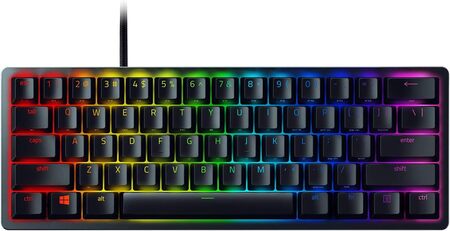
Razer did not just make a small keyboard. They took their best switch technology and condensed it into a form factor that serious esports athletes demand. The Huntsman Mini, with its linear optical switches, delivers a level of smoothness and speed that feels like a well-oiled machine beneath your fingertips. It is a board built for one purpose: to translate your thoughts into actions with as little friction as possible.
The construction backs up the performance. A matte aluminum top frame is fixed to a sturdy base, giving the board zero flex and a satisfyingly cold touch. The doubleshot PBT keycaps have a rugged, textured finish that we found excellent for maintaining grip during tense moments. These keycaps also feature side-printed secondary functions, which is essential for navigating a 60% layout. A standout feature is Razer’s Snap Tap, which we activated via the Synapse software. The way it allowed our player movement to feel instantly more responsive in Counter-Strike 2 was genuinely impressive.
The optical switches actuate at 1.0mm, which is 15-30% shorter than traditional linear mechanical switches, using a beam of light for registration. The result is a keyboard that feels fast without feeling twitchy. The Chroma RGB lighting is, as expected, the best in its class, deeply integrating with a massive ecosystem of games and third-party hardware. The onboard memory means you can save up to five profiles and use your custom lighting and macros on any PC without the software. This keyboard is for the player who wants a proven esports weapon with a rich software ecosystem.
Key Specs:
- Switch Type: Razer Linear Optical Switch (Gen-2)
- Keycap Material: Oil-resistant Doubleshot PBT
- Connectivity: Wired, Detachable USB-C with cable latch
- Enclosure Material: Matte aluminum top frame
- Dimensions: 11.56 x 4.07 x 1.45 inches
Pros and Cons:
- Pros: Extremely fast and smooth optical switches, outstanding Chroma RGB ecosystem.
- Pros: Rugged PBT keycaps and onboard memory for profiles make it highly portable between PCs.
- Cons: The switches are not hot-swappable, limiting long-term customization.
5. Logitech G PRO X 60: The Wireless Champion of Versatility
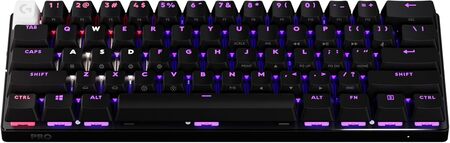
Wires are a drag, but wireless lag is a dealbreaker. The Logitech G PRO X 60 obliterates that concern. This keyboard offers the freedom of a completely wireless desk with its pro-grade LIGHTSPEED connection, and we could not perceive a single millisecond of difference between it and a wired board in our testing. It is the ultimate choice for a clean, uncompromised setup.
We tested the tactile optical switch variant, and the feedback was crisp and immediate. The GX optical switches provide zero debounce delay, making every press feel instantaneous. But the real highlight is Logitech’s KEYCONTROL technology. This system gives you five unique layers of per-key customization, effectively turning a tiny 61-key board into a command center where you can assign macros, shortcuts, and entire profiles to any key you want. The inclusion of a volume roller is a thoughtful touch that we missed on other compact boards, making media control instinctive.
The entire package feels premium. The dual-shot PBT keycaps are sturdy, and the board itself has a weightiness that exudes quality. Logitech includes a hard carrying case, making this the best travel companion for tournaments or mobile workstations. The LIGHTSYNC RGB is customizable in G HUB, and the board connects via Bluetooth too, meaning we could switch from our gaming PC to a work laptop with a simple button press. The biggest hurdle is the price, but for a professional-grade wireless keyboard that does not cut any corners, this is the gold standard.
Key Specs:
- Switch Type: GX Optical Tactile
- Connectivity: LIGHTSPEED Wireless, Bluetooth, Wired USB-C
- Battery Life: Up to 65 hours
- Keycap Material: Dual-shot PBT
- Special Feature: KEYCONTROL with 5 customizable layers
Pros and Cons:
- Pros: Flawless, zero-perceptible-lag wireless performance.
- Pros: Incredible customization with KEYCONTROL and a handy volume roller.
- Pros: Includes a rigid carrying case, perfect for travel.
- Cons: The premium price point makes it a significant investment.
Best 60% Keyboards for 2026: A Quick Rundown
- Best Budget Hot-Swap: Redragon K617 Fizz gives you a true hot-swap experience for less than the cost of a new game.
- Best Premium Build: HyperX Alloy Origins 60 offers an uncompromising, all-aluminum chassis that feels like an heirloom.
- Best Competitive Advantage: EPOMAKER Aula WIN60 HE delivers adjustable magnetic switches and an 8000Hz polling rate for a steal.
- Best Esports Ecosystem: Razer Huntsman Mini combines blistering optical speed with the industry’s best RGB integration.
- Best Wireless Performer: Logitech G PRO X 60 cuts the cord without cutting any corners, backed by deep customization.
Final Thoughts
Picking the right keyboard comes down to what you value most in your daily interaction with your machine. The type of switch under your fingers, the quality of the materials, and whether or not you want to deal with a cable are deeply personal choices. There is no single perfect keyboard for everyone, but there is a perfect keyboard for you in this list.
We encourage you to be honest about your needs. If you crave total control and the ability to modify every part later, lean toward a hot-swap option. If you want a distraction-free, wireless desk, that option exists. Any of these 60% boards will free up your space and sharpen your setup. Pick the one that fits your hand, your budget, and your playstyle, and make your desk a place you enjoy spending time at again.
Be First to Comment