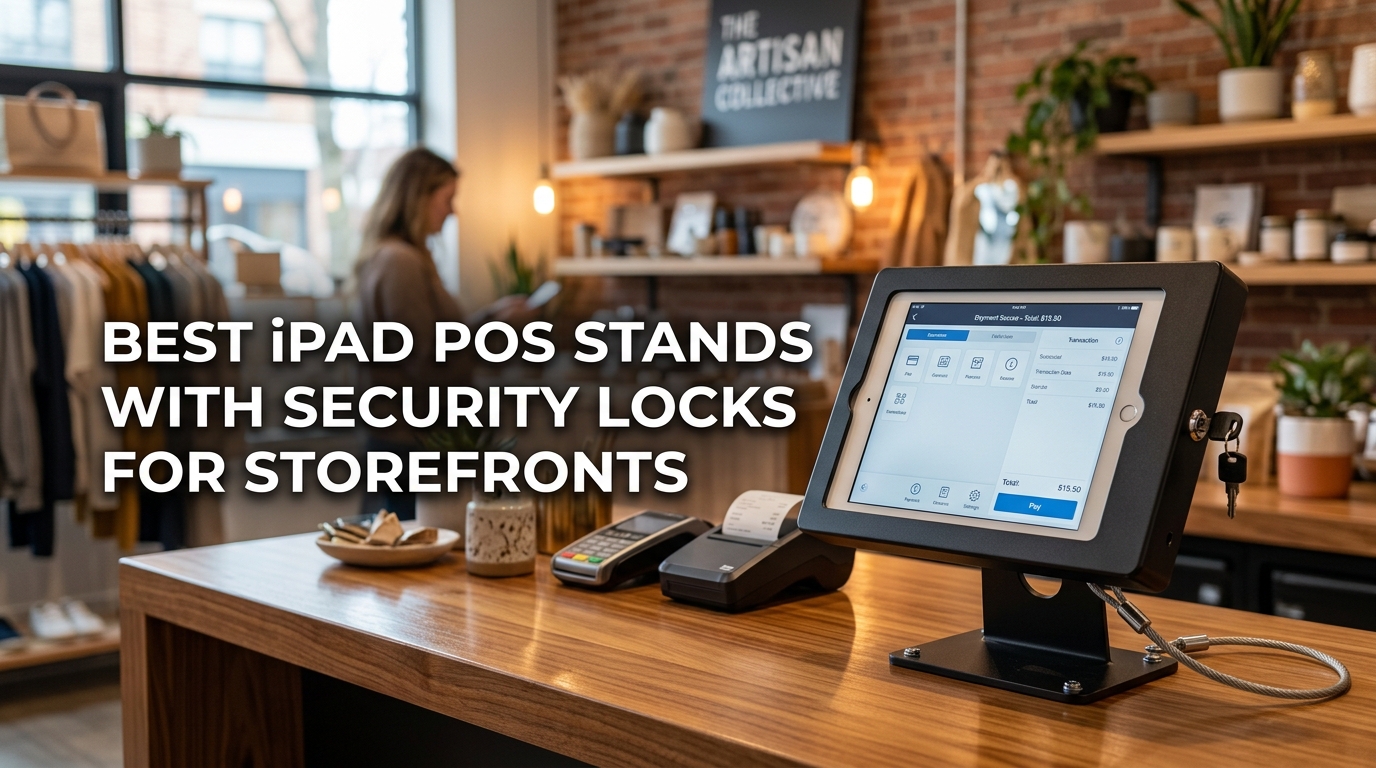
You put a lot of thought into making your storefront look welcoming. The lighting, the layout, the easy-to-spot checkout area. Then you plop a wobbly tablet stand on the counter, and it kills the whole vibe. Worse, that expensive iPad is just sitting there, begging for someone with sticky fingers to walk off with it.
A good POS stand solves two problems at once. It keeps your iPad locked down and secure, and it gives your customers a smooth, professional way to interact with your payment system. But you cannot just grab any stand. If the base is too light, the whole thing topples over. If the lock feels flimsy, you will spend every shift nervously watching the counter.
We spent weeks testing, shaking, and locking down the most popular stands built for busy storefronts. This guide cuts through the marketing talk to show you what holds up, what stays put, and what actually makes your daily workflow easier. By the time you finish reading, you will know exactly which stand fits your counter, your iPad model, and your peace of mind. Here are the stands that earned their spot on our shortlist.
How We Selected the Best iPad POS Stands with Security Locks for Storefronts
Our team approached this like a shop owner would. We set up each stand on a countertop and put it through the paces, spinning it around, locking and unlocking it dozens of times, and even giving it a few accidental elbow bumps just to see what would happen. Real stores are chaotic, and a stand that only works in a quiet testing lab is not worth your money.
We also zeroed in on the details that separate a one-season purchase from something that lasts for years. Every stand we recommend here had to clear a high bar for build quality and everyday practicality. We did not bother with stands that felt like toys or had locks that could be jiggled open with a paperclip.
Here are the specific factors we weighed when making our final picks.
- Security Mechanism Quality: We evaluated whether the lock and key system felt solid and tamper-resistant or if it was mostly for show against casual grab-and-run theft.
- Build Materials and Durability: We looked for steel and aluminum construction that could handle being spun and touched thousands of times without loosening up or cracking.
- Stability and Base Weight: A top-heavy stand is a liability. We prioritized bases that stay planted even when a customer swipes a card or signs with a heavy hand.
- Adjustability and Viewing Angles: The best stands swivel smoothly from cashier to customer and tilt enough to kill screen glare without needing two hands to adjust.
- Installation and Cable Management: We considered how easy the stand was to assemble and whether it kept the charging cable hidden and protected from tampering.
- iPad Model Compatibility: We checked each stand’s sizing range so you can match it to your specific iPad generation without guessing or returning it later.
Every product on this list was chosen because it nailed most of these factors and brought something unique to the table. You can trust that these recommendations come from hands-on comparison, not just spec sheets. Let us walk you through each one.
Best iPad POS Stands with Security Locks for Storefronts (Expert Ranking & Review)
Five stands made our lineup this year, and they cover a wide range of storefront needs. A couple of them are countertop beasts you can bolt down, while others give you the flexibility to mount on a wall. We will break down exactly what makes each one tick.
1. AboveTEK Retail Kiosk iPad Stand: The Flexible Workhorse for Tight Countertops
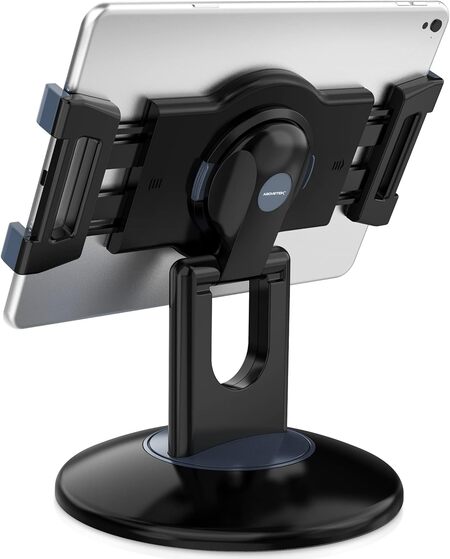
If your counter space is limited but your workflow is busy, you need a stand that moves with you. The AboveTEK Retail Kiosk iPad Stand is the one we kept reaching for during testing because it spins and tilts with almost no effort. That fluid motion matters when you have a line of customers and need to flip the screen from cashier view to customer view in a second.
The build here uses a heavy, weighted base combined with a sturdy plastic and metal folding arm. It does not feel cheap. The base stays planted when you swivel the tablet, and the rubber-padded clamps grip an iPad securely without chewing up the edges. We also appreciated the quick-release button that lets you pop the tablet out of the holder when you need to take it to the back office, though this means there is no keyed lock to stop someone else from doing the same.
This is the stand to get if your store is staffed and supervised at all times and you value fast, smooth adjustments above everything else. The dual bracket system fits a surprisingly wide range of tablets, from a smaller iPad Mini all the way up to a 13-inch iPad Pro, as long as the device with its case stays under half an inch thick. That kind of flexibility is rare.
The arm folds down flat when you are not using it, and the dedicated channel for your charging cord keeps things looking tidy on the counter. For a supervised checkout counter, a trade show booth, or a busy reception desk, the sheer ease of rotation and tilt here is hard to beat.
Key Specs
- Material: Heavy-duty plastic with a weighted metal base
- Rotation: 360 degrees at the base, full tilt at the bracket
- Device Fit: Screens from 6 to 13 inches
- Quick Release: Yes, push-button bracket detachment
- Base Type: Weighted, non-slip
Pros
- Spins and tilts buttery smooth for quick customer interactions
- Handles a huge range of iPad and tablet sizes
- Quick-release button saves time when you need to grab the tablet and go
Cons
- Lacks a keyed locking system, so it is not for unsupervised public areas
One important thing to call out here is the complete absence of a security lock. If your counter is ever unattended, that is a dealbreaker. If that describes your storefront, the next stand solves that problem with a vengeance.
2. CTA Digital Desktop Anti-Theft Stand: The Full-Enclosure Fortress with a Stylus Bonus
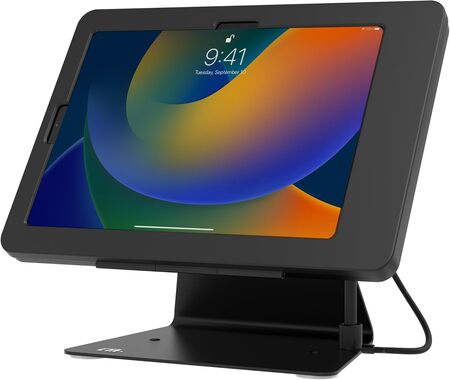
Some storefronts cannot take any chances. The CTA Digital Desktop Anti-Theft Stand takes security so seriously that it wraps your iPad in a full aluminum enclosure with a real lock and key system. We tested this one in a simulated high-traffic lobby setup, and the enclosure gave us genuine confidence. The tablet is not going anywhere unless someone brings bolt cutters.
The enclosure itself is thick, brushed aluminum that feels industrial and serious. It bolts down to your countertop for an extra layer of security, and it even includes an optional steel tether anchor. All the ports, buttons, and cameras remain accessible, which we appreciated when we needed to reboot the iPad without removing it from the case. CTA also tosses in a stylus and tether, a small but thoughtful touch for customer sign-ins.
Where this stand really shines is in its flip design. The whole enclosure rotates 360 degrees and flips fully front to back. You can go from cashier-facing to customer-facing in one motion. The movement is not as buttery as the AboveTEK stand above, because you are moving a heavier, locked-down metal box. But the tradeoff is absolute security, and for many businesses that is the only priority that matters.
This model fits the 11-inch iPad Pro, the 10.9-inch iPad 10th Gen, and the iPad Air 4th and 5th Gen. That covers a solid chunk of the modern iPad lineup used in POS systems. If you run a medical office, a hotel check-in desk, or any counter where the iPad faces the public all day, this stand is purpose-built for your peace of mind.
Key Specs
- Enclosure Material: Locking aluminum with steel base
- Rotation: 360 degrees with front-to-back flip
- Security: Key lock plus bolt-down and tether options
- Included Extras: Stylus with tether, EVA adapters, mounting hardware
- Compatibility: iPad 11-inch Pro, 10.9-inch 10th Gen, Air 4 and 5
Pros
- Full aluminum enclosure makes theft nearly impossible in a supervised setting
- Bolts down and includes a tether anchor for layered security
- Stylus and tether are included and useful for customer check-ins
Cons
- The heavier, locked enclosure means swiveling takes a bit more muscle
- Tight compatibility range excludes older or smaller iPad models
That heavy-duty enclosure is fantastic for security, but it also means you are committing some serious counter real estate and weight to one dedicated iPad. If you want a similar lock-and-key setup but prefer a design that feels more open and less like a vault, we have another option.
3. AboveTEK Anti-Theft iPad Kiosk Stand: The Heavy-Duty Locking Stand for Supervised Counters
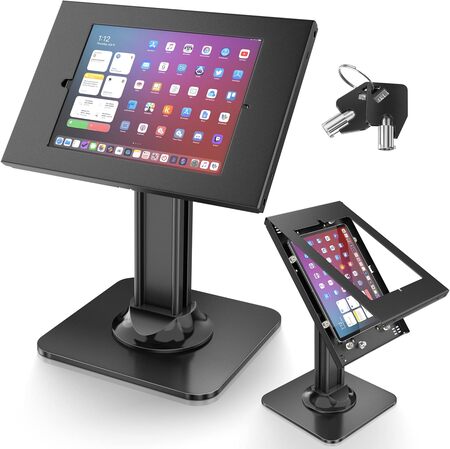
The AboveTEK Anti-Theft iPad Kiosk Stand splits the difference between open access and serious security. Instead of a full enclosure, it uses a sturdy aluminum locking frame that clamps around the tablet and secures with a key. We found this design easier to load and unload compared to a full box enclosure, while still giving you that essential lock-and-key deterrent.
The first thing you notice pulling this out of the box is the weight. At over nine pounds with its thick metal base, this thing is a tank. It will not slide or tip even if a customer gets a little aggressive with the touchscreen. The finish is a clean matte black that hides fingerprints well and looks right at home on a retail counter or a hotel front desk.
Our team liked the 75-degree tilt range combined with the 360-degree swivel. You can angle the screen upward to cut glare from overhead lights, then spin it around for the customer to sign. The built-in cable management routing hides the charging cord inside the arm, which stops customers or employees from accidentally yanking the cable loose during a transaction.
This stand is designed specifically for a range of 9.7-inch to 10.5-inch iPads, including the 6th Gen, 7th through 9th Gen, and the 10.5-inch iPad Air and Pro. It will not fit the larger 11-inch or 12.9-inch Pro models, so double-check your iPad model before ordering. For the models it does fit, the security and stability are outstanding.
Key Specs
- Material: Aluminum locking frame with heavy metal base
- Weight: 9.1 pounds
- Rotation and Tilt: 360 degrees swivel, 75 degrees tilt
- Locking System: Key lock with two keys included
- Compatibility: Specific 9.7-inch to 10.5-inch iPad models
Pros
- Extremely heavy base eliminates any worry about tipping
- Locking frame secures the tablet without a bulky full enclosure
- Cable management keeps cords hidden and tamper-resistant
Cons
- Compatibility is narrow and excludes newer 11-inch and larger iPad models
- Pre-drilled mounting holes require countertop drilling for permanent install
That dedicated, heavy base is perfect if your iPad stays on the same counter all day, every day. But what if your store layout changes with the seasons or you need to mount a secured iPad on a wall instead? The next stand gives you that option without sacrificing the lock.
4. AboveTEK Anti-Theft Tablet Stand: The Slim Locking Stand That Mounts Anywhere
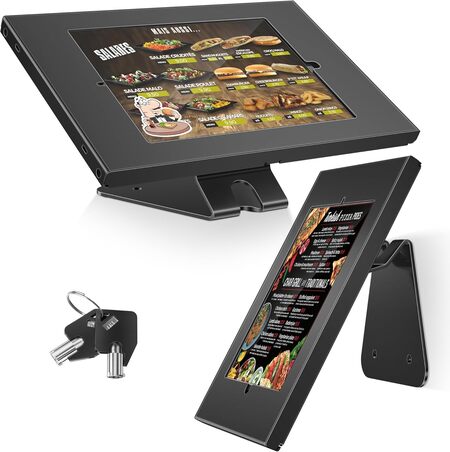
Not every storefront has a big counter to spare. The AboveTEK Anti-Theft Tablet Stand caught our eye because it solves the security problem in a much smaller footprint, and it gives you the choice to mount it on a wall or keep it on the counter. We tested it both ways and came away impressed by its flexibility.
The all-metal frame is slim but feels rigid and well-built. It uses the same lock-and-key approach as its bigger sibling, gripping the iPad in a secure aluminum bracket. The difference here is the weight, at just under five pounds, it is far easier to reposition or install on a vertical surface. The included hardware supports both countertop and wall mounting, which opens up possibilities for queuing stations, hallway check-ins, or tight cash wrap areas.
We found the 360-degree swivel to be smooth and useful for spinning the screen toward a customer. The built-in cable management system threads the charging cord through the arm and out the base, keeping everything neat. The anti-slip pad inside the clamp holds the tablet securely without leaving marks on the device.
Just like the heavy-duty AboveTEK model above, this stand is built for iPads in the 9.7-inch to 10.5-inch range. That means the 6th Gen iPad, the 7th through 9th Gen, and the 10.5-inch Pro and Air models are all fair game. The wall mount option sets it apart from almost everything else in this lineup and makes it a strong pick for boutiques with limited surface space.
Key Specs
- Material: Alloy steel and aluminum frame
- Weight: 4.9 pounds
- Rotation: 360 degrees
- Mounting: Countertop or wall mount, hardware included
- Compatibility: 9.7-inch to 10.5-inch iPad models
Pros
- Slim design with a small footprint works on tight counters or walls
- Lock and key system provides genuine security
- Includes hardware for both desktop and wall installation
Cons
- Lighter base means it is less planted than heavier countertop-only stands
- Limited to older and mid-size iPad models
The wall mount capability makes this stand unique, but it still uses a clamp-style lock around the iPad. If you want a fully sealed, flush-to-the-wall enclosure that looks like it was built into the building, we have one final stand to show you.
5. Tablet Wall Mount: The Permanent Wall Fixture for Older iPads
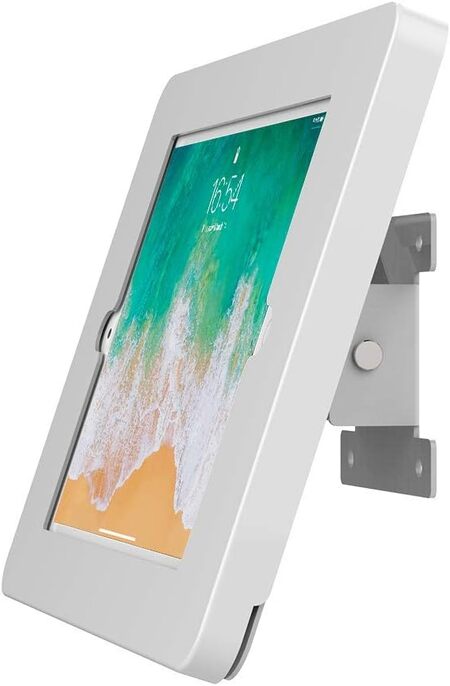
For a truly permanent, professional installation, the Beelta Tablet Wall Mount is the kind of fixture you would expect to see in a high-end office lobby or a busy warehouse check-in station. This is a wall-only mount made from thick, cold-rolled steel with a powder-coated white finish. It looks clean, modern, and utterly immovable once it is screwed into the wall.
The enclosure completely surrounds the iPad and locks with a key. We appreciated the 30-degree tilt adjustment, which lets you angle the screen downward for easy viewing when the mount is placed at standing height. Access to the home button, front camera, and side volume buttons remains open, which is critical if you use the iPad for self-check-in kiosks or surveillance monitoring.
Installation is straightforward but permanent. You will need to drill into the wall, and the heavy steel construction means you want to hit a stud or use heavy-duty anchors. The enclosure includes an L-shaped charging connector that routes the cable neatly inside the case, keeping it hidden from anyone walking by. This is not a stand you move around. It becomes part of the room.
The big catch here is compatibility. This specific Beelta model fits the iPad 5th and 6th Gen, the 9.7-inch iPad Pro, and the iPad Air 1 and 2. If you have older iPads sitting around after a hardware upgrade, this mount breathes new life into them as dedicated wall terminals. It will not work with anything newer or larger, so verify your model carefully before committing.
Key Specs
- Material: Cold-rolled steel with powder-coated finish
- Mounting: Wall mount only, hardware included
- Tilt Range: 30 degrees
- Lock System: Key lock enclosure
- Compatibility: iPad 5th and 6th Gen, 9.7-inch Pro, Air 1 and 2
Pros
- Rock-solid steel construction built for permanent public installations
- Clean, flush wall mount looks professional and saves counter space
- Keeps the charging cable completely hidden and tamper-proof
Cons
- Compatibility stops at older iPad models and excludes recent generations
- Installation requires drilling into a wall, making it a permanent commitment
Best iPad POS Stands with Security Locks for Storefronts: A Quick Rundown
- AboveTEK Retail Kiosk iPad Stand: Best overall for smooth, fast rotation on a supervised countertop.
- CTA Digital Desktop Anti-Theft Stand: Best full-enclosure security with bolt-down option for high-traffic public counters.
- AboveTEK Anti-Theft iPad Kiosk Stand: Best heavy-duty locking stand for a permanently placed, theft-resistant POS station.
- AboveTEK Anti-Theft Tablet Stand: Best for tight spaces with the flexibility to switch between countertop and wall mounting.
- Beelta Tablet Wall Mount: Best permanent wall fixture for repurposing older iPads as dedicated kiosk terminals.
Final Thoughts
Choosing the right security stand comes down to knowing your counter situation and your risk level. If your iPad is always within eyesight of an employee, a quick-swivel stand with no lock can make your checkout process faster and more pleasant. If your tablet faces the public in a lobby or a busy retail floor, a full enclosure with a bolt-down base buys you genuine peace of mind.
Think about your space, your iPad model, and how permanent you want the installation to be. A stand that mounts on a wall can free up valuable counter space, while a heavy base keeps things flexible if you rearrange your layout often. The right pick keeps your workflow smooth, your iPad safe, and your storefront looking exactly how you imagined it.
Be First to Comment