A good mechanical keyboard can make a compact workstation feel much more comfortable, especially when we want proper arrow keys and a function row without carrying a full-size board. The tricky part is finding one that stays practical on the move, rather than simply being smaller than a standard keyboard.
There are plenty of 75% keyboards competing for attention, and many look remarkably similar at first glance. Once we start comparing weight, connectivity, battery life, customization, and overall layout, though, the differences become much more important for anyone working from different desks or carrying a keyboard with a laptop.
We looked closely at the current versions, compared their key features and practical trade-offs, and narrowed the field to five options worth considering. Our goal here is simple: make it easier to see which type of portable mechanical keyboard fits your setup, your devices, and the way you actually work.
How We Selected the Best Portable Mechanical Keyboards
We focused on the things that matter most when a keyboard has to move with us. Rather than treating every extra feature as a benefit, we looked at whether the keyboard’s size, weight, connectivity, layout, and customization options make sense for real mobile or flexible work.
We also checked manufacturer specifications and supporting product information, paying particular attention to features that can affect everyday use. That helped us separate genuinely useful differences from specifications that sound impressive but may not change much about your workflow.
- Portability: Weight and dimensions matter when you are already carrying a laptop, charger, mouse, and other accessories.
- Connectivity: Wireless modes can reduce cable clutter, while USB-C provides a simple wired fallback.
- Layout efficiency: A 75% layout saves desk space while keeping dedicated arrow keys and a function row.
- Customization: Hot-swap support gives you the option to change switches without soldering.
- Typing design: Mounting systems, dampening, and keycap materials can influence the overall typing experience.
- Software or firmware: Remapping and macro support can make a compact layout much easier to tailor to your workflow.
Taken together, these factors help us look beyond appearance and focus on what you actually gain from each keyboard. That makes the differences between these five recommendations much easier to understand.
Best Portable Mechanical Keyboards for Work and Mobile Setups
With those priorities in mind, let’s get into the keyboards themselves. We have included wireless and wired options, so you can choose based on how much freedom, simplicity, and customization you need from your portable setup.
1. AULA F75 75% Wireless Mechanical Keyboard
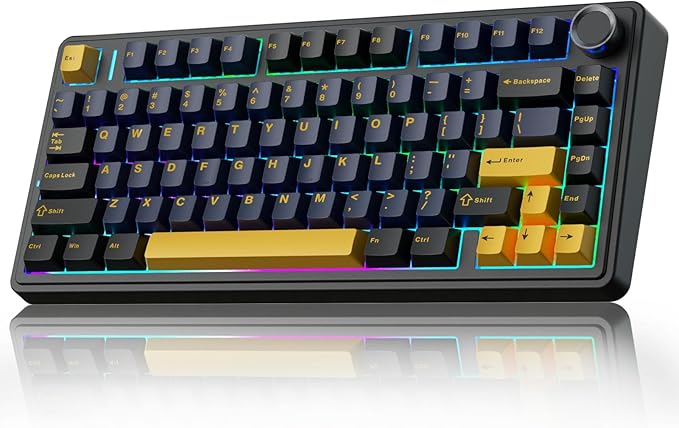
The AULA F75 is a natural fit for laptop users who want a compact keyboard without giving up dedicated arrow keys and the function row. Its 75% layout has 80 keys, while the combination of Bluetooth, 2.4GHz wireless, and USB-C gives us plenty of flexibility between workspaces. The official product listing also confirms its multiple connection options.
That flexibility is backed by a 4000mAh rechargeable battery, a gasket-mounted ABS case, and hot-swappable switches. AULA also specifies NKRO anti-ghosting and 4.0mm total travel, while the Cherry-profile keycaps provide a familiar shape for everyday typing. These details are documented in the manufacturer’s official specifications.
What really makes the F75 practical is the way it combines a space-saving layout with dedicated navigation keys and three connection methods. We can use wireless connectivity when moving around and switch to USB-C when we want a straightforward wired setup.
There is, however, an important distinction between compact and lightweight. The F75 weighs roughly 1.02kg including its cable and receiver, according to the manufacturer’s accessory and weight information. That is perfectly manageable for occasional travel, but it may feel substantial in a bag for someone who commutes with a full mobile workstation.
For everyday use, we would use 2.4GHz when we want a desktop-style wireless connection, Bluetooth when we want fewer accessories, and USB-C for wired operation. We would also pay attention to the exact version because AULA notes some differences in LED orientation and key assignments between variants.
A few things to note:
- Frequent travelers who are especially weight-conscious may find a roughly 1kg keyboard too heavy for a minimalist carry setup.
- Anyone who relies heavily on a dedicated number pad should look at a larger keyboard layout.
2. EPOMAKER X Aula F75 MAX Wireless Mechanical Keyboard
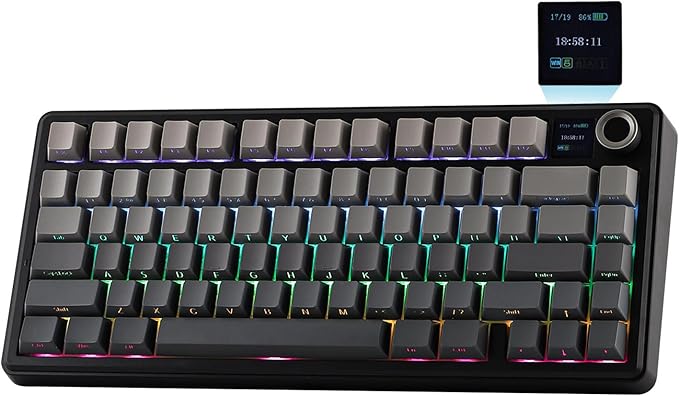
The EPOMAKER X AULA F75 Max is aimed at users who want a compact wireless keyboard but also appreciate extra controls and visual customization. It keeps the familiar 75% layout and adds a TFT display and metal knob, while supporting 2.4GHz, Bluetooth 5.0, and USB-C through the current product page.
Its 4000mAh battery is rated for up to 30.5 hours with the backlight on and up to 80 hours with it off. We also get support for three-pin and five-pin hot-swappable switches, PBT Cherry-profile keycaps, gasket mounting, and five sound-dampening layers. The manufacturer’s technical specifications spell out those features clearly.
For a portable setup, that combination gives us a useful balance of flexibility and control. The keyboard weighs about 0.96kg and measures 32.8 by 14.3 by 4.4cm, with a 20mm front height and a two-stage adjustable kickstand. Those dimensions make it compact without changing the familiar spacing of a desktop-style keyboard.
The TFT display is where this model becomes more interesting. It can show information such as time, battery status, connection state, and other details, while the knob handles functions such as volume and lighting. The manufacturer also provides software for remapping, macros, and custom GIFs through its software information.
We would use USB-C for wired work, 2.4GHz for wireless desktop use, and Bluetooth when switching between compatible devices is more convenient. One limitation is worth keeping in mind: the current driver is Windows-only, so macOS, Linux, and mobile users should not assume every software-based customization feature will be available.
Notes of caution:
- Users who prefer a straightforward keyboard may find the display and software features unnecessary.
- Cross-platform buyers should check the Windows-only driver limitation before depending on software customization.
3. AULA F75 Pro Wireless Mechanical Keyboard, 75% Hot Swappable

The AULA F75 Pro makes sense for laptop workers, students, programmers, and creators who want a compact wireless board with plenty of room to customize. Its 75% layout keeps 80 keys, while 2.4GHz, Bluetooth 5.0, and USB-C give us flexibility across different workspaces, as outlined in the manufacturer’s current F75 Pro details.
The keyboard uses a 4000mAh rechargeable battery and accepts both three-pin and five-pin replacement switches. Its five-layer filling system is designed to reduce cavity noise, while pre-lubricated switches, stabilizers, PBT keycaps, RGB lighting, and a multifunction knob add useful flexibility. Those features are listed in the official product details.
The real appeal is how much control we get without moving to a larger layout. We can change switches without soldering and use the knob for functions such as lighting and volume. AULA also lists compatibility with Windows, macOS, Android, and iOS across its supported connection options.
Portability is still something we need to weigh carefully. The keyboard measures about 32.3 by 14.3 by 4.3cm and weighs roughly 1.023kg according to the manufacturer’s size and compatibility information. That makes it compact enough for a mobile desk, but not especially light compared with simpler wired alternatives.
For the best experience, we would begin with the included configuration and then use the software’s macro and lighting controls only where they genuinely improve our workflow. One thing we would not assume is a specific battery runtime, since the official information confirms a 4000mAh capacity but does not provide a fixed number of hours.
A few cautions:
- Travelers looking for the lightest possible setup may find the roughly 1kg weight less convenient.
- Heavy spreadsheet users who need a dedicated number pad will be better served by a larger layout.
4. Womier SK80 75% Keyboard with Color Multimedia Display Gaming
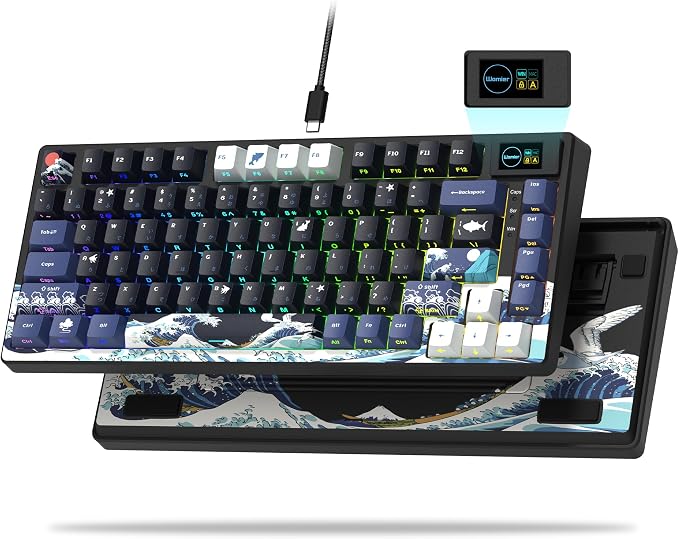
The Womier SK80 is a good match for portable users who are happy with a wired connection and would rather carry less weight. It uses an 81-key 75% ANSI layout with dedicated arrows and function keys, while USB-C keeps the connection simple. The current SK80 listing provides the relevant layout and connection details.
The manufacturer lists a PC plastic case, gasket mounting, Cherry-profile dye-sublimated keycaps, hot-swap support, and Windows/macOS compatibility. At about 680g, the SK80 is considerably easier to carry than the heavier wireless options here. Those details are included in the manufacturer’s current SK80 specifications.
Its biggest point of difference is the small color multimedia display positioned toward the upper-right area. We can customize the display through the supplied software, and Womier also provides controls for keymaps, macros, and screen GIFs. That gives us useful personalization without requiring another accessory.
The trade-off is simple but important: this is a wired keyboard. There is no wireless battery to recharge, which can actually be convenient, but we still need to carry a cable and have access to a suitable USB-C connection wherever we work.
We would use the included USB-C connection for everyday work and take advantage of the hot-swap design only when changing switches adds real value. We would also check the exact switch version before ordering because Womier notes that batches and colorways can differ, including changes introduced after July 2024.
A few things to note:
- Wireless users should choose another model because the SK80 relies on a wired USB-C connection.
- Anyone specifically looking for QMK or VIA-style firmware support should confirm that requirement before choosing this board.
5. RK ROYAL KLUDGE R75 Wired Mechanical Keyboard

The RK ROYAL KLUDGE R75 is a sensible choice for portable users who care more about low weight and customization than wireless freedom. Its 81-key 75% layout keeps the important navigation keys, while the roughly 680g weight and USB-C connection make it easy to move between desks. The current R75 listing confirms those basic specifications.
Under the compact design, we get gasket mounting, five layers of noise dampening, hot-swappable linear cream switches, MDA-profile PBT keycaps, RGB backlighting, and a metal volume knob. Those features are all outlined in the manufacturer’s current R75 specifications, giving the board a good mix of practical controls and customization potential.
For productivity, explicit QMK and VIA support is particularly useful. We can use VIA to remap keys, create macros, customize RGB lighting, and build shortcuts around the applications we use most. That can make a compact 75% layout feel much more personal and efficient.
The R75 also keeps the overall carry weight down. Its 1.6m USB-A-to-USB-C cable provides a conventional wired connection, while the keyboard supports Windows, macOS, and Linux. For someone who moves between workspaces but does not mind one cable, that simplicity can be useful.
We would start with the default layout and use VIA only where remapping genuinely solves a problem in our workflow. The main limitation is connectivity: this is a wired keyboard, so it does not offer the freedom of Bluetooth or 2.4GHz when we need to move quickly between devices.
Notes of caution:
- Users who specifically want wireless connectivity should choose a model with Bluetooth or 2.4GHz support.
- Anyone who depends on a dedicated number pad will need to move up to a larger keyboard.
Final Thoughts
When we choose a portable mechanical keyboard, the most useful features are usually the practical ones: manageable weight, an efficient layout, dependable connectivity, and controls that genuinely improve how we work. Hot-swap support and good keycap materials can also make a compact board more adaptable over time.
The right choice ultimately depends on where the keyboard travels, what devices we connect, and how much customization we actually need. A wireless model can reduce cable clutter, while a lighter wired board can simplify carrying and maintenance. Match the keyboard to your workflow, and portability becomes something you genuinely benefit from every day.
Be First to Comment