Long days at a keyboard can make an awkward setup increasingly noticeable. When your hands and wrists are forced into uncomfortable positions, even routine work can feel less pleasant. OSHA recognizes alternative keyboard designs, including split layouts, as one option for supporting a more neutral working position in suitable setups. Our OSHA guidance provides useful background.
The tricky part is knowing which ergonomic design actually fits your routine. Some keyboards use a gentle curve, others separate the key zones, and wireless models can rely on Bluetooth, USB receivers, or both. Once we add different layouts, angles, switches, and footprints, comparing them quickly becomes confusing.
So we looked closely at the category, checked current manufacturer information, compared the practical differences, and selected five models worth considering. We focus on what each design is actually good at, where it fits best, and where its limitations could matter to your workspace.
How We Selected the Best Split Ergonomic Keyboards
We narrowed the choices by looking at the things that can make an ergonomic keyboard genuinely useful in everyday work. We paid close attention to how each design positions your hands, how it connects to your devices, and whether its layout makes sense for your routine.
We also looked beyond the word “ergonomic.” A curved keyboard is not necessarily a true split keyboard, and wireless connectivity can work very differently from one model to another. Those details can have a surprisingly big effect on whether a keyboard fits naturally into your desk setup.
- Ergonomic positioning: We looked for designs that can help you work toward a more neutral wrist and forearm position.
- Connectivity: We considered whether Bluetooth, a USB receiver, or a wired connection makes sense for your equipment.
- Layout and controls: We checked practical extras such as number pads, media controls, and familiar key placement.
- Adjustability: We considered tilt, tenting, separation, and other ways you can fine-tune the keyboard.
- Typing experience: We looked at switch type, key feel, noise, and the overall approach to everyday typing.
- Build and support: We considered materials, documentation, compatibility information, and available warranty support.
Together, these factors give us a more useful picture than specifications alone. The five picks below take noticeably different approaches, so you can concentrate on the design that fits your desk, devices, and working habits.
Our Wireless Split Ergonomic Keyboard Picks
Let’s get into the keyboards themselves. Each one has a particular type of user in mind, and that difference is worth keeping in mind as we go.
1. Logitech Ergo K860 Wireless Ergonomic Split Keyboard
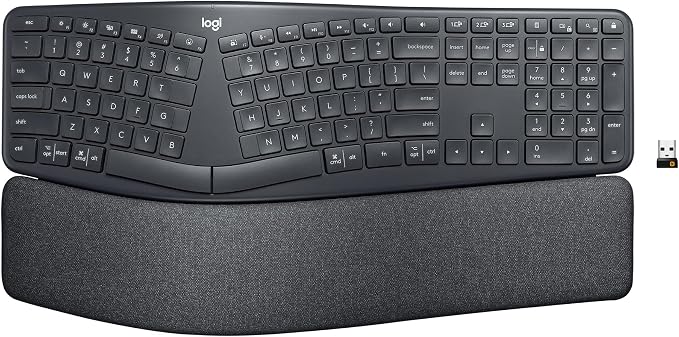
The Logitech Ergo K860 is a strong fit for office workers, home-based professionals, and frequent writers who want ergonomic shaping without giving up a familiar full-size layout. Its curved split keyframe changes the hand position while keeping the number pad, arrow keys, and standard arrangement.
Logitech combines that curved frame with a three-layer palm rest and adjustable lift legs. You can set the lift to 0, 4, or 7 degrees, while Bluetooth or a Logi Bolt receiver handles wireless connection. The manufacturer also rates its AAA battery life for up to 24 months under stated conditions, as outlined in its manufacturer details.
What makes the K860 particularly approachable is that it introduces ergonomic changes without asking you to completely relearn your keyboard. It also supports Easy-Switch for up to three paired computers, while Logitech’s software provides customization on supported Windows and macOS systems. Its listed wireless range reaches up to 10 meters, according to the support guide.
For everyday business work, that combination gives you useful flexibility without making the desk setup feel overly specialized. Logitech also identifies the keyboard as certified ergonomic by United States Ergonomics and lists a two-year limited hardware warranty in its business specifications.
The main drawback is its definition of “split.” The two hand zones are separated within one curved board rather than being independently movable halves. That makes it less flexible for users who want to place each side wherever they like, and it also means this is not a mechanical keyboard.
A few things to note:
- Skip it if you specifically want two completely independent keyboard halves.
- Skip it if mechanical switches are important to your typing experience.
- Skip it if illuminated keys are a must for your workspace.
2. Arteck Split Ergonomic Keyboard with Palm Rest
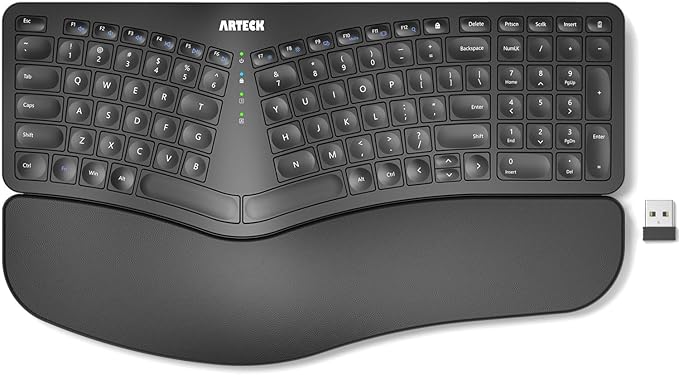
The Arteck HW315 is a practical option for Windows users who want a split-style layout, integrated palm support, and straightforward wireless operation. It should appeal to office workers who prefer a familiar full-size board rather than moving to a highly specialized ergonomic or mechanical design.
The keyboard combines its split layout with a cushioned wrist and palm rest, foldable legs, a number pad, and media controls. It connects through a 2.4G USB receiver with a stated range of up to 33 feet or 10 meters. Arteck also lists six months of battery life under its specified usage conditions in the official product page.
The scissor-switch construction keeps the typing experience closer to what many laptop users already know. That can make the transition easier, while the low-profile design and manufacturer-described quiet operation can be useful in shared offices. The receiver is also stored on the keyboard, which helps keep the small accessory from disappearing into a drawer.
We like that Arteck provides fairly clear information about compatibility, included accessories, and support. The keyboard comes with a USB-C charging cable, and the manufacturer lists a 24-month warranty alongside its manufacturer specifications.
There is one important limitation, though. The wireless connection uses a 2.4G receiver instead of Bluetooth, so your device needs to accommodate that receiver. The two sides are also part of one physical keyboard, meaning you cannot independently reposition them. That distinction is worth checking before buying, especially if full split flexibility is your priority.
Notes of caution:
- Skip it if your setup cannot conveniently use a USB wireless receiver.
- Skip it if Bluetooth pairing is essential for your computers, tablets, or phones.
- Skip it if you need independently movable keyboard halves.
3. Perixx Periboard-106, Wired Performance Full Size
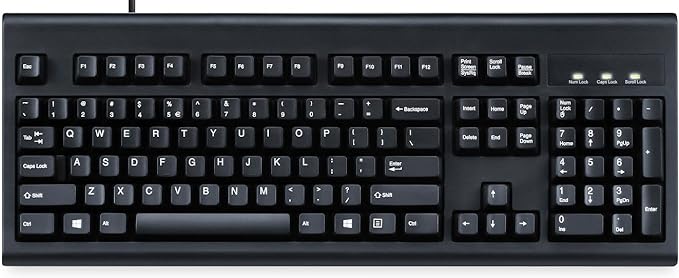
The Perixx PERIBOARD-106 is best suited to buyers who like a curved ergonomic typing surface but are happy to stay connected by cable. It makes the most sense in a stationary desktop workspace where you want a full-size layout, including a number pad, without relying on batteries or wireless pairing.
Perixx uses a curved frame, different key heights, spherical keycaps, and a long-travel membrane mechanism. The current product information lists a 456 by 169 by 34 millimeter footprint, a 1.8-meter USB-A cable, and a weight of 790 grams. Those specifications are detailed in the official product listing.
The curved shape is the main attraction here. Instead of presenting every key on one flat plane, the design creates a more contoured typing surface, while removable keycaps make cleaning easier. Integrated feet also let you change the typing angle, giving you some flexibility without introducing a complicated adjustment system.
Perixx provides documentation covering the keyboard’s features, compatibility, and setup, including its user manual. The manufacturer lists Windows 7 or later alongside functional support for macOS, iOS, iPadOS, Linux, ChromeOS, Android, and Fire OS in its official compatibility details.
The important caveat is that the PERIBOARD-106 does not satisfy the wireless or true split parts of our title. Its ergonomic approach comes from the curved construction and key geometry rather than separate keyboard halves. For a fixed desktop setup, that may be perfectly reasonable, but it is not the choice for someone specifically seeking wireless split positioning.
A few things to note:
- Skip it if wireless connectivity is essential to your setup.
- Skip it if you specifically want two independently positioned keyboard halves.
- Skip it if switching wirelessly between several devices is central to your workflow.
4. Nulea Ergonomic Split Keyboard Wireless with Wrist Rest
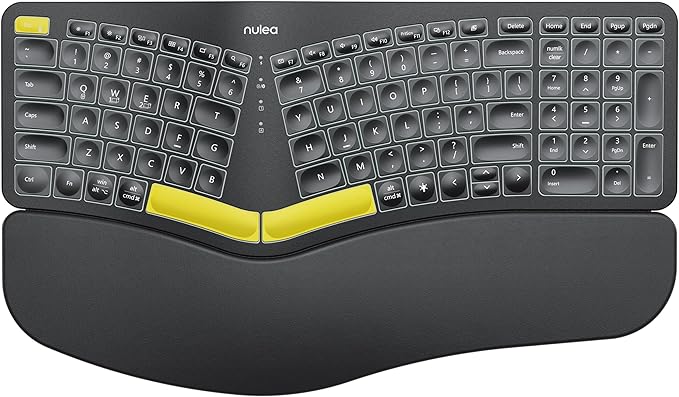
The Nulea RT05 is aimed at professionals who want a larger wireless split keyboard with multiple connection options and a fuller feature set. It can be especially useful for people who move between several computers or devices and want one keyboard that can accommodate different setups.
Its split, splayed, curved design works with Bluetooth and 2.4G USB connectivity, with support for up to three devices. Nulea also specifies a 2,000mAh rechargeable battery and USB-C charging, while four tilt legs provide three available angles. The keyboard includes adjustable backlighting with seven colors and three brightness levels, according to its manufacturer details.
That combination gives the RT05 a more flexible personality than a basic office keyboard. The rechargeable battery means you are not dealing with disposable cells, while the full-size layout retains a number pad and integrated wrist-rest area. For long desk sessions, those details can matter as much as the split shape itself.
Nulea also maintains a current manual and support library for the RT05 family. Its support information states that keyboard and mouse products carry a 12-month warranty, with registration requirements applying to certain Amazon purchases. We can check those details through the support information.
The trade-off is desk space. Current product information puts the keyboard at roughly 41.9 by 24.4 centimeters, so it needs a reasonably generous surface, especially once you add a mouse. The split layout may support a more natural hand position, but it should not be treated as a guarantee against discomfort or injury.
A few things to note:
- Skip it if your desk is too small for a full-size ergonomic keyboard.
- Skip it if you want something compact and easy to carry between locations.
5. Cloud Nine ErgoPRO Full-Size Mechanical Split Ergonomic Keyboard
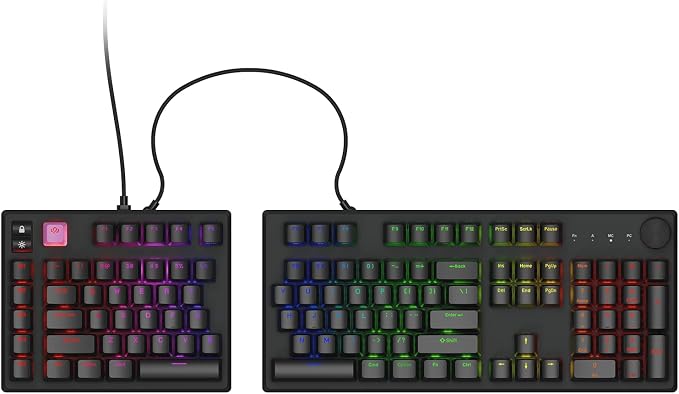
The Cloud Nine C979 ErgoPRO is designed for heavy typists who want a genuinely separated mechanical keyboard with extensive physical adjustment. It should appeal to writers, developers, designers, and office users who care about switch feel and want more control over how the two halves sit on the desk.
The current model uses Kailh Box switches and connects its independent keyboard halves with a linking cable. Cloud Nine emphasizes adjustable separation, angle, and tilt, giving you several ways to tailor the keyboard to your preferred position. The current product information also highlights hot-swappable switches, PBT keycaps, and aluminum construction in its current ErgoPRO features.
That physical adjustability is the biggest reason this keyboard stands apart. Instead of accepting one fixed ergonomic shape, you can change the distance and orientation of the two sides. Cloud Nine’s support documentation also covers VIA and QMK support for Mac and Windows, which opens the door to more customization than a conventional office keyboard.
Setup is more deliberate than with a standard wireless model. The manufacturer’s instructions have you connect the linking cable between the two halves before connecting the keyboard to your computer. Cloud Nine’s support page also documents an initial September 2026 ErgoPRO firmware release in its setup and firmware guide.
There is one obvious mismatch with our title: the C979 ErgoPRO is wired rather than wireless. The separated halves also require a physical connection, and the adjustable design can take up more desk space than a conventional keyboard. For users who value split flexibility and mechanical customization above wireless convenience, however, those may be acceptable trade-offs.
A few things to note:
- Skip it if you want a completely wireless keyboard setup.
- Skip it if you prefer a simple fixed keyboard that needs little physical adjustment or configuration.
Final Thoughts
Choosing an ergonomic keyboard does not have to mean chasing the most complicated design. We should focus on the details that affect everyday use, including split geometry, adjustment options, switch type, connectivity, desk footprint, and compatibility with the devices we actually use.
From there, our own workspace and workflow should guide the decision. A full-size office keyboard can make sense for one setup, while a separated mechanical design may suit another. The right choice is the one that fits your hands, equipment, and working habits without adding unnecessary friction.
Be First to Comment