Getting clean speech from an iPhone sounds easy until wind, background noise, cables, and inconsistent volume start getting in the way. A wireless lavalier can make things much easier, but choosing the right one can be surprisingly tricky. We want something that fits the way we actually record.
The options can look nearly identical at first glance, yet they can be built for very different kinds of creators. Some are wonderfully simple, while others add backup recording, more audio controls, or support for cameras and computers. For small-business owners, entrepreneurs, and home-office creators, those differences can make a real difference.
We looked closely at current models, compared their iPhone connectivity, audio features, battery life, wireless range, portability, and limitations, and then narrowed the field to these five. Our goal is to make the buying process feel much simpler, so you can quickly see which option makes the most sense for your setup.
How We Selected the Best Wireless Lavalier Microphones
We started by looking at what each microphone actually offers an iPhone user rather than getting distracted by long specification sheets. We checked current manufacturer information covering connectivity, audio formats, controls, wireless range, battery life, and other features that can genuinely affect your recording experience.
From there, we considered how those specifications translate into everyday use. Someone recording quick social videos may want effortless pairing, while someone producing interviews or client work may care much more about backup recordings, monitoring, flexible routing, and compatibility with other equipment.
- iPhone fit: A direct, secure connection means fewer adapters, cables, and setup headaches when you need to start recording quickly.
- Audio control: Features such as gain adjustment, noise reduction, and safety options can help keep speech clearer when recording conditions change.
- Backup protection: Onboard recording gives you another copy of your audio, which can be especially valuable when a lost take would be costly.
- Battery life: Longer runtime helps you avoid interruptions during interviews, presentations, livestreams, and longer recording sessions.
- Portability: Smaller transmitters and charging cases are easier to carry between meetings, locations, and content shoots.
- Compatibility: USB-C and Lightning support matter because the right connection depends on the iPhone and other devices in your workflow.
Together, these factors help us focus on the differences that actually matter. The five microphones below each stand out for a particular type of iPhone creator and recording situation.
Best Wireless Lavalier Microphones for iPhones
Whether you want an effortless phone-first setup or something with more room for advanced recording, these five options cover the major needs we would prioritize.
1. RØDE Wireless Micro (2 Mics + Charging Case), USB
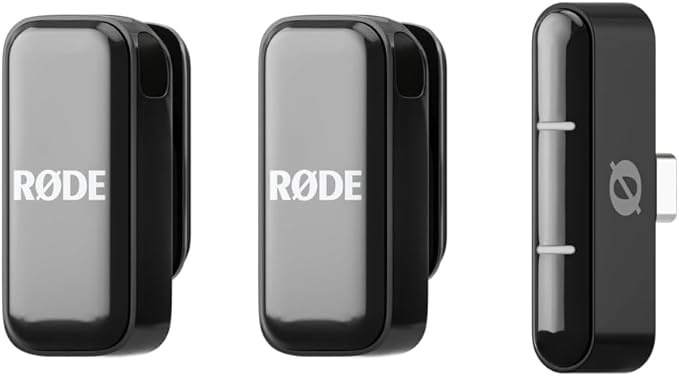
The RØDE Wireless Micro is a great fit for iPhone-first creators who want two wireless microphones without having to manage a complicated receiver. The receiver connects directly to the phone, while the two transmitters have built-in microphones and compact clips that make positioning quick and straightforward.
Each transmitter uses an omnidirectional microphone and an acoustic chamber designed to improve speech capture while helping reduce wind interference. GainAssist automatically manages levels when someone gets louder or quieter, which can be particularly useful when we are recording people who naturally move around or change their speaking volume.
The charging case adds two additional recharges, giving the system up to 21 hours of total use. Each transmitter weighs 12 grams without its magnet, while the receiver weighs just 6 grams. RØDE also offers separate USB-C and Lightning versions, as shown in the official spec sheet, so we can match the receiver to our iPhone.
For the easiest setup, we would connect the receiver directly to the phone, attach the transmitters close to the speakers, and use the supplied furry windshields when recording outdoors. Compatible iPhones can also use Direct Connect through Capture, with RØDE explaining the process in its connection guide.
The biggest compromise is that the transmitters do not have onboard recording. That means there is no separate transmitter copy to fall back on if something goes wrong with the phone’s recording, a limitation RØDE addresses in its recording guidance. It is also less versatile for camera-based setups than more production-focused systems.
A few cautions:
- We would skip it when onboard backup recording is essential.
- We would skip it when we regularly need camera-style connections.
- We would skip it when extensive audio controls matter more than simplicity.
2. DJI Mic 3 (1 TX + 1 RX) + Lightning Adapter
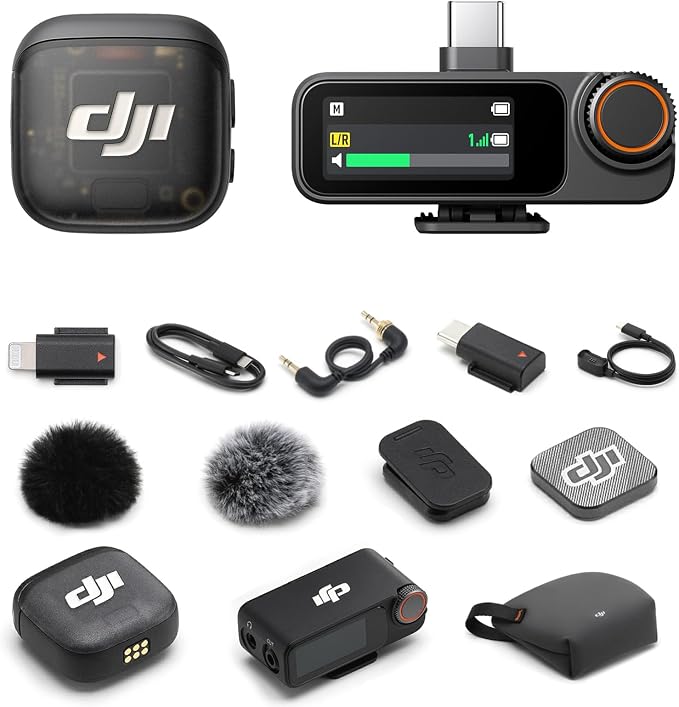
The DJI Mic 3 makes sense for creators who mainly use an iPhone but want a system that feels ready for more serious production work. This single-transmitter kit works well for solo recording, while the wider Mic 3 platform gives us room to expand when our setup becomes more demanding.
DJI combines adaptive gain control with three voice-tone presets and two levels of noise cancellation, so we have more ways to shape speech for different environments. The transmitter also supports 24-bit and 32-bit float internal recording, giving us a useful backup when levels are not perfect. DJI details those capabilities in its current specifications.
The transmitter weighs 16 grams with its magnet and is rated for up to eight hours of operation, while the receiver is rated for up to 10 hours. DJI also lists a maximum transmission range of 400 meters in an open environment, although we would treat that as a best-case figure rather than an everyday expectation.
For Lightning iPhones, the dedicated Mic 3 adapter connects the receiver to the phone’s Lightning port. DJI says that adapter is intended for iPhone 14 and earlier models, so checking the Lightning adapter guidance before buying is important.
The main limitation is ecosystem compatibility. DJI says the Mic 3 Lightning adapter is not interchangeable with earlier microphone adapters, and Mic 3 transmitters and receivers do not work with older systems. That is worth remembering when we already own equipment from a previous DJI generation, as the compatibility FAQ makes clear.
Notes of caution:
- We would skip it when mixing older DJI microphone generations is important to our workflow.
- We would skip the Lightning setup when our iPhone already uses USB-C.
- We would skip it when we want the simplest possible accessory ecosystem.
3. RØDE Wireless GO (Gen 3) (2 TX + 1 RX + Charging Case)
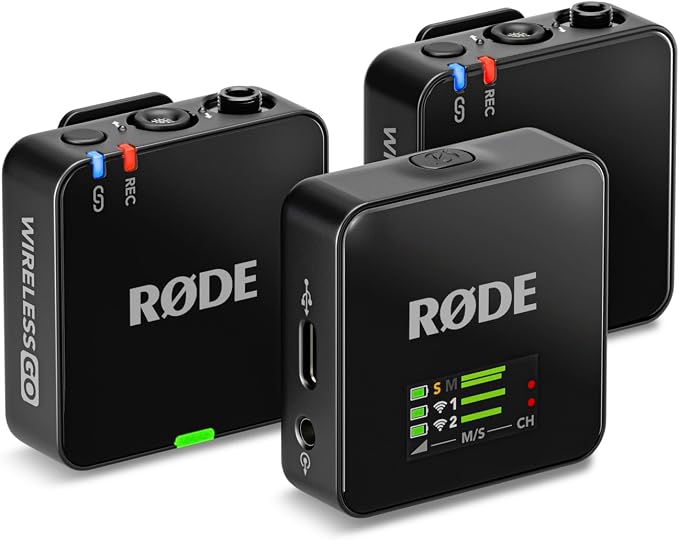
The RØDE Wireless GO (Gen 3) is a particularly good fit for creators who want an iPhone microphone today without boxing themselves into a phone-only setup. With two transmitters and one receiver, it works well for interviews, presentations, client videos, and other situations where two people may need to speak.
Its standout feature is 32-bit float onboard recording. Each transmitter has 32 GB of storage and can hold up to 40 hours of recordings, creating an independent safety file that can help recover audio captured at unsuitable levels. RØDE explains how this works in its recording details.
The system uses RØDE’s Series IV 2.4GHz transmission with 128-bit encryption and a stated line-of-sight range of 260 meters. The transmitters also have locking 3.5mm inputs for external lavalier microphones, while the receiver offers USB-C and 3.5mm TRRS output. Battery life is rated for up to seven hours according to the current specifications.
For iPhone recording, the system supports both USB-C and Lightning connections, with RØDE providing the necessary cables for each. We would configure the gain, routing, and onboard recording in RØDE Central before making a real recording, while the receiver’s headphone output can also be used for monitoring. The user guide covers those controls in more detail.
The tradeoff is that the system is more involved than a basic phone-first microphone. There are more settings to understand, and the charging case is sold separately. For someone who only wants quick iPhone videos, that extra flexibility may simply be more than they need.
A few things to note:
- We would skip it when we want the simplest possible phone-only setup.
- We would skip it when having an included charging case is important to our workflow.
4. MAONO Wave T5 Wireless Lavalier Microphone
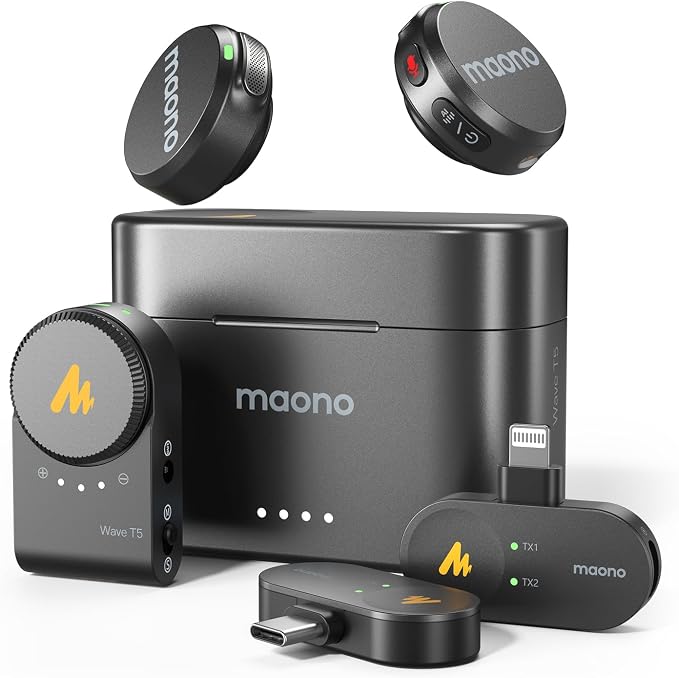
The MAONO Wave T5 is a strong option for creators who want two transmitters, long battery life, and support for both USB-C and Lightning phones. It is well suited to vlogging, interviews, podcasting, and streaming, particularly when we want plenty of runtime without moving into a larger production setup.
The system records at 48kHz/24-bit and combines an 80dB signal-to-noise ratio with adjustable noise cancellation. MAONO provides three button-controlled noise-reduction levels as well as additional app controls, giving us useful flexibility when background sound becomes distracting. Mono and stereo recording are also supported through the manufacturer listing.
Battery life is one of the Wave T5’s most appealing features. Each transmitter is rated for around nine hours, while the charging case can bring total use to roughly 30 hours. The system can also charge the connected phone while recording, which can be handy when we are filming longer interviews or livestreams.
MAONO uses 2.4GHz frequency-hopping transmission and rates the system for up to 300 meters in line-of-sight conditions. The transmitters and receiver automatically pair after being removed from the case, making the initial setup fairly straightforward. The manufacturer specifications outline these operating details.
The main drawback is that the Wave T5 gives us more controls and configurations than a minimalist iPhone microphone. That is useful when we need flexibility, but it can also mean a little more to learn. Its long-distance rating also should not be confused with guaranteed performance through walls or in crowded environments.
A few cautions:
- We would skip it when we want the most stripped-down controls possible.
- We would skip it when we need reliable long-range performance through walls.
- We would skip it when the added configuration options are unlikely to benefit our workflow.
5. BOYA Mini 2 Wireless Lavalier Microphone for iPhone 15/16/17 & Android
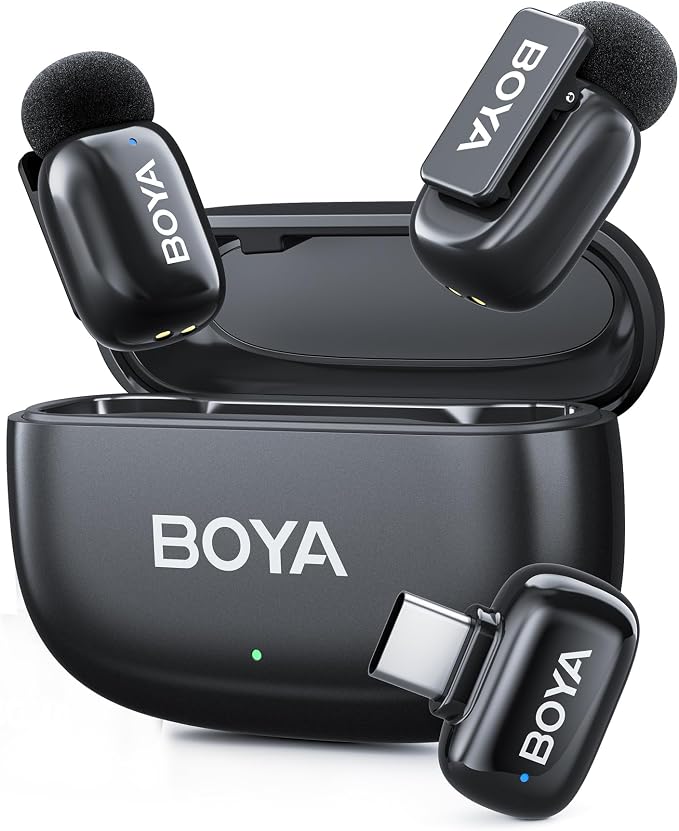
The BOYA Mini 2 is especially appealing to creators who want their microphone to stay almost invisible on camera. Each transmitter weighs just 5 grams and has a very small footprint, making the system a natural fit for short-form videos, interviews, and other mobile content where we want the microphone to attract as little attention as possible.
Despite that tiny size, the Mini 2 supports 48kHz/24-bit audio, an 80dB signal-to-noise ratio, and a maximum SPL of 120dB. Its AI noise cancellation offers Strong and Light modes, rated for up to 40dB and 15dB of reduction, while a limiter and -12dB safety track provide additional protection. Those features are outlined in the BOYA specifications.
The system can connect two transmitters to one receiver and offers mono, stereo, and safety-track recording modes. We also get gain control, monitoring, low-cut options, and a stated 100-meter open-environment range. Transmitters provide at least six hours of use, while the case can extend total runtime to up to 30 hours, according to the BOYA Q&A.
For iPhone use, we would select the receiver configuration that matches our connector. BOYA offers USB-C and combined USB-C plus Lightning configurations, so checking the exact package before ordering matters. After pairing the transmitters, we would set the desired noise-cancellation mode and make a short test recording before starting the real shoot.
The biggest limitation is the lack of onboard recording. Audio is sent to the connected device rather than stored independently on the transmitter, so there is no separate backup file. BOYA also states that the receiver does not support charging the phone while recording, which can matter during longer mobile sessions.
A few cautions:
- We would skip it when independent onboard recording is essential.
- We would skip it when we need to charge the phone through the receiver while recording.
Final Thoughts
The best wireless lavalier is not necessarily the one with the longest range or the longest feature list. We would focus on the things that directly affect your recordings: the correct iPhone connection, dependable battery life, useful noise control, backup protection, and how much setup you are comfortable managing.
From there, the smartest choice is the microphone that fits your workspace, content style, and everyday workflow. When those pieces line up, recording becomes simpler, your audio is better protected, and the microphone can stay focused on one job: helping your voice come through clearly.
Be First to Comment