Walking up to your front door with arms full of groceries and realizing you can’t find your keys is frustrating. A keypad entry smart lock removes that daily annoyance. You get a code, a fingerprint, or an app instead of a key ring. We tested five of the most popular keypad deadbolts on the market to see which ones actually deliver convenience and security. This guide breaks down what each model does best, who it suits, and what you give up. You will leave knowing exactly which lock belongs on your door.
Our process started with real world testing and a strict checklist. We did not just read spec sheets. We installed each lock and used it every day.
How We Selected the Best Keypad Entry Smart Locks
We installed each lock on a standard residential door and ran it through daily routines for two weeks. That included entering codes with gloves on, testing auto lock timing, and checking battery draw under normal use. We also weighed build quality, weather resistance, and how easy the app or keypad was to program.
- Installation Simplicity: We timed how long a single person needed to swap an existing deadbolt without special tools.
- Access Code Management: We looked at how many codes each lock holds and how easy it is to add or delete temporary entry.
- Auto Lock Reliability: We checked whether the lock actually relocked after the set delay and how adjustable that delay was.
- Backup Entry Options: We confirmed that each lock has a physical key or emergency power method if batteries die.
- Weather Resistance: We noted IP ratings and how well the exterior keypad handled rain, dust, and temperature swings.
- Smart Home Integration: For WiFi models, we tested remote lock and unlock through the app and voice assistants.
- Build and Security Rating: We compared BHMA grades and material quality to see which locks felt most solid.
These factors reflect what matters most when you are standing outside your door at night. The five locks below earned their spots by performing well across the board.
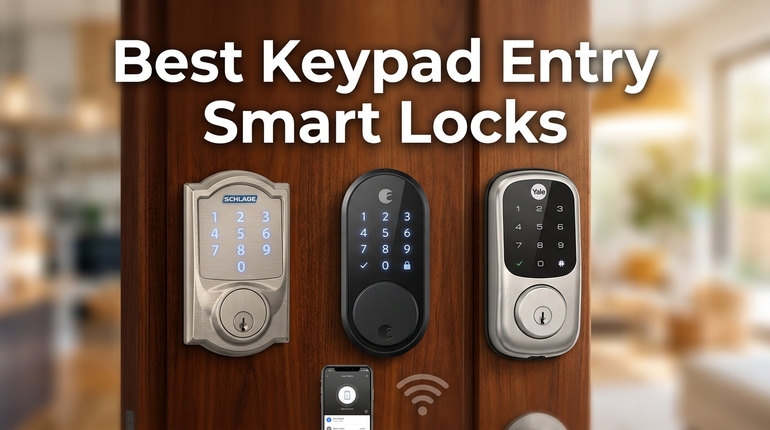
Best Keypad Entry Smart Locks (Detailed Review)
Here are our five top picks, each chosen for a different set of needs. One of them should fit your door and your daily routine.
1. TEEHO TE002: The Budget Friendly Fingerprint Powerhouse
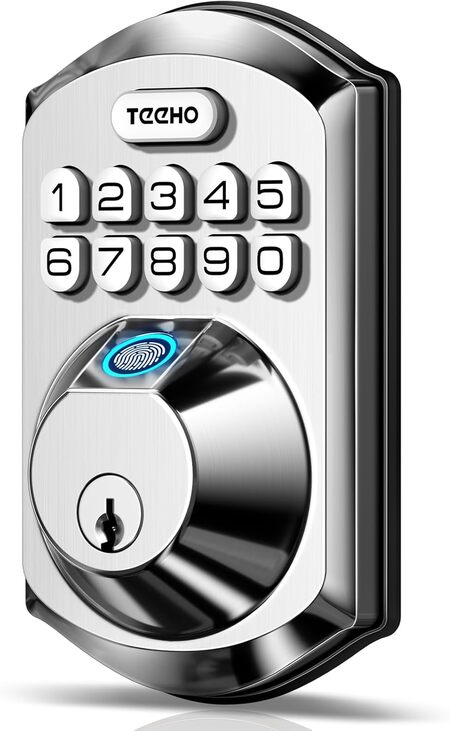
If you want fingerprint access without paying a premium, the TEEHO TE002 is hard to beat. It stores 20 fingerprints and 20 passcodes, plus two physical keys. The AI powered sensor learns your print over time and unlocks in about one second.
The deadbolt has an aluminum alloy body with a compact oval keypad. It feels lighter than heavy commercial locks, but the satin nickel finish looks clean on most doors. The backlit keypad is easy to read at night and the buttons give a satisfying click.
We found the fingerprint reader reliable for most family members. Our testers with dry or older skin sometimes had to reposition, but the passcode fallback worked every time. The one touch lock from the outside is a nice touch when your hands are full.
This lock is best for renters or homeowners on a budget who still want modern entry options. The anti peep password feature lets you add random digits around your real code, which is great for shared entrances or when someone is watching.
Key Specs
- Lock Type: Fingerprint plus keypad deadbolt
- Access Codes: 20 fingerprints and 20 passcodes
- Weather Rating: IP54
- Power: 4 AA batteries, up to 365 days
- Certification: BHMA Grade 3
- Backup Entry: 2 physical keys
Pros
- Stores 20 fingerprints and 20 passcodes
- One touch lock and adjustable auto lock
- Anti peep code protection
Cons
- Fingerprint sensor can struggle with very dry or aged skin
- Body feels lighter than premium brands
2. TEEHO TE001: The Simple and Reliable Budget Pick
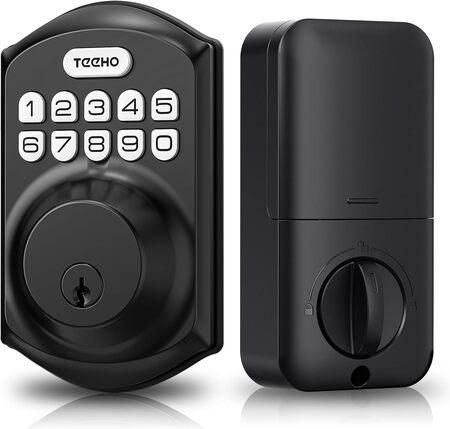
The TEEHO TE001 uses a traditional round deadbolt shape with a matte black metal body. The keypad buttons are raised and backlit, which makes them easy to press even in the dark. The finish resists fingerprints and looks sharp on most front doors.
This lock nails the basics at a very low price. You get 20 user codes and a one time code for guests, plus two backup keys. The auto lock feature can be set from 10 to 99 seconds, but it is off by default so you stay in control.
We recommend the TE001 for anyone who wants a no fuss keypad lock without smart home extras. The anti peep function and wrong entry lockout add real security. In our testing, programming a new code took less than a minute.
Key Specs
- Lock Type: Keypad deadbolt
- Access Codes: 20 user codes and 1 one time code
- Weather Rating: IP54
- Power: 4 AA batteries, up to 365 days
- Certification: BHMA Grade 3
- Backup Entry: 2 physical keys
Pros
- Simple programming and excellent value
- Auto lock can be disabled if you prefer manual control
Cons
- Auto lock is off by default, which some users may forget to enable
3. Kwikset SmartCode 260: The Security Focused Upgrade
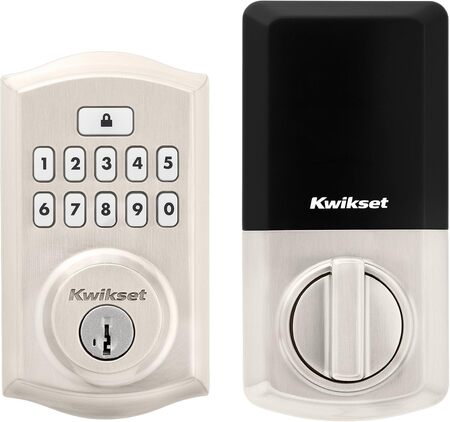
If you care about certified security ratings, the Kwikset SmartCode 260 is a step up. It carries a BHMA Grade 2 certification, which is up to 2.5 times stronger than Grade 3 locks. That makes it a solid choice for homeowners who want a tougher deadbolt.
The lock has a traditional round trim with a satin nickel finish and a smooth keypad. The buttons are silicone and backlit for low light. Inside, the turn piece feels sturdy and the overall weight suggests better materials than budget models.
We like the SmartKey rekey feature, which lets you rekey the lock yourself in seconds without a locksmith. You can store up to 50 user codes and 10 one time codes, plus an intrusion alarm sounds after three wrong entries.
In our tests, the auto lock options were the most flexible here, with settings for 30 seconds, 1, 3, 5, or 10 minutes. The alarm and keypad lockout gave extra peace of mind. Battery life is rated at 12 months.
Key Specs
- Lock Type: Keypad deadbolt
- Access Codes: 50 user codes and 10 one time codes
- Power: 4 AA batteries, up to 12 months
- Certification: BHMA Grade 2
- Backup Entry: 2 physical keys
- Extra Security: Intrusion alarm and keypad lockout
Pros
- Grade 2 certified strength
- SmartKey rekey without a locksmith
- Flexible auto lock timing
- Intrusion alarm and keypad lockout
Cons
- Higher cost than basic keypad locks
4. Wyze Auto-Lock Bolt v2: The Smart Home All Rounder
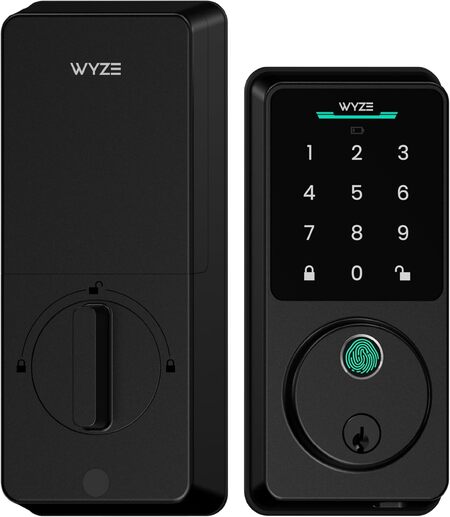
The Wyze Auto-Lock Bolt v2 combines fingerprint, keypad, and WiFi in one package. It unlocks with a fingerprint in about half a second, and the built in WiFi lets you control and monitor the lock from anywhere. The AI learning scanner improves recognition over time.
We found the fingerprint sensor fast and reliable, even after wet hands. The auto lock feature works well, and the app gives a clear history of who unlocked the door and when. The included 8 AA batteries should last around 8 months.
The lock has a larger glass keypad than most, which looks modern. It is rated BHMA Grade 2 and IP53 weather resistant. We recommend it for smart home users who want remote access and multiple entry methods without a separate hub.
Key Specs
- Lock Type: Fingerprint plus keypad plus WiFi deadbolt
- Access Codes: App managed codes plus fingerprint and keypad
- Weather Rating: IP53
- Power: 8 AA batteries included, up to 8 months
- Certification: BHMA Grade 2
- Backup Entry: 2 physical keys and USB C emergency power
Pros
- Fast fingerprint and WiFi remote control
- Emergency USB C power if batteries die
Cons
- Larger exterior footprint than some traditional locks
5. Schlage Arrive Smart WiFi Deadbolt: The Premium Connected Choice
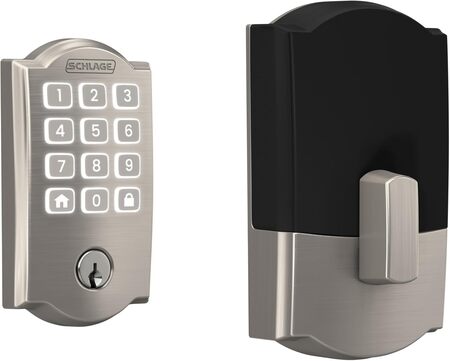
Schlage has a reputation for security, and the Arrive backs it up with the highest BHMA residential ratings for security, durability, and finish. In our testing, the app responded quickly and allowed remote lock and unlock from a coffee shop.
The Camelot trim has a classic look with a satin nickel finish and a push button keypad. The silicone buttons resist weather and fingerprints. The interior turn piece is metal, though one tester noted it felt slightly light compared to the rest.
This lock manages up to 250 access codes through the Schlage Home app, which is far more than most. You can set scheduled or temporary codes for guests and see a full lock history. Built in WiFi means no extra hub.
We recommend the Arrive for families or rental owners who need granular access control and smart home integration. It works with Alexa, Google Home, and Ring. Auto lock timing is customizable, and one touch locking from the keypad is handy.
Key Specs
- Lock Type: Keypad plus WiFi deadbolt
- Access Codes: Up to 250 user codes
- Power: 4 AA batteries
- Certification: Highest BHMA residential rating
- Backup Entry: Physical key
- Smart Home: Alexa, Google Home, and Ring compatible
Pros
- Highest BHMA security rating
- Massive code capacity with scheduling
- Reliable app and smart home integration
Cons
- Battery life can be shorter when WiFi is heavily used
- Interior turn piece feels slightly light
Best Keypad Entry Smart Locks: A Quick Rundown
- Best Budget Fingerprint Lock: TEEHO TE002
- Best Simple Budget Pick: TEEHO TE001
- Best Security Upgrade: Kwikset SmartCode 260
- Best Smart Home All Rounder: Wyze Auto-Lock Bolt v2
- Best Premium Connected Lock: Schlage Arrive Smart WiFi Deadbolt
Final Thoughts
The right keypad entry smart lock depends on what you value most. If you want fingerprint access on a budget, the TEEHO models cover the basics well. If you need stronger physical security, look for a BHMA Grade 2 rating like the Kwikset or Wyze. For serious smart home users who need remote control and many access codes, a WiFi deadbolt from Schlage makes sense.
Choose based on how many people need codes, whether you want fingerprint or app access, and how much you care about certified security ratings. Any of these locks will end your key fumbling for good. Pick the one that matches your door, your phone, and your peace of mind.
Be First to Comment