Finding a good hot-swappable keyboard should be easy, but once we start comparing layouts, switch compatibility, connectivity, and extra features, the choice can get confusing quickly. For a home office or small business setup, we want something that feels comfortable, works reliably, and does not waste space or features.
The tricky part is that hot-swappable keyboards are not all equally flexible. Some support standard 3-pin and 5-pin switches, while others have more limited compatibility. Then there are questions about wireless connectivity, battery life, software, layout, and customization that can make two seemingly similar keyboards feel completely different.
We looked closely at the category, checked the available product specifications, compared the five keyboards in this guide, and considered where each one makes the most sense. Our goal is simple: to help us narrow the choices and make it easier for you to find a keyboard that fits your workspace, typing habits, and everyday workflow.
How We Selected the Best Hot-Swappable Keyboards
We started by looking beyond the hot-swappable label itself. We wanted to know how flexible each keyboard really is, what kind of switches it supports, and whether its layout and feature set make sense for the way you work.
From there, we considered practical details such as connectivity, construction, customization, controls, and everyday usability. Rather than assuming everyone needs the same thing, we focused on how each feature could affect your actual desk setup and routine.
- Switch compatibility: We looked for broad switch support so you can experiment with different mechanical switches or replace worn ones without replacing the entire keyboard.
- Layout: The layout affects both desk space and convenience, especially if you regularly use arrow keys, function keys, or a number pad.
- Connectivity: Wired, Bluetooth, and 2.4GHz options give you different levels of flexibility depending on your computer setup and whether you use multiple devices.
- Typing structure: Features such as gasket mounting, dampening layers, and keycap materials can influence how the keyboard feels and sounds while you type.
- Customization: Knobs, programmable keys, RGB controls, and software support can make everyday operation more convenient.
- Build and usability: We considered documented materials, dimensions, included accessories, and setup requirements because those details matter once the keyboard is on your desk.
- Limitations: We also looked for compatibility restrictions, missing features, and other practical details that could affect whether a keyboard suits your needs.
Together, these factors give us a more useful picture than the hot-swapping feature alone. The five keyboards below each approach customization, connectivity, and workspace efficiency a little differently.
Best Hot-Swappable Keyboards for 2026
With those factors in mind, we can get straight to the keyboards. Each one has a particular combination of layout, features, and flexibility that may work especially well for different types of users.
1. AULA F75 Pro Wireless Mechanical Keyboard

The AULA F75 Pro is a particularly good match for users who want a compact keyboard without giving up the function row and arrow keys. Its 75% layout saves desk space while keeping many of the keys we still rely on for everyday work, and the official product listing confirms its compact design.
Its hot-swappable PCB supports both 3-pin and 5-pin mechanical switches, which gives us plenty of room to experiment with different typing feels. The included pre-lubricated switches and stabilizers also mean the keyboard arrives ready for regular use rather than requiring immediate modifications, according to the hot-swap specifications.
Connectivity is another reason this model stands out. We get USB-C, 2.4GHz wireless, and Bluetooth 5.0, with the manufacturer listing support for Windows, macOS, Android, and iOS. Its 4000mAh battery supports wireless use, while the metal control knob gives us quick access to media or lighting functions through the manufacturer specifications.
The keyboard also combines a gasket structure, several dampening materials, south-facing RGB lighting, PBT side-printed keycaps, and full-key rollover. That combination makes it flexible enough for a workspace where we move between typing, creative work, and gaming. The official feature details outline the full feature set.
For switch changes, we would first power the keyboard down, remove the keycap, pull the switch straight out, align the replacement switch pins, and press it into place. The available manufacturer directions describe the replacement process for its hot-swappable PCB.
A few cautions:
- The 75% layout removes the dedicated navigation and number-pad sections found on full-size keyboards.
- Users who strongly prefer a traditional full-size layout may need some adjustment.
2. AULA F99 Pro Mechanical Keyboard, Wireless

The AULA F99 Pro is a natural fit for users who want the compact feel of a streamlined keyboard without giving up a dedicated number pad. Its 96% layout retains 99 keys, making it particularly useful for spreadsheets, accounting, data entry, and other office work where numeric keys matter.
Its hot-swappable design supports both 3-pin and 5-pin switches, giving us plenty of flexibility when choosing or changing switches. The keyboard also combines a gasket-mounted structure, multiple dampening layers, pre-lubricated switches, and a metal multimedia knob, as outlined in its F99 Pro specifications.
Wireless flexibility is another strong point here. We get USB-C, Bluetooth, and 2.4GHz connectivity, while the manufacturer lists an 8000mAh battery. South-facing RGB lighting adds customization, and the manufacturer details cover the different connectivity and lighting features.
The 96% layout gives us an interesting middle ground. We keep the number pad while trimming some of the unused spacing found around a conventional full-size board. Its gasket structure and multiple dampening layers also support a more cushioned mechanical typing design, according to the technical specifications.
When changing switches, we would disconnect the keyboard first, remove the keycap, use the switch puller carefully, check the replacement pins, and press the new switch into its socket. The available switch replacement guidance confirms support for compatible 3-pin and 5-pin switches without soldering.
Notes of caution:
- Its 96% footprint takes up more desk space than a 75% keyboard.
- The number pad may not be worthwhile if you rarely enter numbers and prefer maximum mouse space.
3. ASUS ROG Azoth X Wireless Mechanical Gaming Keyboard
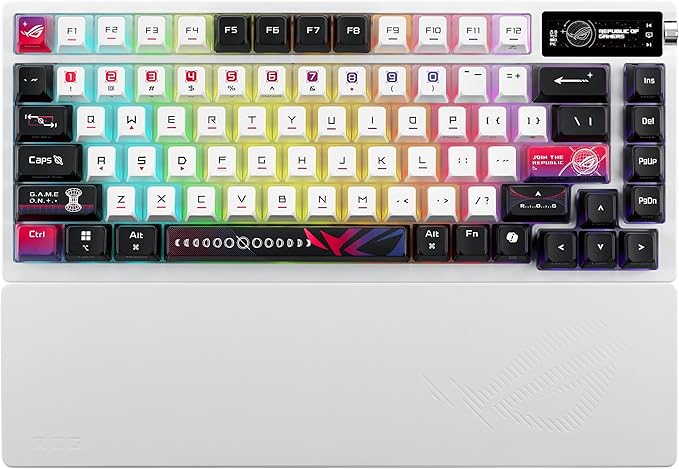
The ROG Azoth X is a strong match for users who want hot-swapping alongside a more advanced enthusiast-style feature set. Its 75% layout keeps the main productivity keys within a compact footprint while adding customization features that can appeal to both desktop users and gamers.
Its hot-swappable ROG NX V2 mechanical switches work with a south-facing PCB, which ASUS says helps with broader keycap compatibility. The keyboard also uses an FR4 positioning plate, gasket mount, and five-layer dampening system, giving the internal construction a bigger role in the overall design. The ROG feature details explain how these elements fit together.
Connectivity is especially flexible. We get wired USB, 2.4GHz RF through ROG SpeedNova, and Bluetooth 5.1, with Bluetooth supporting up to three devices. ASUS lists Windows 11 and macOS compatibility, although Armoury Crate itself is not supported on macOS, as shown in the technical specifications.
The OLED display and three-way control knob give us quick access to additional functions, while onboard memory can store multiple profiles. ASUS also includes a wrist rest, switch and keycap pullers, a USB receiver, and a USB extender. The official product details cover the included hardware and features.
When changing switches, ASUS advises against doing so while the keyboard is powered because a short circuit could occur. We would therefore disconnect or power down the keyboard first, then replace the switches carefully using the supplied tools, following the manufacturer switch guidance.
A few things to note:
- Armoury Crate is not supported on macOS, which limits software-based customization for Mac users.
- Its extensive feature set may be more than you need if your only goal is simple hot-swapping.
4. Redragon K556 Wired RGB Mechanical Gaming Keyboard

The Redragon K556 makes sense for users who prefer a traditional full-size keyboard with a dedicated number pad. Its 104-key layout is particularly useful for office work, spreadsheets, accounting, and numeric entry where familiar key placement matters more than saving desk space.
The manufacturer describes the K556 as using an upgraded hot-swap socket with broad 3-pin and 5-pin compatibility. That flexibility gives us more freedom to experiment with different mechanical switches than we would get from a board limited to a specific switch family, as detailed in Redragon’s hot-swap specifications.
The keyboard also features a brushed aluminum frame and RGB backlighting, along with software for additional customization. Redragon lists multiple onboard lighting modes, while the full-size layout keeps dedicated navigation and number-pad keys available without relying heavily on function-layer shortcuts. The official K556 features provide more detail.
Because the K556 is wired, we do not have to think about battery management, wireless pairing, or charging. That simplicity can be useful when the keyboard stays connected to one desktop computer, and the included keycap puller also makes routine customization easier, according to the manufacturer information.
One detail is worth checking before we buy. Redragon has sold K556 configurations over time, so not every retail listing necessarily represents the same specification. We would therefore compare the current listing with the current K556 comparison to confirm the exact hot-swap configuration.
A few cautions:
- The full-size footprint takes noticeably more desk space than the 75% and 96% alternatives.
- Buyers specifically looking for Bluetooth or 2.4GHz wireless connectivity will need another model.
5. Redragon K580 Wired RGB Mechanical Gaming Keyboard
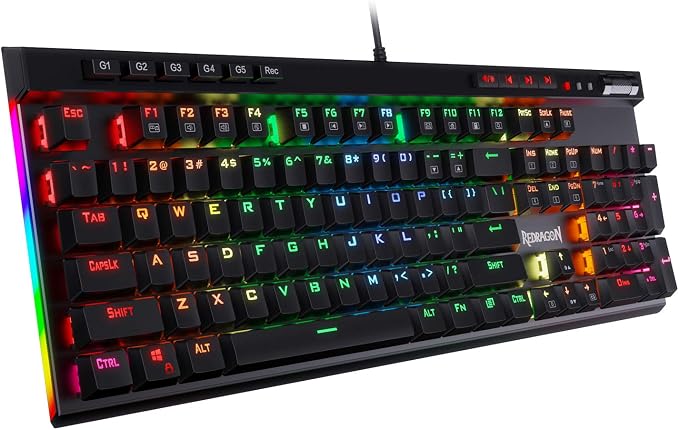
The Redragon K580 VATA is a good fit for users who want a traditional 104-key keyboard but also value dedicated macro and media controls. Its five G-keys can handle programmable macros, while the dedicated controls make media functions and volume adjustments easy to reach.
The K580’s hot-swappable configuration is designed for replaceable mechanical switches, with Redragon describing support for a broad range of 3-pin and 5-pin switches. That means we can experiment with different switch characteristics without replacing the entire board, as explained in the hot-swap specifications.
Its full RGB lighting provides several effects, while anti-ghosting across all 104 keys helps preserve key registration during heavier input. The dedicated macro keys can also be useful for repetitive shortcuts or application-specific commands, particularly when frequently used actions are easier to access with the left hand. More details appear in the manufacturer feature details.
The wired setup keeps things simple, with no wireless battery or pairing process to manage. The current product documentation also explains the hot-swap process and compatibility, making the K580 relatively approachable for anyone who wants to start experimenting with replacement switches. The manufacturer documentation covers those details.
The main tradeoff is its physical size. The K580 prioritizes a full feature set and dedicated controls over compactness, and the model has appeared in different configurations over time. Before buying, we would therefore check the precise switch and socket information in the listing against the current K580 information.
Notes of caution:
- Its full-size layout and extra controls require more desk space.
- Buyers looking for Bluetooth or 2.4GHz wireless connectivity should consider a wireless keyboard instead.
Final Thoughts
When choosing a hot-swappable keyboard, we would start with the things that affect your daily work most: switch compatibility, layout, connectivity, and the features you are genuinely likely to use. A compact design can free up valuable desk space, while a full-size board can remain convenient for spreadsheets and numeric work.
It is also worth checking the exact retail configuration before buying, especially with keyboard families that have appeared in different revisions. Once the layout, connectivity, and customization level match your workspace, hot-swapping becomes a genuinely useful feature that can keep your keyboard adaptable as your preferences change.
Be First to Comment