Long editing sessions can leave us dealing with tired eyes, screen glare, and discomfort after hours of staring at a monitor. Whether we are designing graphics, editing videos, or preparing blog content, choosing eyewear that feels comfortable and suits our workflow can make the decision easier.
However, blue light blocking glasses come in different lens tints, frame styles, and filtering specifications. Some prioritize strong amber lenses, while others offer clearer optics for everyday computer work. Distinguishing useful specifications from marketing promises is particularly important when accurate color reproduction matters.
We researched the category, examined current product listings, and compared five options based on lens characteristics, fit, construction, and practical suitability for extended computer use. This guide explains where each pair stands out, what its limitations are, and which features deserve your attention before making a purchase.
How We Selected the Best Blue Light Blocking Glasses
We compared these glasses according to the practical needs of designers, video editors, writers, and other professionals who spend extended periods at their computers. We prioritized verifiable product specifications, useful lens features, fit information, and the availability of manufacturer guidance.
We also considered the evidence behind blue light filtering. The American Academy of Ophthalmology’s guidance explains that screen-related discomfort is not established as a consequence of blue light itself. We therefore treat filtering percentages as product specifications, not proof of medical benefits.
-
Color accuracy: We considered how strongly tinted lenses might affect the colors you see while editing.
-
Filtering transparency: We favored listings that explain their filtering range or wavelength rather than relying solely on broad protection claims.
-
Comfort and fit: We looked at available frame measurements, materials, and weight information relevant to long sessions.
-
Optical coatings: We considered stated anti-reflective and anti-glare features that may be useful around bright screens.
-
Vision requirements: We checked whether the glasses are non-magnifying and whether corrective or reading options are relevant.
-
Product information: We considered current manufacturer documentation, warranty information, and limitations in the available specifications.
These five options offer different combinations of frame design and lens characteristics worth considering. Our recommendations should help you narrow the selection according to your working environment and priorities.
Best Blue Light Blocking Glasses for Long Editing Sessions
For editors, the right choice depends on whether we prioritize stronger filtering, discreet styling, or a lens that interferes as little as possible with color perception. Here are five options to evaluate.
1. Horus X Blue Light Blocking Glasses | Gaming Glasses
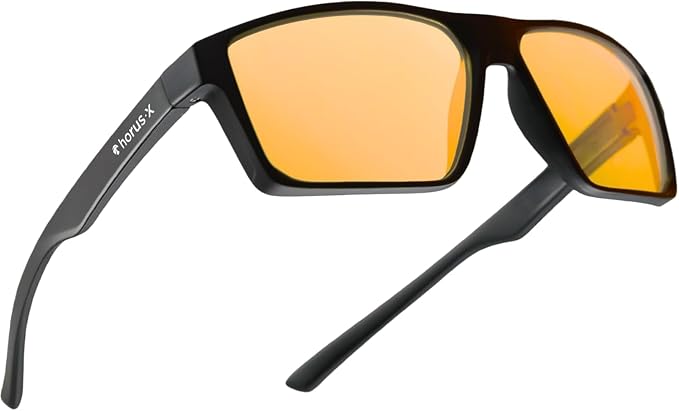
The Horus X One Amber suits editors who want a stronger amber filter and a gaming-style frame for long monitor sessions, particularly if they also wear a headset. Its design is aimed at gaming and extended screen use rather than a conventional office appearance, as the current product listing indicates.
Its amber PLASMA lens is rated to filter 100% of blue light between 380 and 400 nanometers and 86% across 380 to 450 nanometers. The manufacturer’s lens specifications also identify UV protection and an anti-reflective coating.
The main attraction is the combination of a pronounced filter, a lightweight frame, and specifications that identify the wavelengths covered. The listed frame weighs approximately 27 grams and uses polycarbonate construction, making the design worth considering for people who dislike heavier eyewear.
There is an important trade-off, however. Amber lenses noticeably change the appearance of colors on screen. That can be acceptable for browsing, writing, or general computer work, but it makes these glasses less suitable for judging subtle color differences in photographs, illustrations, and video footage.
For better results, we would use them during general editing work and remove them when checking final colors. Keep your display’s calibration and lighting consistent, particularly when matching brand colors or grading footage. An amber filter should not become part of your color-reference process.
A few cautions:
-
Skip them if accurate color judgment is essential throughout your entire workflow.
-
Avoid assuming that their filtering specifications guarantee relief from digital eye strain.
-
Confirm the fit before purchasing if you have a particularly narrow or wide face.
2. Benicci Stylish Blue Light Blocking Computer Glasses
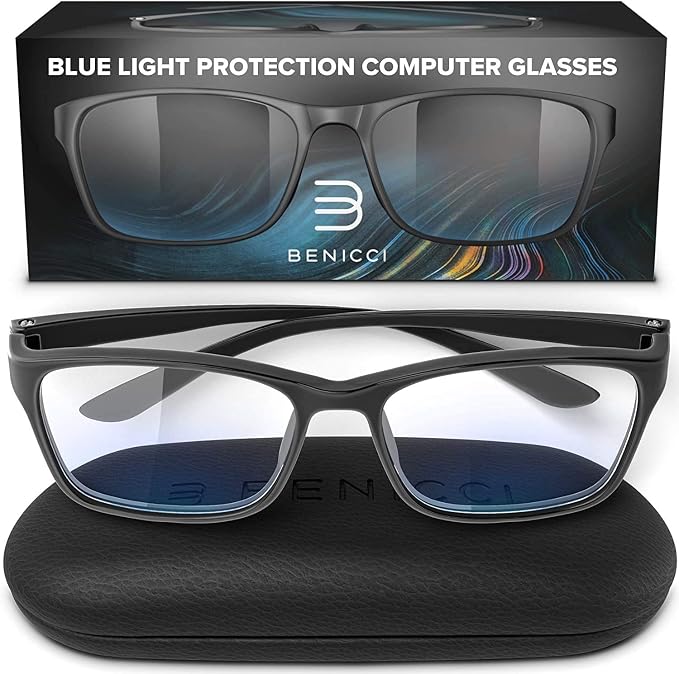
Benicci’s computer glasses are a practical option for editors who prefer a familiar, everyday frame instead of an explicitly gaming-oriented design. They are intended for computer, phone, and other screen use, with a product listing that identifies non-magnifying, anti-glare lenses.
The listed construction combines a TR90 plastic frame with polycarbonate lenses. The available measurements include a frame width of approximately 139 millimeters and a bridge width of 18 millimeters. These figures help you compare the frame against glasses you already find comfortable.
Their main advantage is the combination of a conventional appearance and a lens intended for relatively unobtrusive everyday use. For a designer switching between a laptop, video calls, writing, and other office tasks, this style can fit naturally into the working day without a conspicuous gaming aesthetic.
Benicci also advertises a 365-day satisfaction guarantee on its website. Before ordering, read the actual terms and confirm that the guarantee applies to your chosen product and seller. The current listings do not establish a precise wavelength-by-wavelength filtering rate that we can confidently compare against more detailed specifications.
For best results, check that the temples do not press against your head and that the lenses sit comfortably without interfering with your usual viewing distance. Use regular screen breaks and sensible lighting adjustments as part of your routine rather than expecting eyewear alone to solve discomfort.
A few things to note:
-
Skip this pair if you require prescription lenses or specific reading magnification.
-
Do not assume its filtering percentage matches products with different wavelength ratings.
-
Check the fit carefully rather than relying on the one-size description alone.
3. Blue Light Blocking Glasses for Men and Women by Prospek
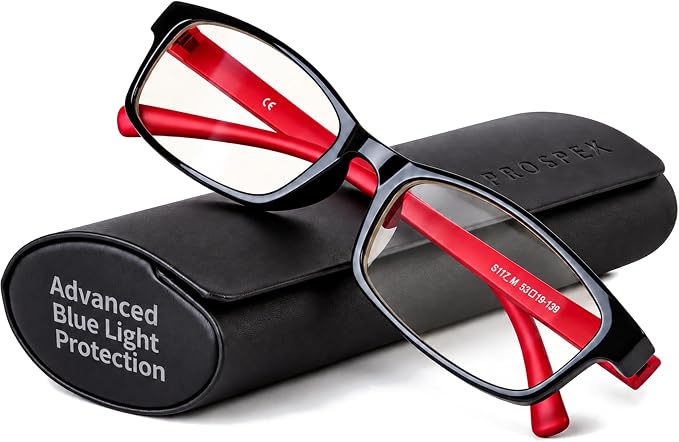
The Prospek glasses are worth considering for editors who prefer a clear-looking, non-magnifying lens and an understated frame. The specific Amazon listing identifies this version as an oval design with zero magnification, making it relevant to people who want ordinary computer eyewear rather than reading assistance.
The listed construction uses a TR90 frame and polycarbonate lenses. Prospek also describes anti-glare and anti-reflective optics, alongside coatings intended to resist scratches and smudges. Those features are relevant for people who regularly move between applications, documents, and multiple windows during a typical editing session.
A useful distinction is the emphasis on a relatively clear visual appearance. Strong amber filters can shift perceived colors, while clear-looking lenses generally make less obvious changes to what you see. Nevertheless, the actual amount of blue light filtered by these particular lenses is not specified in a way that allows us to verify a precise filtering rate.
The product’s listed instructions recommend cleaning the lenses with the supplied anti-fog cloth and storing the glasses in their case. Following those directions can help keep the viewing surface clean. Before checkout, also confirm that the selected listing is the non-magnifying version if you do not want reading power.
The principal limitation is the lack of a clearly documented, wavelength-specific filtration figure in the product information we could verify. The listing also includes references to reader versions, so it is important not to assume every available variant has identical optical characteristics.
Notes of caution:
-
Skip this version if you need prescription correction or reading magnification.
-
Look elsewhere if a documented filtering curve is essential to your purchase.
4. GUNNAR Premium Gaming and Computer Glasses
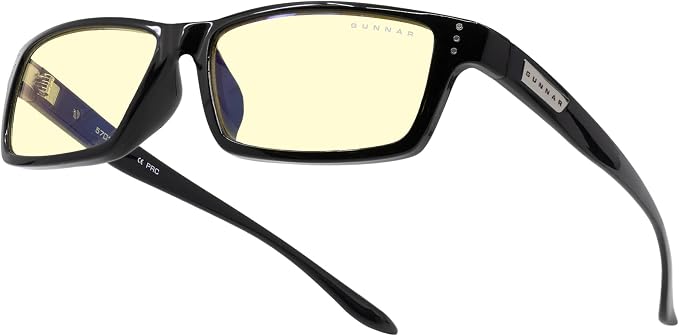
The GUNNAR Riot in Onyx with amber lenses is designed for people who want purpose-built computer eyewear and a relatively broad rectangular frame. Its manufacturer’s product page describes a wide fit intended for broader face shapes, making the model worth considering for extended computer work.
The listed construction uses a nylon frame, polycarbonate lenses, and a dual-sided anti-reflective coating. The frame weighs approximately 26 grams without packaging, and the supplied information gives a 147-millimeter frame width. GUNNAR also specifies a one-year warranty for the model.
The amber lens is rated to block 65% of blue light at 450 nanometers. This is a useful specification to know, but it describes performance at a particular wavelength rather than establishing an overall filtering rate across the entire blue-light spectrum. The distinction matters when comparing eyewear with different reporting methods.
GUNNAR also offers lens options beyond amber. Its lens guidance identifies Clear and Clear Pro options for users who prioritize color rendition, including people working in graphic arts. Those alternatives are particularly relevant when choosing eyewear for a workflow where color matching is part of the job.
One practical issue is availability. During our review, the manufacturer’s US listing showed the Riot as sold out, although availability from other sellers can change. Check the selected variant, seller, warranty coverage, and return terms before ordering, especially when purchasing from a marketplace.
A few things to note:
-
Skip the amber version if color-critical editing requires neutral viewing throughout your session.
-
Confirm availability and warranty coverage before purchasing from another seller.
-
Do not interpret the 450-nanometer figure as a complete spectral-filtering measurement.
5. ANYLUV Blue Light Glasses, Al-Mg Metal Computer Gaming Glasses
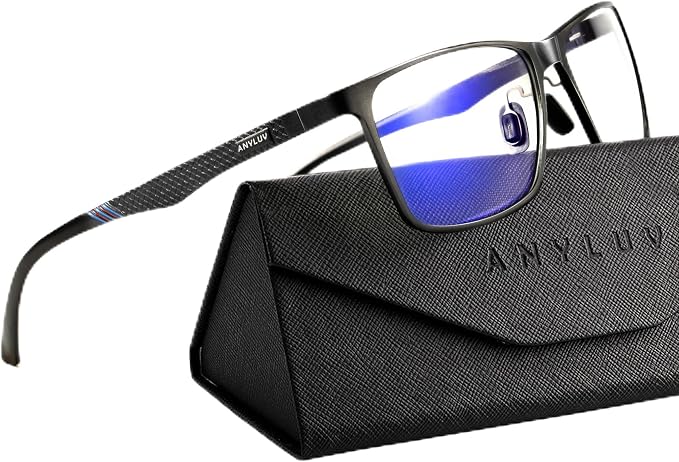
The ANYLUV glasses are a reasonable candidate for editors who prefer a contemporary metal-frame appearance and clear-looking lenses. The current product listing identifies an aluminum-magnesium-style metal frame and describes the design as suitable for computer use without the pronounced amber appearance associated with some gaming glasses.
The listing advertises 45% blue light filtering, describes the frame as weighing 27 grams, and identifies polycarbonate lenses with an anti-reflective feature. It also lists a 148-millimeter frame width, a 58-millimeter lens width, and an 18-millimeter bridge, giving you useful measurements to compare against your existing eyewear.
Its main distinction is the combination of a clear lens, a metal frame, and a relatively simple rectangular shape. This may suit a home-office setup or creative workspace where you want eyewear that looks appropriate during work calls as well as ordinary computer tasks.
For editing work, we would check the appearance of the lens against a calibrated display before relying on it for any color-critical activity. Also, interpret the advertised 45% figure cautiously: the listing does not provide enough wavelength-specific detail to make a direct comparison with products that report filtering over a defined spectral range.
The limitation is the relatively narrow scope of independently verifiable product information. We could not establish a detailed, independent spectral test or comprehensive warranty documentation for this specific listing. Its metal construction and stated filtering rate are useful starting points, but neither alone establishes long-term durability or a measurable improvement in eye comfort.
A few cautions:
-
Skip this pair if documented wavelength-by-wavelength filtering is a strict requirement.
-
Compare the listed dimensions against a comfortable pair before ordering.
Final Thoughts
Choosing glasses for long editing sessions means balancing lens clarity, frame comfort, optical coatings, and any vision correction you may need. Stronger filtering is not automatically better for creative work, especially when tinted lenses change the appearance of colors. We recommend treating advertised specifications as selection criteria, not guarantees of improved eye health.
Choose according to your workspace, editing requirements, and personal comfort rather than the strength of the marketing claims. Take regular breaks, adjust your screen brightness and distance, and seek professional eye care if discomfort persists. The best setup is the one that supports your work without compromising clear, accurate vision.
Be First to Comment