Camera slider tracks help us turn ordinary product close-ups, desk setups, and workspace footage into more deliberate B-roll. However, the right rail depends on camera weight, movement length, and whether you want to repeat a move automatically.
Choosing well can become confusing quickly. Manual rails, compact phone sliders, motorized systems, and support accessories solve different problems, and a long feature list does not guarantee compatibility with your camera or shooting style.
We researched current manufacturer information and product listings, compared the options, and selected five products for distinct B-roll needs. This guide highlights their meaningful strengths, limitations, and the details worth confirming before you buy.
How We Selected the Best Camera Slider Tracks
We compared the products against the practical demands of small business video, including tabletop demonstrations, product-detail shots, interview inserts, and repeatable camera movements. We prioritized published specifications over broad marketing claims.
We also checked whether each product is a complete sliding system or an accessory. A support arm, for example, can help stabilize equipment but cannot create a rail movement by itself.
-
Movement type: Manual and motorized tracks serve different needs, particularly when you require precise, repeatable shots.
-
Travel and footprint: Usable camera travel matters more than rail length alone, especially on compact desks and crowded workspaces.
-
Payload and mounting: Weight limits and mounting threads help you avoid pairing a track with an unsupported camera, lens, gimbal, or head.
-
Control and repeatability: App controls, programmed points, and time-lapse modes can simplify consistent recording sessions.
-
Compatibility: We looked for explicit support for phones, action cameras, and gimbals instead of assuming standard mounting threads guarantee compatibility.
-
Evidence and caveats: We favored verifiable specifications and flagged conflicting listings or unclear details that deserve confirmation.
The following picks serve different roles rather than one identical workflow. Use their features and limitations to narrow your options, then confirm the exact model and load requirements before ordering.
Best Camera Slider Tracks for Cinematic B-Roll
These recommendations cover simple manual movement, automated camera slides, compact creator setups, and more advanced production rigs.
1. Zecti Camera Slider 24″/60 cm Adjustable Carbon Fiber
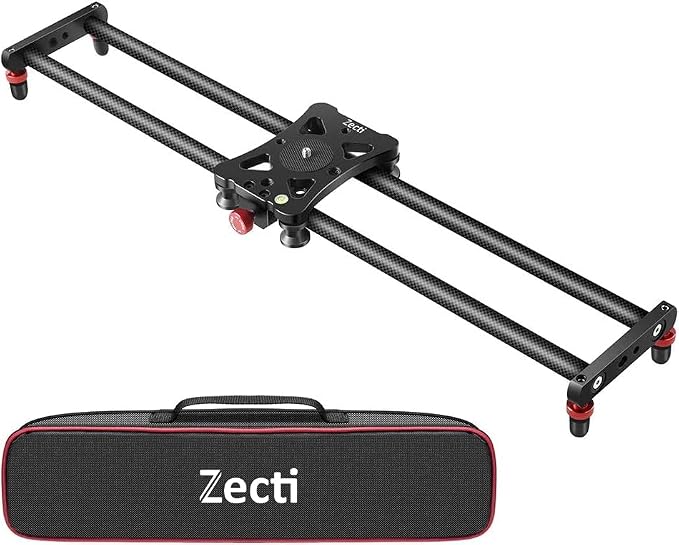
For solo creators filming small products, packaging, or desk accessories, a compact manual slider can add a measured push or pull without a motor or controller. The Zecti is listed as a carbon-fiber slider, making it a candidate for lightweight tabletop and travel setups.
Its appeal is straightforward: the carriage provides a controlled camera path, while manual movement lets you choose the pace. Listing details identify the ZT-701 model, a carrying bag, instructions, an L-shaped wrench, and a maximum recommended load of 2 kg. Confirm bundle contents and mounting options with the seller.
The main buying caution is model clarity. The listing title calls it a 24-inch/60 cm unit, but another marketplace record for the same ASIN gives 16 inches/40 cm. We could not resolve this mismatch with a manufacturer specification sheet, so confirm the rail length before ordering.
For the smoothest result, keep the camera and lens within the listed load rating, level the rail on a stable support, and move the carriage with an even hand. Practice one slow pass before filming because manual movement depends heavily on your pacing.
This style stands out for its simplicity: there is no motor programming to learn, and you can adjust a manual pass quickly to match the product. It can reveal texture, packaging edges, and dimensions, but cannot reproduce motorized timing precisely between takes.
A few cautions:
-
Skip it if your rig exceeds the seller-confirmed load rating.
-
Skip it if you need powered, repeatable motion or a verified 24-inch track before the listing mismatch is resolved.
-
Confirm the included hardware fits your mounting setup.
2. NEEWER 31.5″/80 cm Motorized Camera Slider
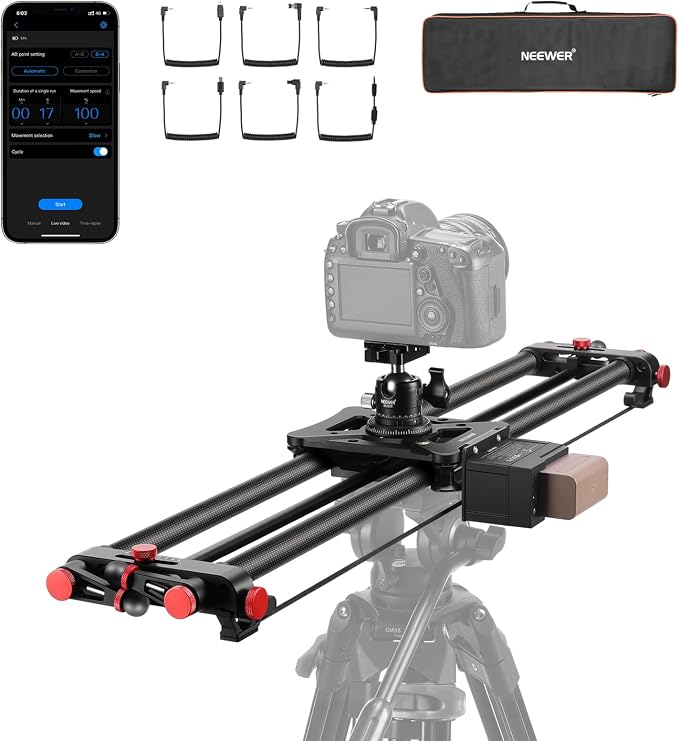
For solo product videographers and small teams that need repeatable moves, the NEEWER ER1-80 automates camera travel along an 80 cm rail. Its motor can produce consistent passes for product reveals, tabletop demonstrations, and time-lapse work without relying entirely on hand speed, as detailed on the official product page.
The manufacturer lists carbon-fiber rails and an aluminum-alloy structure, with manual operation, video and time-lapse shooting, and a 120-degree panoramic mode. Its published specifications give a maximum payload of 5 kg horizontally and 2.5 kg at a 45-degree incline, so shooting angle matters when choosing your rig.
Wireless control lets you adjust speed, choose constant or slow-start/stop movement, set A and B points, and repeat a path. These control options matter when you want two shots to match or a slow slide to run while you operate lighting or position a product.
The ER1 is still a longer, heavier rig than a pocket slider, so plan space for the rail and the camera at both ends of travel. NEEWER lists an included battery, ball head, shutter cables, and tools; check the exact package contents because bundles can vary by model or seller.
For best results, mount the rail on a stable, level support, confirm the shutter cable matches your camera, and test the full path with the camera attached. NEEWER lists a two-year warranty for purchases from its own website. Marketplace purchases may have different terms, so check the relevant seller’s policy separately.
A few things to note:
-
Skip it if you only need a compact, fully manual rail.
-
Check the lower payload limit before using it on an incline.
-
Verify cable compatibility, included accessories, and battery details with the seller.
3. IFOOTAGE Shark Slider Pico Pro Motorized Slider
For smartphone creators and owners of compatible DJI Pocket or Action cameras, the iFootage Shark Slider Pico Pro is a compact motorized platform for controlled movement in close-up shots. It is a mini movement system, not a long rail for a cinema rig. The official product page explains its intended device compatibility and compact design.
iFootage lists a 40 cm overall length, 25.5 cm travel, 1.5 kg horizontal load, and 0.8 kg vertical capacity. Its official specifications also list NFC and Bluetooth, with control through the app, manual controls, or Apple Watch, plus about seven hours of horizontal operation.
The PRO model’s carbon-fiber tube, color LCD screen, and expansion contacts for a third axis distinguish it from the standard Pico. Its feature set supports coordinated movement and quick changes between creative modes rather than simply moving a camera along a straight line for product demonstrations.
Its small size suits cramped desks and travel kits, but 25.5 cm of travel limits wide lateral moves. Check camera mounting and connectivity, especially for phone gimbals or cameras outside the listed device types. That short travel is a deliberate portability trade-off for compact setups.
For repeatable results, secure the device on a steady surface, balance the camera correctly, and rehearse your movement before recording. iFootage’s official product information helps confirm current compatibility and operating instructions, since third-party descriptions may mix standard and PRO specifications. Confirm your exact model before setup.
A few things to note:
-
Skip it for long, full-length lateral moves or heavier cinema rigs.
-
Confirm your phone, camera, and any mounting accessories are compatible before ordering.
4. IFOOTAGE Camera Slider Support Arm Stabilizer SA-32
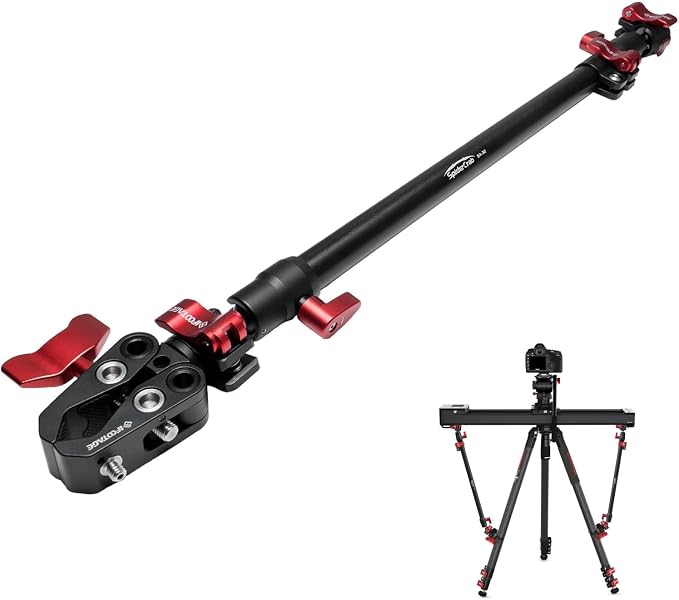
For videographers using a slider on a tripod, support stand, or overhead rig, the iFootage SA-32 is a support accessory designed to add reach and hold compatible equipment in position. It does not slide a camera along a track and cannot replace an actual slider. The manufacturer’s product information places it within the Spider Crabs support system.
iFootage describes the rod as extending from 52.8 to 81.3 cm, weighing 660 g, and supporting up to 6 kg. Its official SA-32 specifications identify aluminum-alloy and stainless-steel construction, making it an adjustable mounting accessory for a modular rig.
It is useful when B-roll needs an arm to position a light, monitor, or supported accessory near the slider while keeping the track free. The compatible accessory range helps explain its role in a larger camera setup. Compatibility depends on clamp style, threads, and the mounting surface, so check these details before assembly.
The arm’s value is in rig flexibility rather than camera travel. Telescoping reach helps you position components at a useful angle, but every extension can create leverage on the stand or clamp. Payload ratings, clamp fit, and the entire rig’s stability therefore deserve attention.
Before mounting, follow iFootage’s guidance and confirm every clamp locks onto a suitable tube or support. Test the arrangement gently with the gear secured, stay within the rated load, and avoid supporting a camera overhead without a properly rated system.
A few cautions:
-
Skip it if you need a complete slider track that creates camera movement.
-
Avoid mounting it to a support that cannot safely handle the extended load.
-
Do not treat the support arm as a substitute for a stable base.
5. IFOOTAGE Shark Nano II Motorized Camera Slider
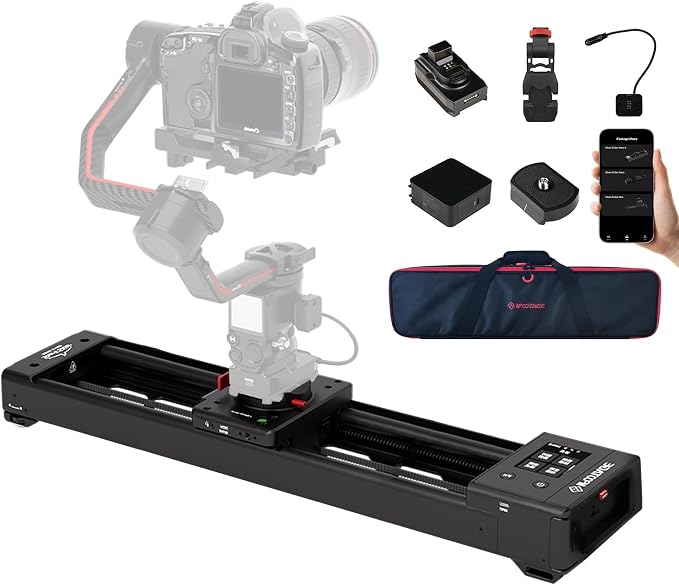
For commercial product filmmakers and small teams needing repeatable, complex moves, the iFootage Shark Slider Nano II 660 combines a motorized 66 cm rail, pan control, and compatibility with selected DJI RS gimbals. It is built for multi-axis work, not a quick manual push. Its manufacturer documentation outlines its movement and compatibility features.
iFootage lists 433 mm of travel, a 7 kg horizontal payload, and a 3.5 kg vertical payload for the 660 model, with aluminum-alloy and carbon-fiber construction. The official specifications distinguish rail length from usable travel, which matters because the camera does not move the full physical length of the product.
The system supports up to eight programmed points, with customizable parameters through its app or touchscreen. Its listed modes include video, time-lapse, stop-motion, macro, and panoramic capture. The manufacturer’s feature list also describes facial recognition and object-tracking capabilities for more advanced shooting sequences.
Its biggest advantage is coordinated movement: when paired with a compatible DJI stabilizer, the system can synchronize slider and gimbal motion for more complex camera moves. This DJI compatibility can help with product ads, orbit-like reveals, and precise sequences where repeated positioning matters more than simple portability.
The trade-off is a more involved setup and more hardware to pack than a small desktop slider. Use the official support page to confirm the 660 versus 860 size, payload limits, compatible gimbal, and required adapters before attaching your camera and programming a path.
A few things to note:
-
Skip it if a simple manual push is all your content needs.
-
Confirm your exact gimbal model and payload needs before building a rig.
-
Budget room for setup, adapters, and a larger support footprint.
Final Thoughts
Start with usable travel, payload in your actual mounting orientation, and the movement you need. A compact manual rail may be enough for tabletop demonstrations, while motorized control helps when you need repeatable passes or coordinated motion with a compatible gimbal.
Before ordering, verify the exact model, package contents, mounting threads, and compatibility with your camera or phone. Confirm conflicting listing details with the seller, leave room for the track at both ends, and choose the simplest setup that reliably supports your intended shots.
Be First to Comment