Creating clear top-down videos for cooking demonstrations, art tutorials, product photography, or small-business presentations requires more than a capable camera. We also need a stable mounting system that keeps our hands free, maintains a useful shooting angle, and captures the workspace without unnecessary equipment getting in the way.
Choosing the right mount can be surprisingly confusing. Some models are designed primarily for smartphones, while others accommodate heavier cameras or provide adjustable arms for different shooting positions. A mount that works beautifully for a compact phone setup may not be suitable for a DSLR, so comparing the right features before buying matters.
We carefully examined the category, researched current product information, and compared five overhead desk mounts suited to different recording needs. Our selections cover flexible phone mounting, adjustable camera positioning, integrated lighting, and support for heavier equipment. This guide helps us identify the practical strengths and limitations of each option before committing to a setup.
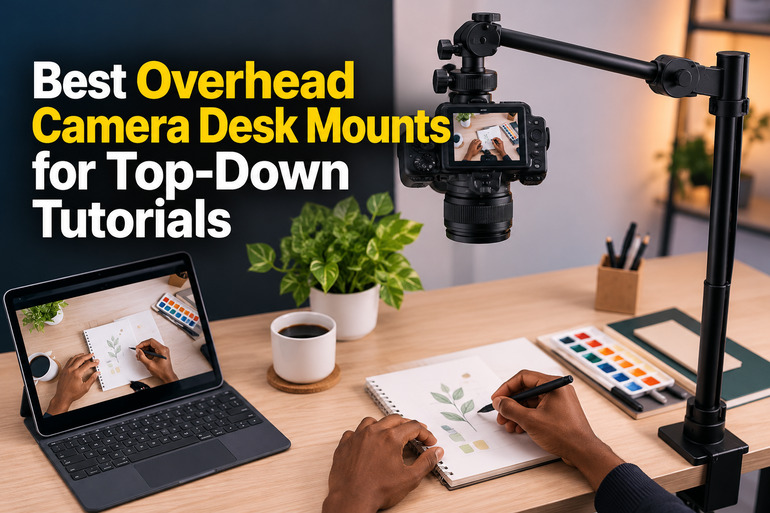
How We Selected the Best Overhead Camera Desk Mounts
We focused on mounts that can help creators capture overhead footage from a desk or workbench. Our evaluation considered their mounting systems, positioning flexibility, supported equipment, and suitability for activities such as drawing, crafting, cooking demonstrations, and product tutorials.
We also checked manufacturer documentation wherever available and compared product listings to understand what each package includes. We gave particular attention to details that can affect everyday usability, including desk clearance, device compatibility, load limits, and the ability to reposition a camera without rebuilding the entire setup.
-
Mounting stability: A secure base or clamp helps keep your recording position consistent and reduces the risk of accidental movement.
-
Equipment compatibility: The mount should accommodate your phone or camera using the correct holder, thread, and adapter.
-
Adjustability: Flexible arms, telescoping sections, and ball heads make it easier to frame overhead shots precisely.
-
Weight capacity: Checking the stated limit helps you avoid overloading the mount with a camera, lens, or other accessories.
-
Desk fit: Clamp opening, base footprint, and available workspace determine how conveniently the mount fits your setup.
-
Practical extras: Included phone holders, tablet mounts, and lighting can reduce the number of separate accessories you need.
The following options serve different priorities, from compact smartphone recording to more demanding camera setups. We have highlighted the details that matter most when deciding which one suits your workspace.
Best Overhead Camera Desk Mounts for Top-Down Tutorials
Our selections range from flexible articulated arms to a heavier-duty desktop camera support. The right option depends on your camera, available desk space, and the angles you need for your tutorials.
1. NEEWER Basics Magic Arm with Desk Clamp for Phone Webcam
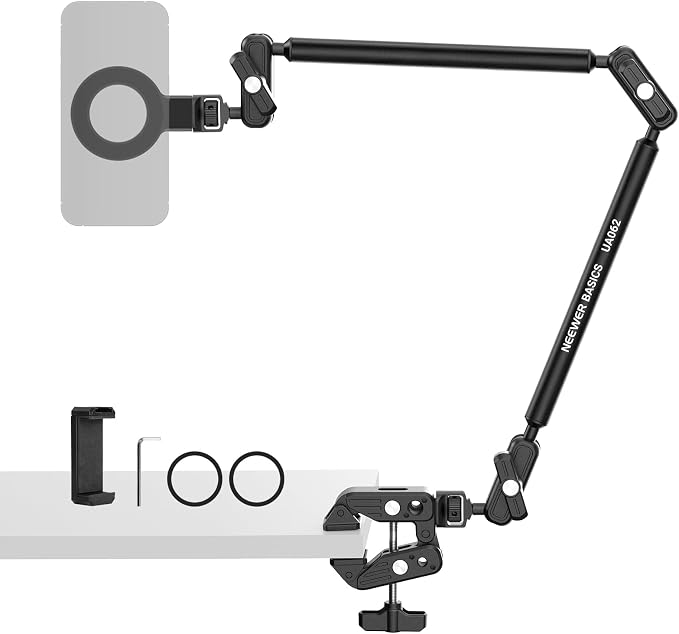
The NEEWER Basics Magic Arm is a practical option for creators who mainly record with a smartphone, webcam, action camera, or other compatible lightweight device. Its articulated design suits tutorial makers who want to move a camera over a desk without dedicating a large portion of the workspace to a freestanding stand.
The current UA062 model has a 26.4-inch arm made from aluminum alloy and a stated maximum load capacity of 2.2 pounds. Three adjustable joints provide 360-degree rotation and 180-degree tilt, allowing us to reposition compatible equipment for different views. These specifications appear in the official product listing.
The mounting system is another useful feature. Its super clamp attaches to flat surfaces up to two inches thick or compatible poles up to 1.6 inches in diameter. This gives us more flexibility than a mount limited to one particular desk configuration. The included magnetic phone mount, phone holder, and magnetic rings also accommodate different phone-mounting preferences.
For product demonstrations, sketching videos, and small craft tutorials, the articulated arm makes it easier to position the camera above the work area instead of directly in front of it. NEEWER specifies that this mount is intended for relatively static setups, which makes it better suited to stationary recording than frequent movement during filming.
We should tighten the joints securely, check the clamp before each session, and confirm that the complete camera assembly stays within the published load limit. The phone holder makes smartphone recording more convenient, but heavier cameras and unsupported mounting adapters should not be assumed compatible simply because they fit a thread.
Who should skip it:
-
Creators using equipment heavier than the stated 2.2-pound limit.
-
Anyone who needs a camera arm designed for frequent movement while filming.
-
Buyers who need a complete DSLR mounting kit without checking adapter compatibility.
2. ARKON Mounts Phone Holder Full Kit: Adjustable Overhead Arm Cell Phone
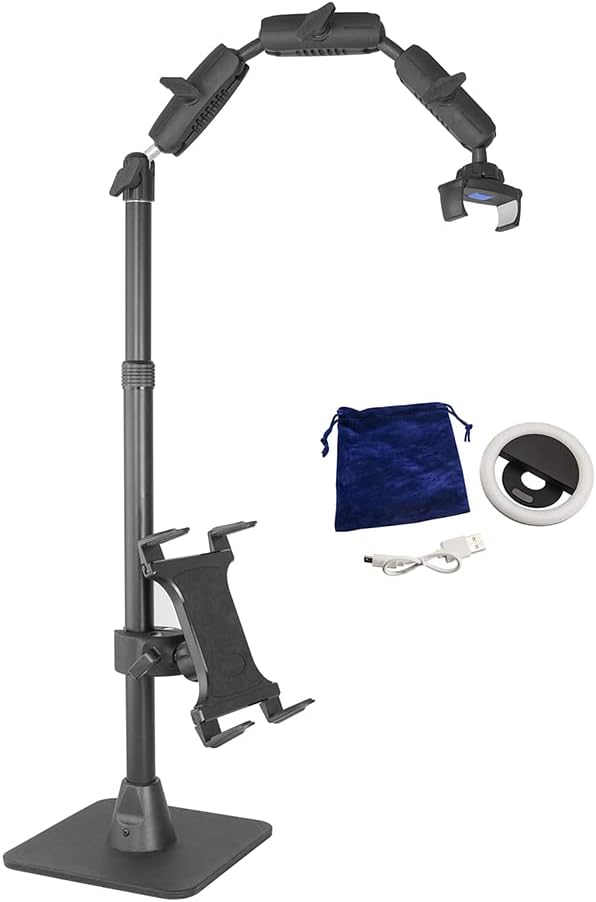
The ARKON Phone Holder Full Kit is particularly suited to smartphone creators who want an overhead recording stand with useful accessories included. It makes sense for baking demonstrations, drawing sessions, craft videos, and other tutorials where we want to record a work surface while keeping a second device available for monitoring the session.
The model RCBTABLED combines a weighted tabletop base with an adjustable overhead arm. Its pole extends from 17 to 29 inches, giving us room to position the phone for overhead or more conventional front-facing shots. The manufacturer’s product documentation also describes a tablet holder and a clip-on LED ring light as part of the bundle.
The phone holder accommodates devices up to four inches wide, according to ARKON’s product information. The tablet attachment supports tablets with screen sizes from 8.9 to 18.4 inches, making it useful for viewing comments, following instructions, or monitoring another part of a recording workflow. The rechargeable ring light provides additional illumination when ambient lighting is insufficient.
Unlike clamp-mounted arms, this stand rests on a weighted base. That means we do not have to attach it to the desk edge, but we do need enough clear tabletop space to position it securely. ARKON’s setup manual advises aligning the overhead arm over a corner of the base to help maintain stability.
One limitation is that this bundle is primarily designed around smartphone filming rather than heavier interchangeable-lens cameras. Its tablet attachment also adds weight to the stand, so we should follow the manufacturer’s balancing guidance instead of assuming every accessory can be mounted in any configuration.
Who should skip it:
-
Creators who need to keep the desk surface completely clear.
-
Users who primarily record with heavier DSLR or mirrorless camera bodies.
-
Buyers who prefer a desk-edge clamp instead of a weighted tabletop base.
3. NEEWER Extendable Camera Desk Mount with Ball Head
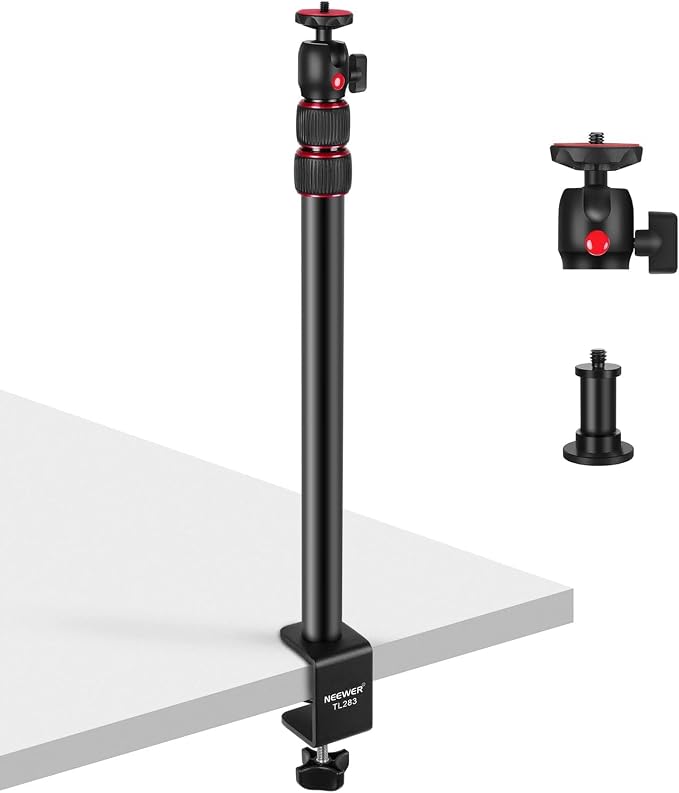
The NEEWER TL283 is a useful choice for creators who need more height adjustment than a short phone arm provides. It suits overhead product photography, tutorial recording, online teaching, and live streaming setups using compatible cameras, webcams, or lighting accessories.
Its three-section telescoping stand adjusts from 17 to 40 inches. NEEWER lists a maximum load capacity of 6.6 pounds, or approximately three kilograms, and uses an aluminum-alloy construction with twist locks to secure the extending sections. The extra height gives us more room to frame a larger work surface or position a camera farther from the subject.
A C-clamp attaches the stand to desks up to two inches thick, helping preserve usable tabletop space. Its ball head rotates through 360 degrees and supports vertical tilt from minus 45 to plus 90 degrees. These adjustments allow us to move between landscape, portrait, and downward-facing views without having to reposition the entire desk assembly. The official specifications provide the relevant measurements and compatibility details.
The TL283’s main advantage is its combination of height range and compact construction. It weighs approximately 680 grams, according to NEEWER, so it is relatively convenient to store when the recording space must serve other purposes during the day. Its mounting thread also supports compatible equipment beyond cameras, although the correct adapter remains important.
The major limitation is that the package does not include a dedicated phone holder. Smartphone users may need to purchase a compatible holder separately, and the stand’s published capacity should not be treated as a guarantee that every camera-lens combination will balance comfortably at maximum extension.
Who should skip it:
-
Smartphone users who want a complete holder included in the box.
-
Anyone whose desk exceeds the two-inch clamp opening.
-
Creators who need a multi-jointed boom arm rather than a telescoping support.
4. Overhead Camera Mount, 3-Section Articulating Desk Arm
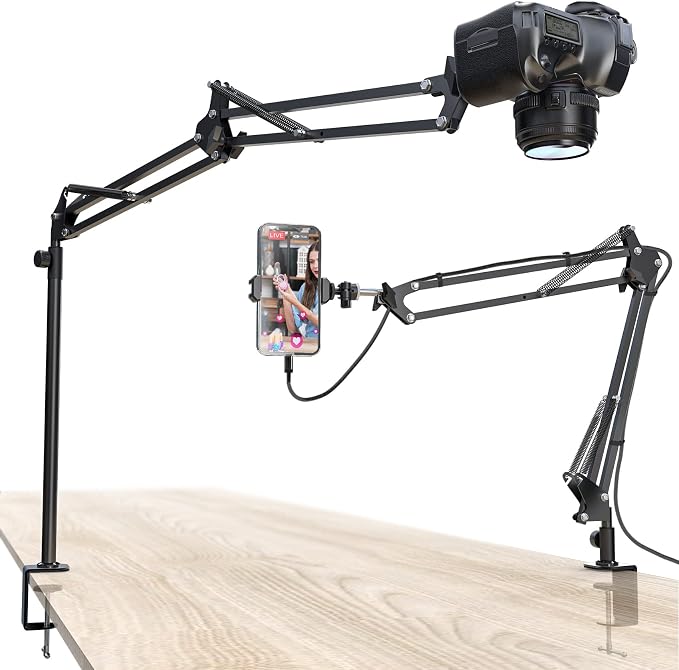
The CACENCAN three-section articulating mount is worth considering for creators who need a compact desk-mounted system for overhead tutorials. Its listed configuration targets smartphone, webcam, and compatible camera use, making it suitable for home studios, craft workbenches, and desks used for product demonstrations.
The available product listing states a maximum load capacity of five pounds, or approximately 2.3 kilograms. It describes a three-section mounting system with a 360-degree ball head and a phone holder, allowing us to change the shooting direction without relying on a fixed camera position.
The listed design also includes a heightening pole and a padded C-clamp intended for desks approximately 0.5 to 2.1 inches thick. The product description gives a height range of 15 to 25 inches, although buyers should confirm the exact configuration in the current listing before ordering. These mounting options can help creators achieve an overhead view without permanently altering the desk.
For drawing tutorials, stationery demonstrations, and small product videos, the ability to reposition the camera and use a phone holder is helpful. Its clamp-based attachment also makes the design less dependent on a weighted base occupying the work surface. However, we should check that our desk edge and mounting position provide sufficient clearance for the arm’s full movement.
The main concern is product-documentation transparency. Compared with models that have detailed manufacturer pages, the available specifications are primarily presented through retailer listings. We should verify the included accessories, exact dimensions, load limit, and support arrangements before purchasing rather than relying on broad claims about compatibility.
Who should skip it:
-
Buyers who require extensive manufacturer documentation and clearly established support terms.
-
Creators whose full camera rig exceeds the stated five-pound limit.
-
Anyone whose desk thickness falls outside the listed clamp range.
5. TARION Camera Desk Mount Overhead DSLR Arm Stand
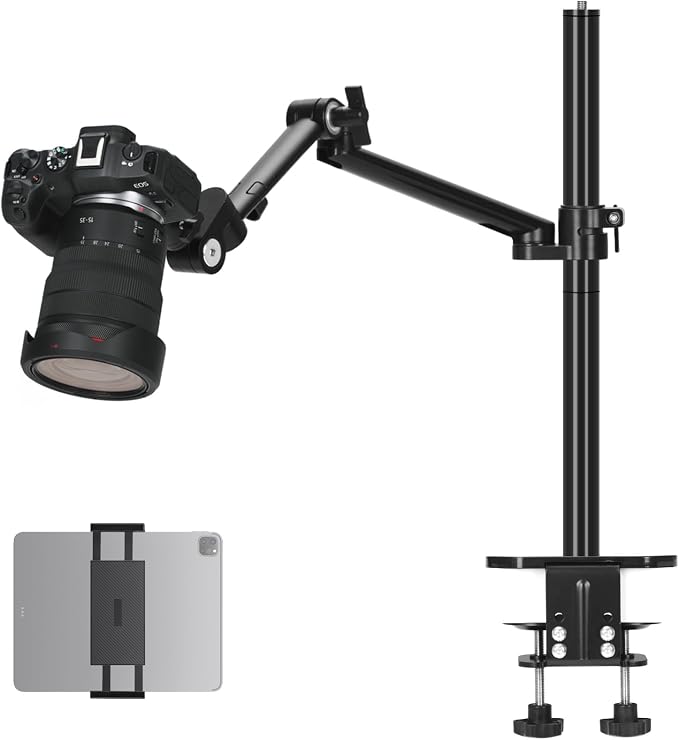
The TARION camera desk mount, identified as the TitanRig Desktop Lite Z, is a suitable option for creators building a more substantial recording setup. It is intended for people who need to position cameras and compatible accessories over a workspace for videography, streaming, or instructional content.
TARION’s official product page describes an adjustable camera desk mount built from aluminum alloy with secure clamps and mounting screws for compatible equipment. Retailer specifications for this model identify a maximum load capacity of eight kilograms, or approximately 17.6 pounds, along with compatibility for cameras, phones, tablets, and lights. Check the exact configuration against the detailed listing specifications.
The dual-clamp arrangement and adjustable arm make this mount appealing when a creator wants a more secure attachment than a lightweight single-point phone stand. Listed accessories include a tablet holder and mounting fittings compatible with common 1/4-inch and 3/8-inch threads. That combination can support a versatile desk setup, although every attached item still needs to fit the relevant mounting interface and total load limit.
For a tutorial studio, the key advantage is the ability to accommodate different equipment rather than being restricted to a phone alone. TARION also advertises a two-year warranty on its official product page. We should still review the applicable warranty terms for our region and confirm that the package being sold is the Lite Z configuration.
This is a more substantial mount than a simple phone arm, so it may take up more storage space and require more careful positioning during setup. Before recording overhead, we should firmly secure the clamps, verify clearances, test the camera angle, and make sure the desk itself is suitable for the assembled equipment.
Who should skip it:
-
Smartphone-only creators who do not need a more substantial mounting system.
-
Users with desks that cannot accommodate the supplied clamp arrangement.
-
Buyers who need verified load limits for an unusually long or heavy camera-lens assembly.
Final Thoughts
When choosing an overhead camera mount, we should prioritize a secure attachment, suitable load capacity, enough height and angle adjustment, and compatibility with the equipment we already own. Included accessories can simplify setup, but only when they genuinely match our recording needs.
For occasional phone tutorials, a compact articulated arm may be all we need. Larger cameras and more elaborate recording setups call for closer attention to mounting strength, desk clearance, and balancing. By matching the support system to our camera and workspace, we can create a practical overhead filming setup that serves us reliably.
Be First to Comment