Creating music, recording a podcast, streaming, or producing voiceovers becomes much easier when your computer can capture clean audio from a microphone or instrument. A dedicated USB audio interface gives you more control over recording levels, input connections, and headphone monitoring than a basic computer audio setup.
Choosing the right interface can feel confusing because specifications such as preamp quality, sample rate, input count, and monitoring options are not always easy to compare. An interface designed for a singer-songwriter may not provide the features a livestreamer or independent podcaster needs.
We researched the category, examined current manufacturer specifications and setup guidance, and selected five USB audio interfaces that suit different solo-creator workflows. Our recommendations highlight practical strengths, important limitations, and compatibility considerations, helping you choose equipment that supports your work today without overlooking your future recording needs.
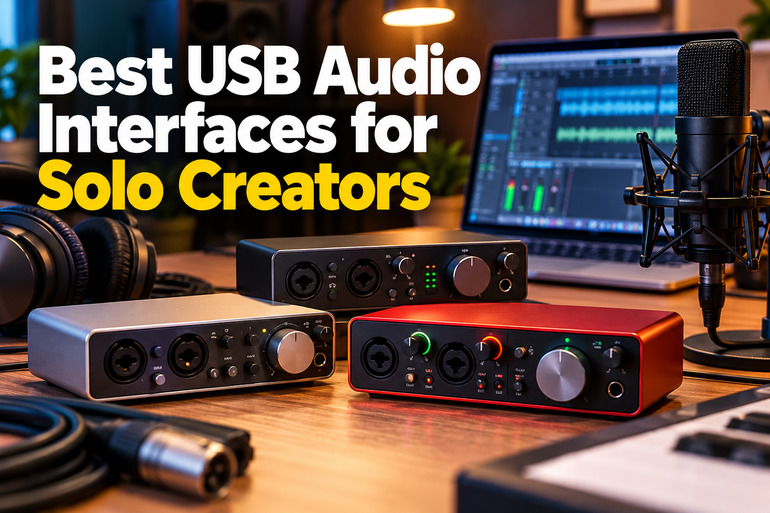
How We Selected the Best USB Audio Interfaces
We evaluated these interfaces by looking at the features that make a real difference in a compact recording setup. Rather than relying on broad sound-quality claims, we prioritized manufacturer-documented specifications, practical connectivity, monitoring controls, and the number of sources each interface can accommodate.
We also considered how each model fits different creative workflows, from recording a single voice to capturing two instruments or expanding a home studio. Compatibility, available routing features, and documented setup instructions helped us identify limitations that could influence your purchasing decision.
-
Fit for purpose: We considered whether the interface makes sense for your particular work, whether that means music production, podcasting, streaming, or voiceovers.
-
Input flexibility: We looked at microphone, instrument, and line-level connections so you can connect your existing equipment without unnecessary adapters.
-
Recording capabilities: We compared documented sample rates and recording specifications to help you select an interface suited to your projects.
-
Monitoring: We prioritized practical ways to hear your inputs and computer playback while recording.
-
Connectivity and expansion: We considered USB connections, MIDI support, additional outputs, and expansion options where available.
-
Compatibility and usability: We examined official setup documentation, operating-system information, and controls that influence everyday use.
Each interface offers a different balance of simplicity, control, and flexibility. Let’s look at what makes each one worth considering for a solo recording setup.
Best USB Audio Interfaces for Solo Creators
1. M-Audio M-Track Duo USB Audio Interface
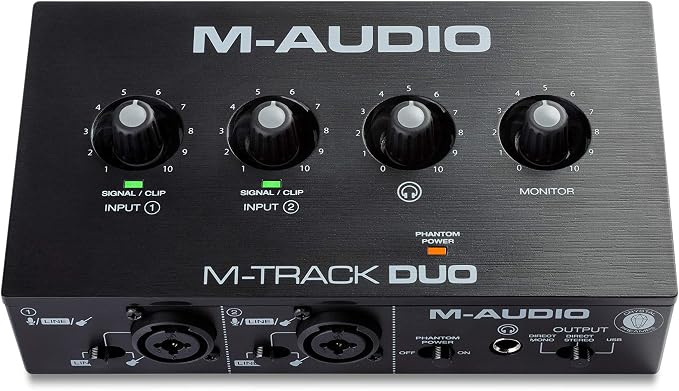
For solo creators recording vocals, guitar, or a two-person conversation, the M-Track Duo is a straightforward starter interface. M-Audio lists two combo inputs and USB bus power, a practical combination for a desk that doubles as a music or podcast workspace.
Each input uses a Crystal preamp, with +48V phantom power for suitable condenser microphones and a selector for line or instrument level. That helps you connect a microphone, guitar, bass, or suitable line-level instrument without needing a separate microphone preamp for a basic setup. The two inputs also allow you to record two compatible sources simultaneously.
The main compromise is its 48 kHz maximum sample rate, as confirmed by the manufacturer’s specifications. That is suitable for many voiceovers, podcasts, and songwriting sessions, but creators specifically seeking higher sample rates should consider alternatives. The interface focuses on straightforward recording rather than extensive studio routing.
Its monitor switch lets you choose between direct input monitoring and computer playback. M-Audio’s official setup guide explains how to select the interface in recording software and configure the monitoring switch. Follow those instructions when setting up your first session, then adjust gain carefully to avoid recording distorted signals.
There is also an important compatibility limitation. M-Audio’s macOS 26 compatibility list marks the standard M-Track Duo unsupported on macOS Tahoe. Check your exact operating-system version before purchasing instead of assuming that general Mac compatibility guarantees support for the latest release.
A few cautions:
-
Skip it if you specifically need recording at 88.2 kHz or 96 kHz.
-
Skip it if you use macOS 26 Tahoe and require officially supported compatibility.
-
Skip it if your recording sessions regularly require more than two simultaneous physical inputs.
2. PreSonus AudioBox 96 25th Anniversary USB Audio Interface
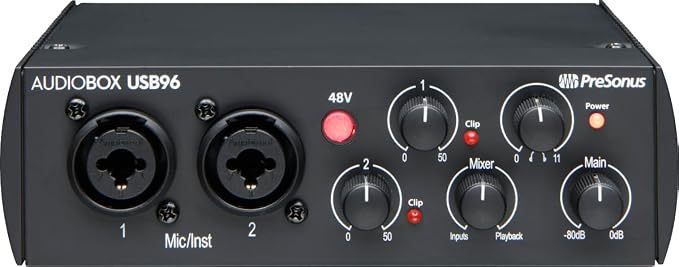
The AudioBox USB 96 25th Anniversary is a practical choice for solo musicians, podcasters, and singer-songwriters who want to record vocals and instruments while retaining the option to connect MIDI equipment. Its official product listing documents a two-input, two-output interface designed for personal and portable recording.
It provides two front-panel microphone/instrument combo inputs, balanced TRS main outputs, a stereo headphone output, and MIDI input and output. This combination is particularly useful if your workflow includes an external MIDI keyboard, synthesizer controller, or other compatible MIDI hardware alongside your microphone or instrument.
The interface supports 24-bit recording up to 96 kHz, giving creators more sample-rate flexibility than a 48 kHz-only interface. Its hardware Mix control blends the live input signal with computer playback for direct monitoring, helping you hear yourself while recording without relying entirely on software monitoring.
USB 2.0 connectivity and bus-powered operation keep the setup relatively simple because the interface draws power from the connected computer. PreSonus also documents macOS and Windows compatibility, although checking the latest support information for your precise operating system remains sensible. Use the Mix control to establish a comfortable monitoring balance before recording, and verify your input levels in your recording software.
One practical limitation concerns availability. The manufacturer’s current product page marks this specific 25th Anniversary edition as sold out, so stock may depend on individual retailers. Confirm that a listing is for the exact edition you intend to purchase rather than assuming every AudioBox package has identical contents.
Notes of caution:
-
Skip it if you need more than two simultaneous analog inputs.
-
Skip it if this particular anniversary edition is unavailable from a reliable retailer.
-
Skip it if your workflow specifically requires a native USB-C connection rather than its USB 2.0 setup.
3. MOTU M2 USB-C Audio Interface
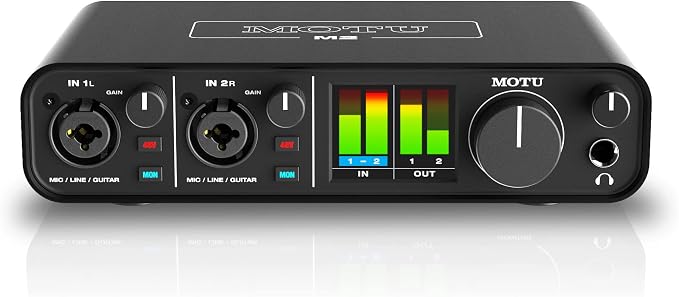
The MOTU M2 is well suited to solo musicians, independent producers, and streamers who want close visual control over their recording levels. Its most noticeable feature is a full-color LCD meter display, which makes input and output levels easier to inspect without relying entirely on your computer screen. The manufacturer’s user guide explains the display and front-panel controls.
The interface has two XLR/TRS combo inputs that accept microphones, instruments, and suitable line-level signals. Each channel has its own gain control and phantom-power button, while dedicated monitoring controls help you listen to incoming audio directly. These features are useful when moving between vocal recording, guitar tracking, and other two-source sessions.
The official operating guide explains how the LCD meters indicate signal levels and identify clipping. This gives you a useful visual reference while adjusting gain. The display does not eliminate the need to set levels carefully, but it makes it easier to identify an overloaded signal before it becomes a persistent recording problem.
Connectivity is another strength. The M2 includes balanced quarter-inch monitor outputs, mirrored RCA outputs, a headphone output, and standard MIDI input and output. It is USB-powered, making it suitable for a compact desk setup without a separate power supply. MOTU documents the included USB-C-to-USB-A cable, so a computer with only USB-C ports may require a suitable alternative cable or adapter.
The principal trade-off is its two-input design. It works well for a solo creator tracking a voice and instrument, but it is less suited to recording several microphones simultaneously. Buyers should also check their cable requirements before connecting it to a newer laptop.
A few things to note:
-
Skip it if you routinely record three or more separate analog sources at once.
-
Skip it if you require an included USB-C-to-USB-C cable.
-
Skip it if you want an interface with built-in ADAT input for digital input expansion.
4. Audient iD14 MKII USB Audio Interface
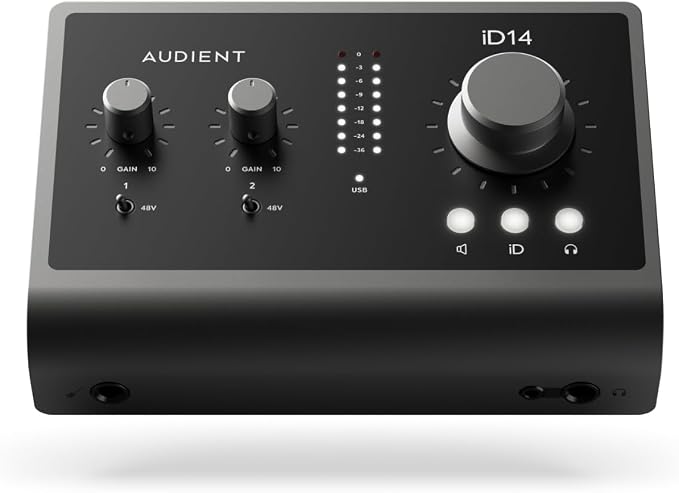
The Audient iD14 MKII is a strong fit for independent producers, musicians, and voiceover creators who want a capable two-preamp interface with room to expand. Audient’s official product overview documents two console-style microphone preamps, advanced converters, and ADAT expansion in a compact desktop design.
Its two microphone preamps support recording vocals, instruments through appropriate connections, and other sources simultaneously. Audient specifies up to 68 dB of microphone preamp gain, while the dedicated JFET instrument input provides a convenient connection for a guitar or bass. That arrangement helps keep common recording tasks straightforward without needing a separate instrument DI for every source.
Expansion is where the iD14 MKII becomes particularly useful. Its documented connections include an ADAT input and four line outputs, allowing a compatible digital preamp or other suitable external device to extend a more developed setup. It also offers a dual headphone output arrangement, giving creators additional monitoring flexibility when working with a collaborator.
Audient includes software-based monitoring and audio loopback, along with a metal enclosure and USB bus-powered operation. Its feature documentation outlines these capabilities. Loopback can be particularly useful for streaming or recording computer audio alongside a microphone, while the software mixer provides additional control over monitoring arrangements.
The main drawback is complexity relative to a basic solo recording setup. Some creators may never use the additional outputs or digital expansion, while others may need time to understand the software mixer. Also, Audient lists 24-bit/96 kHz operation in its feature specifications, so its 32-bit converter description should not be interpreted as a documented 32-bit recording mode.
A few cautions:
-
Skip it if you only need a basic single-microphone setup with no expansion requirements.
-
Skip it if your workflow requires recording at sample rates above 96 kHz.
-
Skip it if you would not benefit from its additional routing and monitoring features.
5. Arturia MiniFuse 1 USB Audio Interface
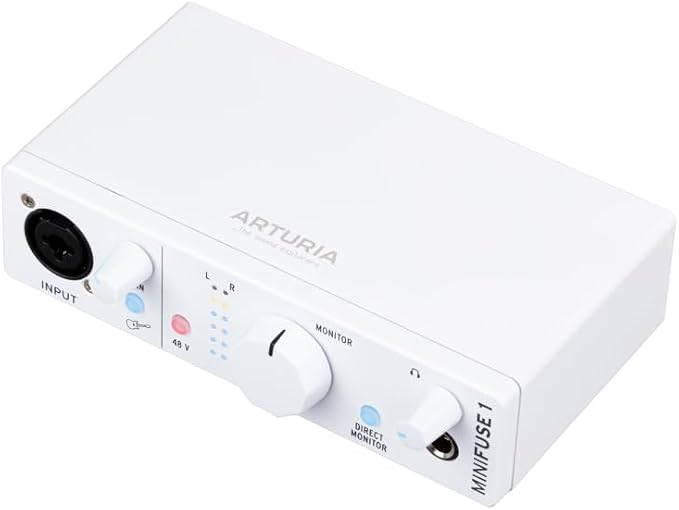
The Arturia MiniFuse 1 is designed for solo creators who primarily record one microphone or instrument at a time. It is particularly suitable for voiceovers, solo podcasts, streaming, and individual music production sessions. Arturia’s official product page documents its single-input design and USB-powered operation.
Its combination input accepts microphone, instrument, or line-level sources, and it supplies 48V phantom power for compatible condenser microphones. The interface also provides balanced stereo line outputs, a headphone output, and a dedicated direct-monitoring switch. These controls cover the central needs of someone recording their own voice or instrument without a large studio setup.
A particularly useful feature is the built-in stereo virtual loopback channel. Arturia documents this loopback functionality, which can help creators capture computer audio alongside a microphone when streaming or recording suitable applications. The interface also has a USB-A hub rated at 250 mA maximum, useful for compatible low-power accessories within that limit.
The MiniFuse 1 connects through USB-C and draws power from the computer. Arturia also includes access to creative software, including Ableton Live Lite and Analog Lab Intro, as detailed on its official product page. These extras can help new creators get started with recording and music production without immediately assembling a separate software collection.
Its most important limitation is the single physical audio input. You cannot independently record two microphones or a microphone and guitar simultaneously through separate physical input channels. The built-in loopback adds a software-audio option, but it does not replace the second analog input available on the other interfaces in this guide.
A few cautions:
-
Skip it if you regularly record two microphones or instruments simultaneously.
-
Skip it if your accessories require more than 250 mA from the built-in USB-A hub.
-
Skip it if your workflow depends on multiple physical recording inputs for collaborative sessions.
Final Thoughts
The best interface for your setup depends on how many sources you record, whether you need MIDI connections, and how much control you want over monitoring. Sample-rate support, expansion options, operating-system compatibility, and cable requirements also deserve attention before you commit to a particular model.
We recommend choosing around your actual recording habits rather than specifications alone. A straightforward interface can be entirely sufficient for solo voice work, while music production or streaming may benefit from additional inputs and routing. Choose the model that fits your current workflow, gives you useful flexibility, and lets you focus on creating better work.
Be First to Comment