A good Bluetooth mechanical keyboard can make a home office feel more comfortable and flexible, but finding the right one takes more than checking whether it connects wirelessly. Layout, switch feel, battery life, software, and desk space can all change how well a keyboard fits into your routine.
That choice can get surprisingly confusing, especially when compact productivity boards sit alongside gaming-focused and enthusiast-style keyboards. For a small business owner, entrepreneur, or home office worker, the wrong layout or feature mix can quickly become an everyday annoyance.
We looked closely at the category, compared the available options, and examined the five keyboards featured here across the factors that matter most for everyday work. Our aim is to make those differences easier to understand so you can choose with less guesswork and more confidence.
How We Selected the Best Bluetooth Mechanical Keyboards
We focused on the things that actually affect your day-to-day experience rather than treating wireless connectivity as the main selling point. We reviewed current product information and compared each keyboard for layout, connectivity, customization, battery behavior, and software support.
We also looked at how each keyboard fits into a real workspace. A compact board can give you more room to move your mouse, while a full-size design can be much more convenient for spreadsheets and frequent number entry. We also kept legitimate limitations in view.
- Layout: We looked at whether the keyboard gives you the keys you need without taking over your desk.
- Connectivity: Bluetooth, 2.4GHz, and wired options can make it easier to move between your work devices.
- Typing design: Switches, mounting style, and construction all influence how the keyboard feels and sounds during long sessions.
- Customization: Hot-swap support, lighting, macros, and software can help you tailor the keyboard to your preferences.
- Battery: A capable rechargeable battery means fewer interruptions when you prefer to work wirelessly.
- Software and support: Clear drivers and device compatibility make advanced controls easier to manage.
These factors help us focus on meaningful differences instead of flashy specifications. They also give us a practical way to compare the five options without making the decision feel more complicated than it needs to be.
Best Bluetooth Mechanical Keyboards for Work and Everyday Use
These five keyboards cover several different priorities, from compact enthusiast-style layouts to a full-size office keyboard and a retro-inspired design.
1. AULA F99 Wireless Mechanical Keyboard
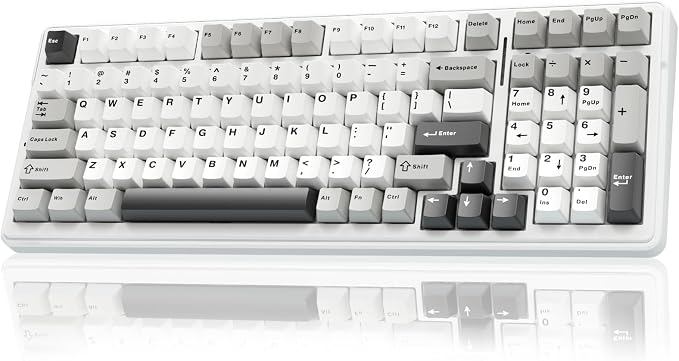
The AULA F99 is a good match for anyone who wants to keep a number pad without committing to the bulk of a traditional full-size keyboard. Its 96% layout keeps the numeric section, making it especially handy for spreadsheets, accounting, and everyday office work. The official F99 specifications provide more detail on the current configuration.
Connectivity is one of its biggest strengths. You get Bluetooth 5.0, 2.4GHz wireless, and USB wired connectivity, with support for switching across multiple devices. The hot-swappable PCB also accepts both 3-pin and 5-pin switches, so you can change the typing feel without getting into soldering.
The construction adds to its appeal. A gasket-mounted design and five layers of sound-dampening material are intended to soften keystrokes and control resonance. It also uses double-shot PBT keycaps and an 8000mAh rechargeable battery, giving it a strong combination of customization and wireless flexibility. The current Amazon listing provides the model-specific details.
We would install the appropriate AULA driver for the exact F99 version before changing macros, lighting, or other settings. AULA provides F99 driver support, which is useful because different F99 variants should not automatically be treated as identical.
The main drawback is simply its size. It is more compact than a conventional full-size keyboard, but it is still noticeably wider than a 75% board. On a very small desk, that extra width may matter.
A few things to note:
- Its compact full-function design still takes more room than a 75% keyboard.
- Users who rarely use a number pad may prefer a smaller layout.
- Its extensive feature set may be more than casual typists really need.
2. AULA F75 75% Wireless Mechanical Keyboard
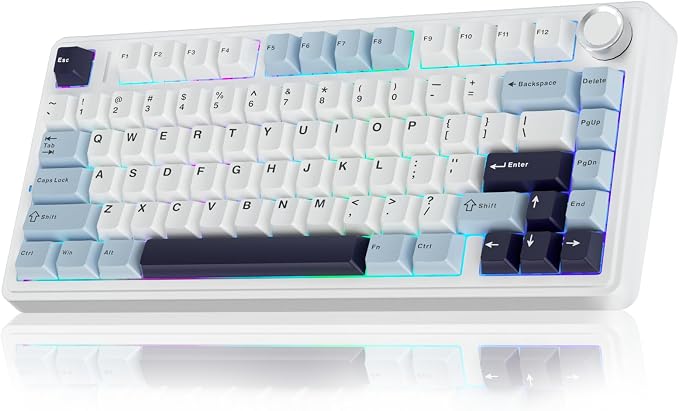
The AULA F75 is a natural fit for people who want to reclaim desk space without giving up dedicated arrow keys and the function row. Its 75% layout makes sense for home offices and smaller work surfaces, particularly when you want more room around the keyboard for your mouse and other accessories. The official F75 specifications outline its current feature set.
The keyboard supports Bluetooth 5.0, 2.4GHz wireless, and wired USB connectivity. It also has a 4000mAh rechargeable battery, while the gasket-mounted construction and multiple layers of sound-dampening material are designed to make typing feel softer and more controlled.
Hot-swappable support is another reason it stands out. The current configuration accepts both 3-pin and 5-pin switches, giving you room to experiment with different switch types later without soldering. There is also a multifunction knob for convenient media and lighting controls, as detailed on the official product page.
AULA also offers a dedicated driver for the F75. Its F75 driver guidance notes that Windows users need to switch to WIN mode for the driver to work correctly. We would set up the keyboard in the correct mode before changing advanced settings.
The biggest limitation comes with the compact layout itself. There is no dedicated number pad, so users who spend much of the day entering figures may find a larger keyboard more convenient.
Notes of caution:
- The 75% layout does not include a dedicated number pad.
- Advanced driver features are more relevant to Windows users.
- Users looking for extensive case-level customization may prefer a more enthusiast-focused board.
3. Logitech MX Mechanical Wireless Illuminated Keyboard Tactile
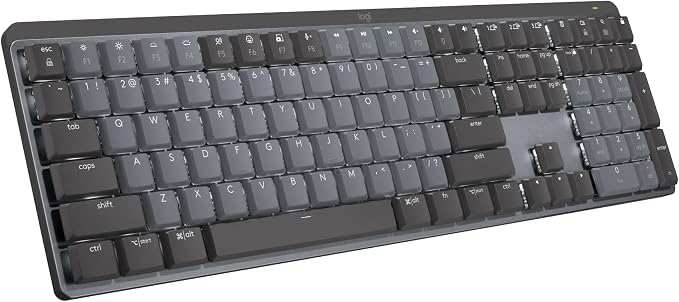
The Logitech MX Mechanical is aimed squarely at office users who want mechanical switches without giving up a familiar full-size layout. The Tactile Quiet version is especially suitable for people who want noticeable mechanical feedback without the sharper sound of clicky switches. Logitech’s official product page covers the current configuration.
Its low-profile mechanical switches are available in Tactile Quiet, Clicky, and Linear versions. The keyboard also includes smart illumination that responds to your hands and surrounding conditions, while Easy-Switch lets you move between up to three connected devices.
The full-size layout includes a number pad, which can be genuinely useful for spreadsheets, accounting work, inventory entry, and other number-heavy tasks. Logitech also supports Windows, macOS, ChromeOS, Linux, and iPadOS, making the keyboard flexible for households or offices that use several different platforms.
Software is another strength. With Logi Options+, you can customize keys, adjust backlighting, create app-specific settings, and configure Smart Actions. We would start with only the shortcuts that genuinely improve your workflow rather than changing everything at once.
The main limitation is its footprint. The full-size design needs noticeably more desk space than the compact boards here. It is also more focused on a polished office experience than deep enthusiast customization, which may matter if building and modifying keyboards is part of the appeal for you.
A few cautions:
- The full-size layout takes more desk space than compact alternatives.
- Its low-profile design delivers a different typing feel from taller enthusiast-style boards.
- Users who want deep mechanical customization may prefer a more enthusiast-oriented platform.
4. Kisnt KN85 Wireless Mechanical Keyboard, 75% Layout
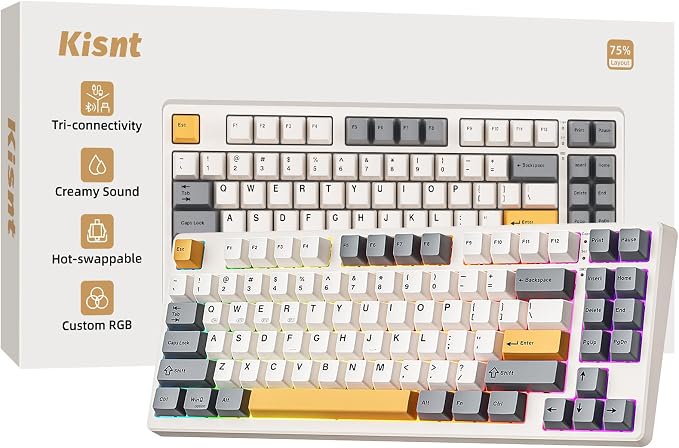
The Kisnt KN85 is a good option for users who want a compact 75% keyboard with plenty of connectivity and customization potential. Its 85-key layout keeps the function row and arrow cluster while leaving out the number pad, making it a sensible choice for smaller desks and general productivity. The current KN85 specifications show its current feature set.
You can connect it through Bluetooth 5.0, 2.4GHz wireless, or USB-C, giving you plenty of flexibility across different devices. The 4000mAh rechargeable battery is designed for wireless use, while the keyboard also offers multiple Bluetooth channels for switching between devices. Its current Amazon listing provides the model-specific details.
The KN85 also leans into customization. Its pre-lubricated linear switches are hot-swappable and support both 3-pin and 5-pin switches. A gasket-mounted construction and multiple sound-dampening layers are intended to create a softer, deeper typing experience without making the keyboard unnecessarily bulky.
The included driver adds another layer of flexibility. It can be used for key remapping and macros, although the manufacturer’s software guidance makes clear that the driver is Windows-focused and works through wired or 2.4GHz connections.
That is the main limitation for Mac-first users. The keyboard can still be used normally, but the advanced driver-based customization described by the manufacturer is not equally available across operating systems. That is worth keeping in mind before making it the center of a heavily customized setup.
A few things to note:
- The compact layout does not include a dedicated number pad.
- Advanced driver-based remapping is Windows-focused.
- It makes more sense for general typing than number-heavy workflows.
5. Redragon Wireless Typewriter Style Mechanical Gaming Keyboard
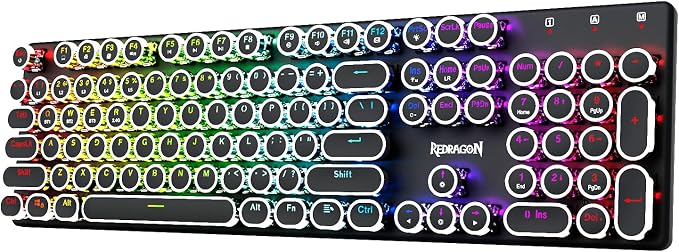
The Redragon typewriter-style keyboard is a good fit for anyone who wants a full-size mechanical keyboard with a strong retro look. The current listing identifies the model as K710 and includes round keycaps, blue clicky switches, RGB lighting, and a 4000mAh rechargeable battery. Its current Amazon listing provides the current model details.
Connectivity is flexible, with USB-C wired operation, Bluetooth 3.0/5.0, and 2.4GHz wireless. The 104-key layout also gives you a dedicated number pad, which can be helpful for office work involving spreadsheets or frequent numeric entry. Anti-ghosting is included for situations where multiple keys are pressed at once.
The keyboard’s personality comes from its design. A metal panel, round keycaps, and blue clicky switches give it a noticeably different feel from the quieter, more understated boards elsewhere in this guide. Software support also allows lighting customization and programmable macros, adding practical functionality beneath the retro styling.
For setup, the K710 uses dedicated shortcuts for Bluetooth channels and 2.4GHz pairing. The K710 manual outlines those controls, while wired mode remains available when you want a direct connection.
The clearest drawback is also one of its most noticeable characteristics: sound. Blue switches are deliberately clicky and audible, which may not work well in a shared office, recording environment, or any workspace where quieter typing is important.
Notes of caution:
- The clicky switches can be too loud for shared workspaces.
- The full-size layout needs more desk space than compact alternatives.
- The retro styling will not suit every office environment.
Final Thoughts
The right Bluetooth mechanical keyboard should make your daily work easier, not give you a long list of features you rarely use. We would focus first on layout, switch feel, connectivity, software support, and the amount of desk space available for your setup.
Your ideal choice will depend on your own workflow, devices, and workspace. Think about whether you need a number pad, how much customization you actually want, and how much typing noise your environment can handle, then choose the keyboard that fits naturally into the way you work.
Be First to Comment