Mechanical keyboards can make long typing sessions feel much better, but the noise can quickly become a problem in a shared office, bedroom, library, or home workspace. Finding one that still gives you that satisfying mechanical feel without making every keystroke stand out is not always straightforward.
The tricky part is that “quiet” can mean very different things from one keyboard to another. Some rely on different switches, while others use internal damping or a combination of design choices to soften the sound. For small business owners, entrepreneurs, and home-office workers, comparing those differences can take more time than expected.
We looked closely at the category, checked current product information, compared the features that matter most, and selected five keyboards worth considering. Throughout the guide, we focus on who each model suits, what makes it useful, and where its limitations could affect your workspace, so you can make the decision with less guesswork.
How We Selected the Best Quiet Mechanical Keyboards
We started with the things that can genuinely influence how a mechanical keyboard sounds and feels. That meant looking at switch types, internal damping, construction, layout, and overall design, while also considering practical details such as connectivity, compatibility, and durability.
We then narrowed our attention to what matters when the keyboard becomes part of your everyday setup. A keyboard can have impressive specifications and still be inconvenient for your desk or workflow, so we considered how the different designs could work for real office and home-office needs.
- Noise control: We looked for switch and construction choices that can help reduce sharp key sounds and unwanted vibration.
- Typing feel: A quieter keyboard should still feel comfortable and responsive during long sessions.
- Workspace fit: Layout and footprint matter, especially when desk space is limited or you need a number pad.
- Useful features: Damping, hot-swapping, lighting, controls, and programmability should provide benefits you will actually use.
- Build quality: Materials and construction can influence stability, durability, and the overall feel of the keyboard.
- Compatibility: We checked connection methods, operating-system support, and software requirements.
- Everyday usability: Setup, customization, and convenient controls can make a noticeable difference over time.
These factors help us look past broad claims about quiet typing and focus on what each keyboard can realistically offer. They also make it easier to match your choice to your workspace, habits, and daily workload.
Best Quiet Mechanical Keyboards for Work and Home Offices
The five keyboards below take noticeably different approaches to quieter mechanical typing. That variety is useful because the best fit depends on whether you care most about sound, desk space, a number pad, customization, or a straightforward office experience.
1. RK ROYAL KLUDGE S108 Typewriter Keyboard
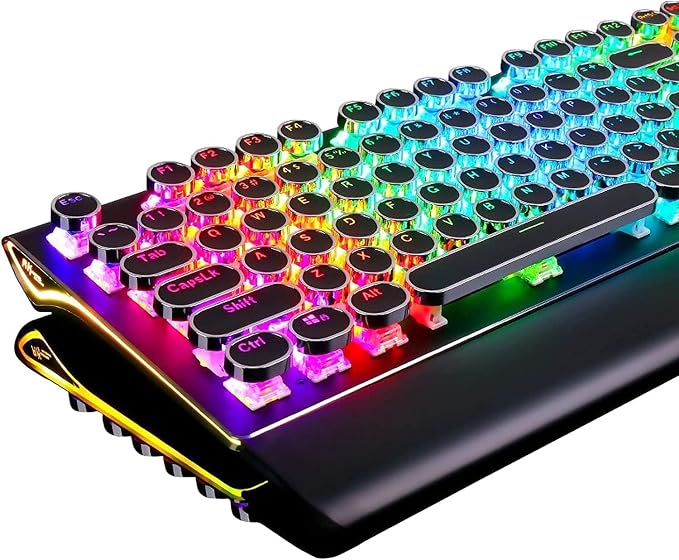
The RK ROYAL KLUDGE S108 makes the most sense for users who want a full-size mechanical keyboard with a distinctive typewriter-inspired design. Its 108-key layout is particularly handy for writers, administrators, and home-office users who regularly work with numbers and need a dedicated number pad. You can see the current configuration in this current listing.
The keyboard uses mechanical blue switches, giving you tactile feedback along with the familiar audible click associated with that switch style. It also combines RGB lighting with a detachable wrist rest, while the metal construction gives the board a more substantial feel. The manufacturer information is summarized in these product details.
Its full-size layout is a practical advantage if you rely on dedicated navigation keys and a number pad. Anti-ghosting also helps maintain dependable input when several keys are pressed together, which can be useful during both everyday work and gaming.
For a quiet-keyboard buyer, however, the switch choice deserves careful attention. Blue switches are deliberately audible, so this is not a silent-focused design. If your workspace needs genuinely low typing noise, the sound from the switches may be more noticeable than you would like, even though other aspects of the keyboard are appealing.
For everyday use, we would keep the setup simple: connect it through USB, position the wrist rest comfortably, and adjust the lighting to suit your environment. It supports Windows, macOS, and Linux, giving it useful flexibility if you move between different desktop platforms.
A few cautions:
- Its blue switches produce noticeable click noise, so it may not suit very noise-sensitive spaces.
- The full-size design takes up more desk space than compact alternatives.
2. Logitech G413 SE Full-Size Mechanical Gaming Keyboard

The Logitech G413 SE is a practical fit for users who want a full-size mechanical keyboard for everyday office work, with enough capability to handle gaming too. Its tactile switches, PBT keycaps, and aluminum top case give it a straightforward design that feels at home on a conventional desk. Logitech’s official specifications provide the core details.
Logitech lists tactile mechanical switches with a 1.9 mm actuation distance, 50 g actuation force, and 4 mm total travel. Because these switches provide tactile feedback without a click mechanism, their sound is different from blue-style switches. They are still mechanical rather than truly silent, though, as the technical specifications make clear.
The PBT keycaps are designed to resist heat and wear, while the brushed 5052 aluminum alloy top case adds structural support. Six-key rollover with anti-ghosting also helps maintain dependable input when several keys are pressed during busy typing sessions or gameplay.
Another nice thing about the G413 SE is its simplicity. It uses a wired USB connection, so there are no batteries or wireless pairing to manage. The full-size layout is also helpful for spreadsheets, accounting, data entry, and other work where reaching for a separate number pad would slow you down.
For setup, connect the USB cable and use the built-in controls for lighting and media functions. Logitech lists support for Windows and macOS and provides a two-year limited hardware warranty, which adds some useful reassurance for a straightforward office setup.
A few things to note:
- The full-size footprint can feel bulky on a small desk.
- The tactile switches are not designed for completely silent operation.
3. RK ROYAL KLUDGE R75 Wired Mechanical Keyboard

The RK ROYAL KLUDGE R75 is a strong match for users who want to save desk space without giving up a mechanical typing experience. Its 75% layout keeps the function row, navigation keys, and a dedicated volume knob while trimming away much of the bulk found on full-size boards. The official product listing outlines the layout and features.
Sound control is one of the more interesting parts of the design. RK lists a gasket-mounted construction along with five layers of noise-dampening material, giving the keyboard several built-in measures intended to absorb vibration and reduce unwanted resonance. That makes the internal construction particularly relevant for people who are trying to keep typing noise under control.
The R75 also supports hot-swappable mechanical switches, so you can change the switches without replacing the entire keyboard. Add PBT keycaps, RGB lighting, USB-C connectivity, and QMK/VIA support, and there is plenty of room to tailor the board to your preferences. The manufacturer provides more information in its QMK/VIA details.
The compact layout is especially useful when your desk is tight or you like keeping more space around your mouse. The trade-off is straightforward: there is no dedicated number pad. If you spend much of your day entering figures into spreadsheets, that missing keypad may matter more than the smaller footprint.
For everyday use, connect the board through USB-C and use the customization tools only when you need them. The combination of gasket mounting, internal damping, and a compact layout gives the R75 plenty of flexibility, although the final sound will still depend on the switches installed.
Notes of caution:
- The 75% layout is less convenient for heavy spreadsheet and numeric-entry work.
- The final sound profile varies according to the switch configuration.
4. SteelSeries Apex Pro TKL Gen 3 Gaming Keyboard

The SteelSeries Apex Pro TKL Gen 3 is aimed at users who want a compact keyboard with plenty of control over both feel and performance. Its tenkeyless layout leaves more room on the desk, while adjustable magnetic switches and sound-dampening construction give it a more customizable approach to mechanical typing. The official product information covers its core design.
SteelSeries uses OmniPoint 3.0 Hall Effect switches with an adjustable actuation range from 0.1 mm to 4.0 mm. In practical terms, that lets you decide how far a key should travel before it registers, which can be useful when you want a lighter or deeper trigger point for different tasks. The available switch specifications explain the range in more detail.
The sound-focused construction is another reason this keyboard stands out. SteelSeries lists triple-layer sound-dampening foam, redesigned stabilizers, and per-key lubrication intended to reduce unwanted noise and make key movement smoother. It also uses double-shot PBT keycaps and an aluminum top plate, according to the official product information.
There is a lot more here than simple sound control. You also get an OLED smart display, detachable USB-C cable, per-key RGB lighting, Rapid Trigger, Protection Mode, and GG QuickSet. Those features can be useful for power users, although they may be more than you need if your priority is simply quiet, uncomplicated office typing.
For setup, connect the detachable USB-C cable and use SteelSeries software to adjust actuation and other settings. The company supports Windows 10 and later and macOS 11 and later, while noting that some software features are not available on Mac. The software compatibility information is worth checking before purchase.
A few cautions:
- The TKL layout does not include a dedicated number pad.
- Mac users should check software compatibility before relying on advanced features.
5. Cherry KC 200 MX Wired Mechanical Office Keyboard

The CHERRY KC 200 MX is built with office users in mind, making it a natural fit for conventional workspaces where you want mechanical typing without a gaming-heavy appearance. Its full-size layout, shaped keycaps, slim profile, and anodized metal plate are all suited to everyday writing, administration, and desk-based work. The official product page provides the main specifications.
For quieter typing, the available CHERRY MX2A Brown switch is especially relevant. CHERRY describes it as tactile without a click, so you still get physical feedback from each press without the distinct clicking mechanism associated with blue-style switches. The updated MX2A design is also promoted with improved acoustics and smooth operation in the official switch information.
The keyboard includes 104 standard keys plus four additional keys for calculator and volume controls. It also offers N-key rollover, anti-ghosting, a 1 ms response time, adjustable feet, and white status indicators for Caps Lock, Scroll Lock, and Num Lock. Those details are laid out in the official specifications.
Its straightforward design is one of its biggest strengths. There is no RGB lighting, and CHERRY positions the keyboard as an office-focused model rather than a heavily customized gaming board. That keeps the experience fairly simple, although anyone who wants illuminated keys will naturally find the feature set limited.
For customization, CHERRY KEYS software lets supported keys handle functions, shortcuts, and macros. The keyboard connects through USB-A, officially supports Windows, and includes a two-year warranty. You can also review the available features through the CHERRY KEYS support information before setting it up.
A few things to note:
- There is no keyboard illumination or RGB lighting.
- Official software support is centered on Windows.
Final Thoughts
When we choose a quiet mechanical keyboard, it helps to look past the word “quiet” and pay attention to the switch design, damping, layout, and construction underneath it. Tactile switches, internal foam, gasket mounting, and different keycap materials can all influence sound and feel, but none of them guarantees completely silent typing.
The right choice ultimately comes down to your workspace, typing habits, need for a number pad, and comfort with customization. A compact desk may suit a 75% or TKL board, while office-heavy work may call for a full-size layout. Once we match those details to our daily workflow, choosing becomes much easier.
Be First to Comment