Printing shipping labels should be one of the easier parts of running a small business. Yet once you are dealing with orders every day, a regular printer can quickly become a hassle, especially when you have to manage ink, paper, cutting, and label alignment.
Choosing a dedicated thermal printer sounds simple until you start comparing the options. Many look alike, but connectivity, label support, software compatibility, setup, and day-to-day usability can vary quite a bit. That makes it surprisingly easy to choose a printer that does not fit the way you actually work.
We looked closely at the category, checked current manufacturer information, and compared the five models featured here. Our goal was to make the choice easier by showing where each printer fits, which features genuinely matter, and what limitations you should keep in mind before buying.
How We Selected the Best Shipping Label Printers
We started with the things that matter most when you are running a small shipping operation. That means looking beyond a printer’s headline features and asking whether it can handle the labels you actually use, work with your devices, and fit naturally into your packing routine.
We also paid close attention to the small details that can become frustrating later. Driver support, setup requirements, connectivity, and manufacturer documentation may not sound exciting, but they can make a big difference when you are trying to get orders out quickly.
- Label compatibility: We looked for support for common 4×6 shipping labels so you can spend less time worrying about awkward formatting or wasted labels.
- Connectivity: USB, Bluetooth, and broader device support can make printing much easier when your workflow involves more than one computer or mobile device.
- Print performance: Resolution and claimed print speed give us a useful indication of whether a printer can keep up with routine shipping work.
- Software support: Drivers, mobile apps, and platform compatibility can save you plenty of setup frustration.
- Ease of setup: Clear installation guidance matters when you simply want to start printing rather than troubleshoot a complicated installation.
- Workspace fit: A practical footprint can make a real difference in a home office, packing table, or compact shipping station.
- Manufacturer support: Good documentation, drivers, and warranty information give you a clearer path when you run into problems.
Taken together, these factors help us separate genuinely useful features from specifications that look impressive but may not matter much to your workflow. The five printers below each take a slightly different approach to small-business shipping.
Best Shipping Label Printers for Small Businesses
We chose these five models because they cover several different needs, from straightforward computer-based printing to more flexible wireless setups and business-focused hardware. The best fit for you will depend on how you work, what devices you use, and how much flexibility you need.
1. Rollo USB Shipping Label Printer – Commercial Grade

The Rollo X1038 makes a lot of sense for a small business that does most of its shipping from a Windows, Mac, or Linux computer. It takes a straightforward approach, using USB rather than wireless connectivity, and Rollo says it can print a 4×6 label in about one second. You can check the current Rollo details for the manufacturer’s latest information.
Because it uses direct thermal printing, there is no ink, toner, or ribbon to replace. Rollo also says the printer can work with compatible direct-thermal labels rather than requiring proprietary stock. That gives you more flexibility when choosing shipping supplies, and the company’s label compatibility guide explains the supported options.
For businesses using popular shipping platforms, compatibility is another plus. Rollo says the printer works with services including Shopify, Amazon, eBay, ShipStation, Shippo, and FedEx, while its platform compatibility list provides more detail. Rollo also offers dedicated setup guidance for Windows and Mac.
That simplicity is really where the X1038 shines. There is no wireless pairing to manage, and a fixed packing desk with one computer can stay pleasantly uncomplicated. We can also follow Rollo’s Windows driver guide when setting everything up.
The main limitation is equally straightforward: this is a USB-only model. If your workflow depends heavily on phones or tablets, it will not offer the same flexibility as a Bluetooth printer. You also need to match your document settings to the label size, as Rollo explains in its 4×6 setup guidance.
A few cautions:
- Skip it if wireless printing from mobile devices is central to your workflow.
- It is better suited to a stable computer-based packing station than a highly mobile setup.
2. JADENS Bluetooth Thermal Shipping Label Printer
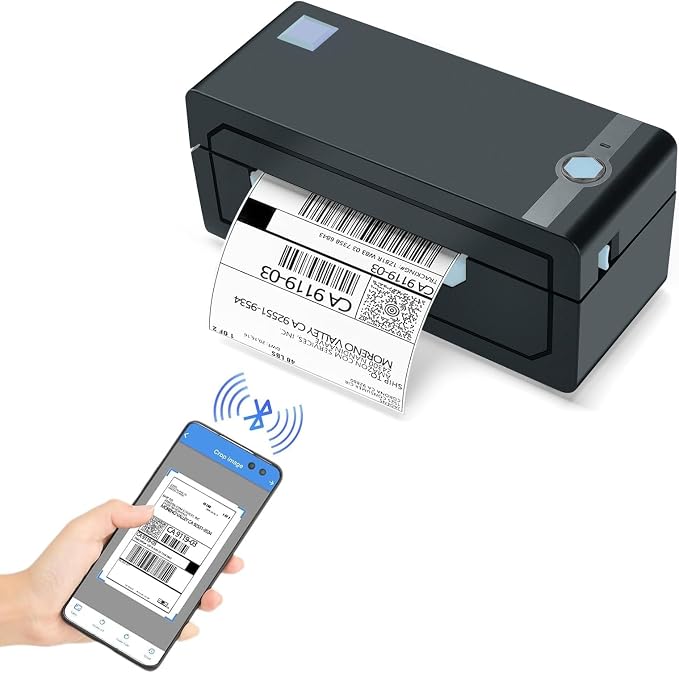
The JADENS model is a natural fit for small sellers who want a little more flexibility than a basic USB printer offers. Its JD-168 documentation covers Bluetooth and wired use, with support information for Windows and Mac alongside additional guidance for phones, iPads, Chromebooks, and Linux. The company’s setup resources are useful when you are getting started.
JADENS specifies direct thermal printing at 203 dpi, with a stated maximum speed of 150 mm per second. It also supports label widths from 40 to 110 mm, which includes the familiar 4×6 shipping-label format. Since the printer works directly with heat-sensitive labels, there is no ink or toner routine to worry about. Those details are outlined in the manufacturer’s specifications.
The biggest appeal is the combination of USB and Bluetooth. You can keep using a computer when that is most convenient, while Bluetooth gives you another option when your workflow includes compatible mobile devices. JADENS also provides separate driver information and tutorials, including Bluetooth setup guidance, which can make the installation process easier to follow.
That said, we would still check your exact device setup before committing. The documentation covers several configurations, and the supported connection method can vary depending on the platform. JADENS’ device setup resources make that distinction clearer.
One thing we would keep in mind is that the specification information is shared across the broader JADENS JD-168 family. We should therefore avoid assuming that every listed feature automatically applies to every marketplace configuration without checking the exact model.
Notes of caution:
- Avoid it if you need certainty about a specialized software environment that is not documented for the exact configuration.
- Check the precise model details before relying on a feature listed for the wider product family.
3. 2054A Shipping Label Printer for Windows Mac Chromebook Android
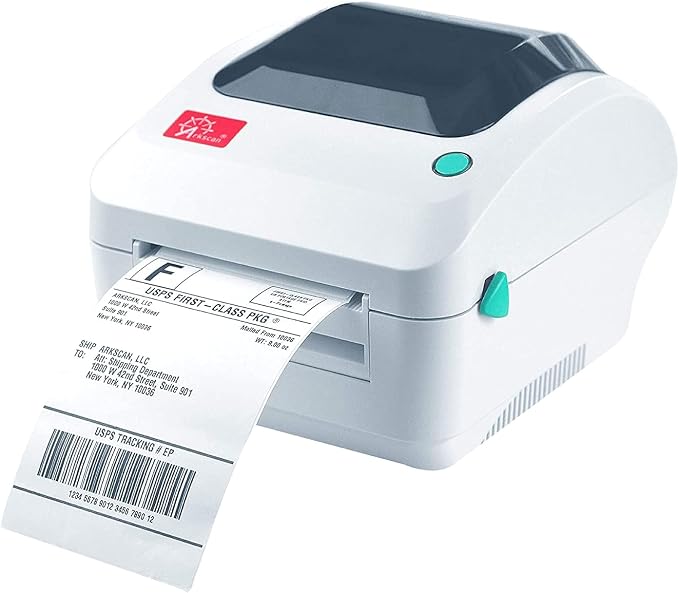
The Arkscan 2054A is a good match for a small business that wants broad computer compatibility without moving into a more complicated setup. Arkscan specifically lists Windows and Mac support and provides additional drivers for Chromebook and Linux users, which is useful when your business is not tied to a single operating system. The official 2054A page outlines the supported environments.
The printer is designed for shipping labels, product labels, and barcodes without ink or toner. Arkscan also lists compatibility with major shipping and marketplace services, including Amazon, eBay, Etsy, Shopify, ShipStation, Shippo, UPS, USPS, and FedEx. For a small seller working across several platforms, that broad compatibility can save a lot of headaches. You can review the supported platforms before setting it up.
Another thing we like is the amount of setup material Arkscan makes available. Its documentation covers label loading, automatic label-size detection, driver installation, and platform-specific configuration. Having that information in one place can make the initial setup much less intimidating, particularly when you do not have an IT person around to sort things out. The 2054A setup guide is a useful starting point.
The 2054A is primarily built around USB connectivity, so it is more at home on a computer-based packing station than a mobile-first setup. Arkscan also provides different driver options for certain desktop applications, including software that may work better with its Zebra-compatible driver. The company’s driver guidance explains those options.
That extra flexibility is useful, but it also introduces a little more configuration. If your shipping software requires a particular driver, you may need to pay closer attention during installation than you would with a simpler plug-and-print model.
A few things to note:
- It may be more capability than you need for a very simple single-platform workflow.
- Check your shipping software against Arkscan’s driver guidance before installation.
4. KNAON Bluetooth Thermal Shipping Label Printer, 4×6 Portable Thermal

The KNAON Y813BT is designed for small businesses that want a compact 4×6 thermal printer with both Bluetooth and wired connectivity. KNAON’s current product page lists the Y813BT with Bluetooth and USB, 203 dpi resolution, and a claimed print speed of 180 mm per second. The current KNAON product page provides the manufacturer’s specifications.
Its biggest draw is flexibility across devices. KNAON publishes setup instructions for Windows, macOS, Chromebook, Linux, Android, and iOS, although the connection method is not identical across all of them. For instance, KNAON explains that Windows Bluetooth printing requires its Bluetooth driver, while Mac users should use USB according to its Bluetooth setup guidance.
The company also provides a FlashLabel Pro app along with resources covering label creation, 4×6 configuration, custom sizes, calibration, and troubleshooting. That can be handy for small sellers who occasionally work from different devices rather than keeping everything tied to one desktop computer. KNAON’s Y813BT resource center brings those resources together.
We would still pay close attention to the settings you use. Thermal printers can produce labels that are too small, rotated, or poorly aligned when the document size and label size do not match. KNAON addresses those issues in its Mac printing guidance, and following the platform-specific instructions should make setup smoother.
The main trade-off is that Bluetooth support does not mean every device will behave in exactly the same way. The manufacturer documents different connection methods by platform, so buyers looking for completely uniform wireless printing should check those details first.
A few cautions:
- Skip it if you need identical wireless behavior across every device you use.
- Keep USB available for platforms where Bluetooth support is limited.
5. Zebra ZD421 Thermal Shipping Label Printer | 4×6 | No Ink
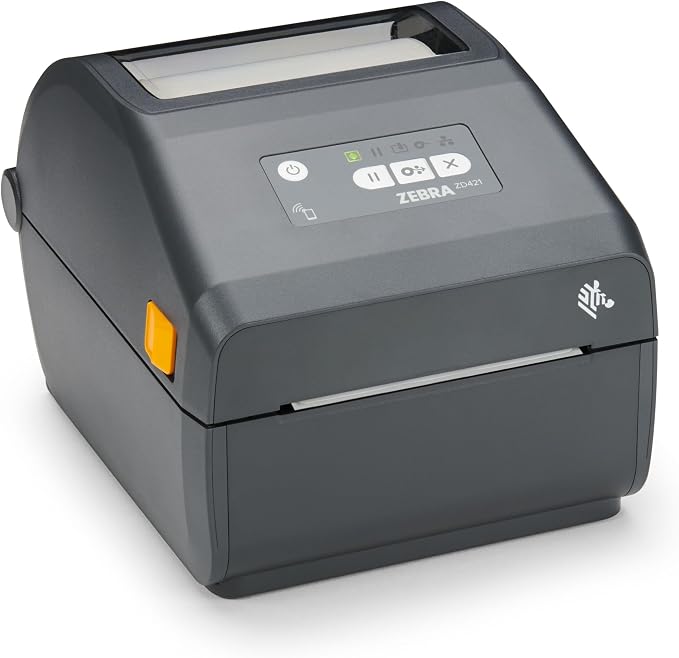
The Zebra ZD421 is a particularly interesting option for a small business that expects its labeling needs to grow. Rather than focusing only on basic shipping labels, the ZD421 family is designed for a broader range of business labeling tasks. Zebra’s current ZD421 specifications show support for four-inch-wide printing and direct thermal configurations.
At 203 dpi, Zebra lists a maximum print speed of 6 inches per second, while 300 dpi configurations are rated at up to 4 inches per second. The printer can also work with roll-fed or fan-fold media and provides media-sensing options for different label types. Those details are covered in the Zebra technical specifications.
Another reason the ZD421 stands out is its software ecosystem. Zebra’s documentation references Link-OS, ZPL II, EPL2, PDF Direct, and several management and configuration tools. That can become valuable when a business starts using inventory, warehouse, or shipping systems that expect established printer languages. The relevant software specifications give more context.
Connectivity depends on the exact configuration, so we should not assume every ZD421 listing has the same ports. Zebra lists USB as standard in its documentation, while Ethernet and wireless options are available on appropriate configurations. The configuration options are worth checking carefully before ordering.
The main drawback is that this broader capability can make the printer feel like more than a very small seller needs. If you only want a basic 4×6 shipping-label printer, some of its business-oriented features may never become relevant to you.
Notes of caution:
- Avoid it if your needs are limited to occasional basic 4×6 labels.
- Confirm the exact configuration for connectivity and print resolution before ordering.
Final Thoughts
When we choose a shipping label printer, we should start with our actual workflow rather than the longest feature list. The connection method, label format, software compatibility, and setup requirements will usually matter much more than a specification that sounds impressive but never affects our day-to-day shipping.
It also helps to think a little beyond today’s orders. We should choose something that fits our current workspace and devices without adding unnecessary complexity, while leaving enough flexibility for the business to grow. The right printer should make fulfillment feel routine, not like another problem to solve.
Be First to Comment