Choosing an ink tank printer should be easy, but once we compare refillable ink systems, print speeds, paper capacity, scanning features, and connectivity, the decision gets complicated. For a small business or home office, the wrong model can leave us with features we rarely use or a printer that struggles with our workload.
It does not help that manufacturers use different names for high-yield ink systems, refillable tanks, and cartridge-based designs. We can easily assume two printers work the same way when they actually suit very different workflows, which is why looking beyond headline features matters.
We examined the category, checked the current specifications, and compared the practical strengths and limitations of the five models in this guide. Our aim is simple: give you a clearer picture of where each printer fits so you can choose one that feels right for your workspace, workload, and everyday routine.
How We Selected the Best Ink Tank Printers
We focused first on the things that matter once the printer becomes part of our everyday workflow. That meant looking closely at the ink system, expected workload, paper handling, scanning features, connectivity, and the amount of hands-on maintenance each model may require.
We also looked beyond the specification sheet where useful, checking independent evaluations and repeated user observations for practical details. A printer can have an impressive feature list and still be awkward for a particular office, so we paid attention to those real differences.
- Ink system: We considered how the refill design works and whether it can reduce frequent ink changes during regular printing.
- Print workload: Paper capacity and printing speed matter when documents are part of your daily routine.
- Useful features: Duplex printing, scanning, faxing, and wireless connectivity can remove extra steps from your workflow.
- Paper flexibility: We looked at support for everyday paper, specialty media, and larger formats where relevant.
- Ease of use: Straightforward refilling, setup, and controls can make everyday printing much less frustrating.
- Limitations: We considered missing features, maintenance requirements, workspace demands, and compatibility issues that could affect your decision.
Together, these factors helped us narrow the field to five printers with noticeably different strengths. The important part is finding the one that fits your needs most naturally.
5 Best Ink Tank Printers for Different Workflows
Each printer below brings something different to the table, so we have focused on the kind of user and workflow it suits best.
1. Canon PIXMA G6020 All-in-One

The Canon PIXMA G6020 is a practical match for a home office or small business that wants a genuine refillable tank system without moving to a larger office machine. Canon rates its MegaTank system for up to 6,000 black pages and 7,700 color pages with a full set of ink under its stated testing conditions, as shown in the official specifications.
For regular document work, the G6020 gives us a 250-sheet main paper capacity and automatic two-sided printing. Canon rates it at up to 13.0 images per minute in black and 6.8 images per minute in color, which is plenty for many home offices and smaller businesses that print steadily rather than constantly.
Its ink setup is also well suited to mixed document work. The printer uses pigment-based black ink alongside dye-based colors, while wireless connectivity makes it easier to print from computers and compatible mobile devices. We can find more detail in Canon’s product information.
The biggest compromise is scanning. Because the G6020 does not include an automatic document feeder, handling a stack of pages means placing them on the scanner individually. That is manageable for occasional copying, but it becomes less convenient when multi-page paperwork is part of our normal routine.
For everyday use, we would keep standard paper in the main tray and use the rear feed when appropriate for specialty media. Regular use and following Canon’s maintenance guidance should also help keep the ink system working reliably.
A few cautions:
- The lack of an ADF makes repeated multi-page scanning and copying slower.
- Its color printing speed is better suited to steady office work than demanding production jobs.
2. Canon MegaTank MAXIFY GX2020 All-in-One
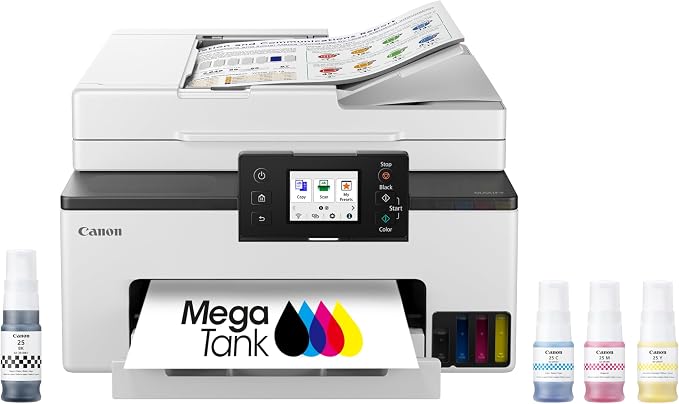
The Canon MAXIFY GX2020 is a better fit when our home office or small business needs a more office-focused all-in-one. It combines a refillable ink system with a 250-sheet cassette, a 35-sheet automatic document feeder, fax capability, and a 2.7-inch touchscreen, all documented in Canon’s official specifications.
Its four-color pigment-based GI-25 ink system uses refillable tanks rather than conventional cartridges. Canon rates a full bottle set for up to 3,000 black-and-white pages and 3,000 color pages, while wireless, Ethernet, Wi-Fi Direct, and mobile printing give us plenty of ways to connect it to the devices we already use.
Where the GX2020 really makes sense is document-heavy office work. Independent testing found strong black and color document quality and straightforward bottle refilling, while the overall design is clearly aimed at regular office use. The independent evaluation also highlights an important limitation: the ADF does not provide fully automatic duplex scanning.
Photo printing is another area where we should keep our expectations realistic. Testing has identified limitations with photo color and visible print patterns, so this makes more sense as an office document machine than as a dedicated photo printer.
For a typical workflow, we would keep standard paper in the main cassette, use the ADF for multi-page documents, and take advantage of automatic duplex printing when we want to reduce paper use.
Notes of caution:
- The ADF does not provide true automatic duplex scanning.
- Users who care heavily about photo quality may find its output less suitable for that job.
3. Brother MFC-J5855DW INKvestment

The Brother MFC-J5855DW is designed for small businesses and home offices that need flexible paper handling, especially when larger documents are part of the workflow. Brother lists support for printing up to 11 x 17-inch Ledger pages, along with a 250-sheet main tray, 100-sheet multipurpose tray, and 50-page automatic document feeder in its official specifications.
It also offers automatic duplex printing, Ethernet, dual-band Wi-Fi, Wi-Fi Direct, USB, and mobile printing. Brother rates its MAXIDRIVE system for speeds of up to 30 pages per minute in both black and color, which gives this model a noticeably more office-oriented feel when we are working with frequent document jobs.
There is an important distinction to understand before buying, though. The MFC-J5855DW uses Brother’s INKvestment Tank cartridge system rather than a conventional refillable bottle reservoir. Brother’s own specifications identify the consumables as ink cartridges, so we would not treat it as equivalent to the MegaTank and EcoTank models elsewhere in this guide.
Availability is another factor worth checking carefully. Brother’s current U.S. product page marks the MFC-J5855DW as discontinued, although official specifications and support information remain available. That makes remaining stock and future availability particularly relevant for anyone considering it now.
When available, its combination of Ledger support, large paper capacity, and an ADF makes it useful for proposals, spreadsheets, forms, reports, and other larger office documents. We would use the multipurpose tray for specialty media and oversized jobs.
A few things to note:
- Brother currently lists this model as discontinued in the U.S.
- Its INKvestment system is cartridge-based, not a traditional bottle-refill tank.
4. Epson EcoTank Pro ET-5800 Wireless Color
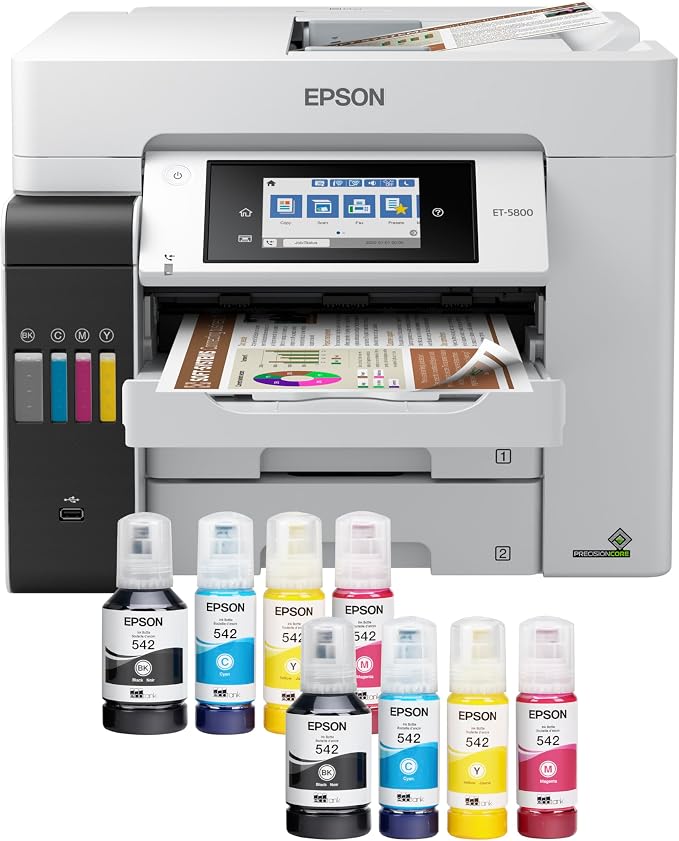
The Epson EcoTank Pro ET-5800 is aimed at busy home offices and small workgroups that need more capacity and stronger document performance. Epson gives it two 250-sheet front cassettes plus a 50-sheet rear feed, bringing total input capacity to 550 sheets according to its official product specifications.
It uses pigment-based DURABrite ink and PrecisionCore Heat-Free technology, with advertised speeds of up to 25 ISO pages per minute in black and 12 in color. We also get a 50-sheet ADF, automatic two-sided printing, Ethernet, Wi-Fi, Wi-Fi Direct, USB, and mobile printing, giving the printer plenty of flexibility for a busy office.
The large paper capacity is especially convenient when we regularly switch between different document types. We can keep everyday paper loaded while using the rear feed for compatible specialty media, which means fewer interruptions to reload the machine. Epson also rates its ink yields in the thousands of pages, supporting sustained printing workloads.
The trade-off is size. Epson lists the ET-5800 at about 38.6 pounds with a substantial footprint, so it needs a proper home rather than a tiny corner of an already crowded desk. The published dimensions make that especially clear.
For the smoothest experience, we would give it a stable location with enough room for the trays and ADF to open fully. We should also stick with Epson-recommended pigment inks rather than experimenting with incompatible formulations, as explained in Epson’s product documentation.
A few cautions:
- The large footprint may be difficult to accommodate in a compact workspace.
- Its capabilities are most useful when printing is a regular part of the workday.
5. Epson EcoTank ET-2903 Wireless All-in-One Color
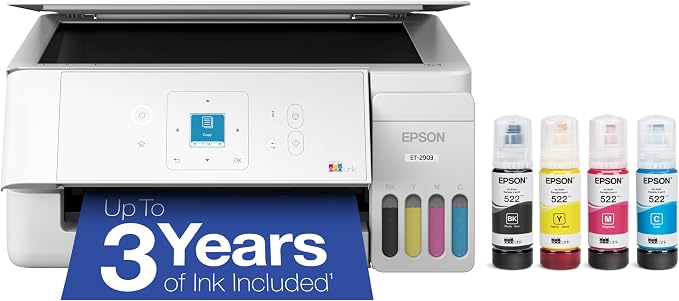
The Epson EcoTank ET-2903 is a natural fit for home offices, students, and small businesses with lighter printing needs. Epson describes it as a compact cartridge-free all-in-one with a built-in scanner, 100-sheet paper capacity, and a color display, making it easier to fit into smaller workspaces.
Its EcoFit refill system is designed for straightforward filling, with keyed bottles that help prevent accidental color mixing. Epson rates the included ink for up to 3,600 black pages and 6,500 color pages, while replacement bottles are rated for up to 4,700 black and 7,500 color pages under the manufacturer’s stated conditions. More details are available in the Epson product listing.
Its compact design is one of the biggest attractions for smaller workspaces. Epson also supports wireless printing through its Smart Panel ecosystem, although independent evaluation found that text printing is relatively slow and wireless setup can require more patience than some competing models. Consumer Reports testing also found very good scanning and graphics performance.
That balance makes the ET-2903 appealing when we care more about economical, everyday printing than rapid document production. It can comfortably handle forms, schoolwork, reports, and occasional color jobs, but it is not built around a demanding office workload.
For setup, we would leave enough space for the paper tray and scanner lid to open fully, then connect it over Wi-Fi and use the Smart Panel app when convenient. Epson provides current manuals, software, and setup material through its support resources.
A few cautions:
- The 100-sheet paper capacity can become limiting in a busy office.
- Printing speed is better suited to lighter workloads than fast, high-volume document production.
Final Thoughts
When we choose an ink tank printer, the lowest ongoing ink use is only part of the picture. We also need to think about paper capacity, printing speed, scanning, connectivity, workspace, and maintenance. Those details have a much bigger effect on day-to-day convenience than a long feature list.
The right choice is the one that fits how you actually work. Think about your typical workload, available space, preferred paper sizes, and how often you scan or copy documents, then choose the model that supports those habits without adding unnecessary complexity.
Be First to Comment